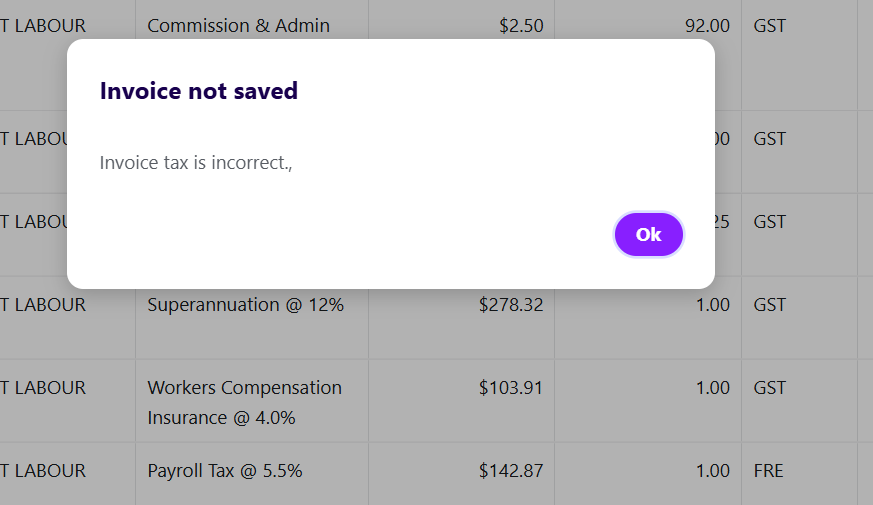
I keep getting an error using the new invoicing system when including GST & GST Free items in the invoice. I used to use the classic invoicing to get around this but now that it is retired I am unable to do my invoicing.
Hi @SarahWBC
Thanks for flagging this. Can I just confirm whether your creating your invoice with the Tax Exclusive (Net) setting? Example below
Hi @Rav, yes I do have it set to Tax exclusive (net)
Thanks for that @SarahWBC
Let me have a quick word with our product dev team about this and I'll come back to you shortly.
Hi again @SarahWBC
Ok, I've got the team to look into this and it looks like you've come across a bug that we need to stamp out. This is now under investigation by our devs to work on a fix.
In the meantime, I do have a workaround that you can utilise just for now so that you can get your invoicing done.
To explain, this issue is being caused by the usual rounding that occurs not matching the expected value based on the invoice total, in this case on the GST tax component.
I'll explain this with an example below but first, if you manually edit the tax value on the item it will allow your invoice to be successfully saved.
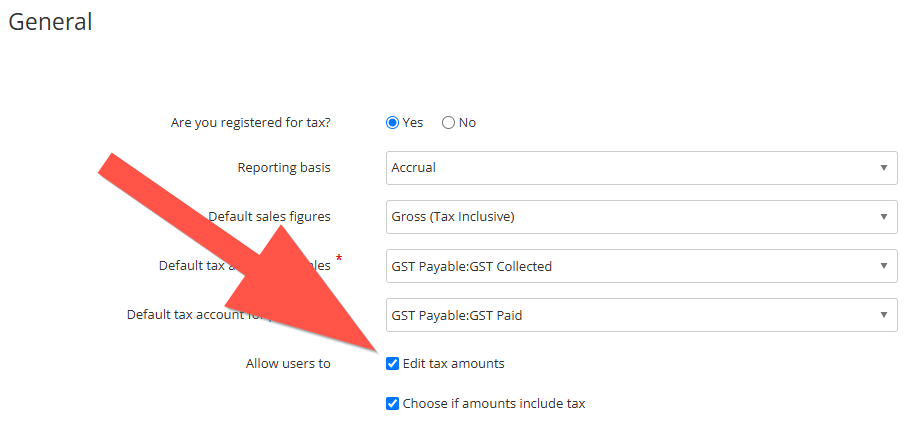
To do that, first go into Settings ➡️ Tax ➡️ Enable the Allow users to: Edit tax amounts option (example below).
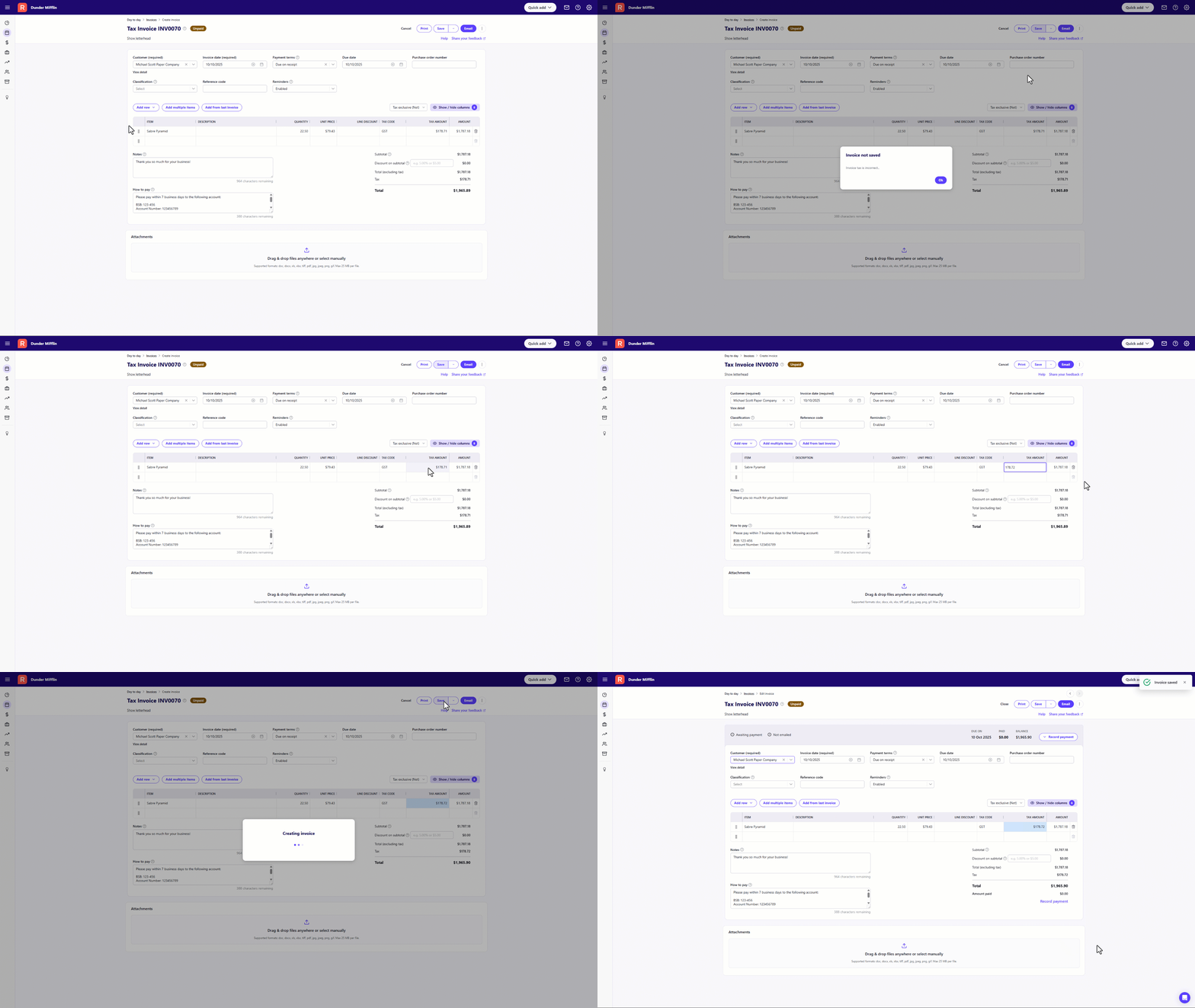
Next, here's an example with a quick little screen recording (click on it for a larger view).
You'll see I've got an item with a quantity of 22.50 with a price of $79.43 which equates to $1787.175, (this is rounded to $1787.18 as you'll see in the Amount field).
The corresponding GST component should be $178.7175 (1787.175/10%) and this should be rounded to $178.72 however at the moment Reckon One is failing to do that. You'll see that its leaving GST as $178.71.
To allow the invoice to save, I manually edit the GST tax component to $178.72 for that item and save the invoice. This allows the invoice to create successfully.
I know that's a fair bit of information and somewhat complicated so please let me know if you have any questions.
Hi @Rav, thank you for looking into this for me. I did report it each time it happened when the classic invoicing was still available (there was a pop-up or similar that requested feedback of why changing to classic invoicing). I look forward to seeing a fix for this 🤞 I have checked the settings & I am able to edit the tax amounts, so I will go through the invoice again & see if this works. Thanks, Sarah
Thanks Sarah, I'll keep you posted on when the fix is rolled out, its looking like early next week but I'll come back with an update as soon as I know.
Hi @Rav unfortunately the work around did not work. I went through the whole invoice (38-line items) & checked the calculations on a calculator & changed where required but still getting the same error
Sorry to hear that @SarahWBC
Were you rounding up/down depending on the decimal value ie. following on from my example above, the tax component calculates to $178.7175 so I round that up to $178.72
@Rav I was rounding using same theory as you have above
Hey @SarahWBC
Just a quick update to let you know a fix for this issue has just been released.
Can you please try creating invoice again when you have a chance and let me know how you get on.
Hi @Rav, sorry for the late response, it has been a busy week! I have just been able to save my invoice. Thank you for your help in getting this completed quickly!
Hi @Rav, bad news, I am now getting the same error on a customer adjustment note. Are you able to help please?
Sorry to hear that, can I grab a specific example of what's happening on the customer adjustment note along with what you're inputting specifically and I'll see if I can replicate.
Hi @Rav, it is exactly the same as when I was having the issue with the invoicing. There are some entries that are GST free & then the rest has GST so I am getting the error Tax is incorrect
Don't miss announcements and important info for Reckon One.
Check out our Reckon One how-to videos for tips & tricks, and help with common tasks!
Got a cool idea or want a new feature in Reckon One? Click here to let us know!