I am wanting to print a report that shows the Date and Amount of Super i have paid for each Employee. How do i run this report? Will it still work if i pay 1 balance thru the Liability Payments section?
Hi @MTS ,
You can run the Super Report by Employee and customise it to show employee names. Open the report, click Modify Report, then add the Name column to display each employee.
Regarding your second question, are you referring to paying the super liability as a single lump-sum payment through the Liability Payments section and wanting to know whether the report will still show the super amounts by employee? Please clarify so that I can provide you with accurate answer.
Hi, yes i was wanting to clarify. When paying the super thru the Pay Liabilities after choosing the preferred dates. It then creates a Liabilities cheque.
Will this payment flow through to the reports and show the date the super was paid for the amounts that make up the lump sum?
Hopefully i explained that ok ;-)
Hi @MTS
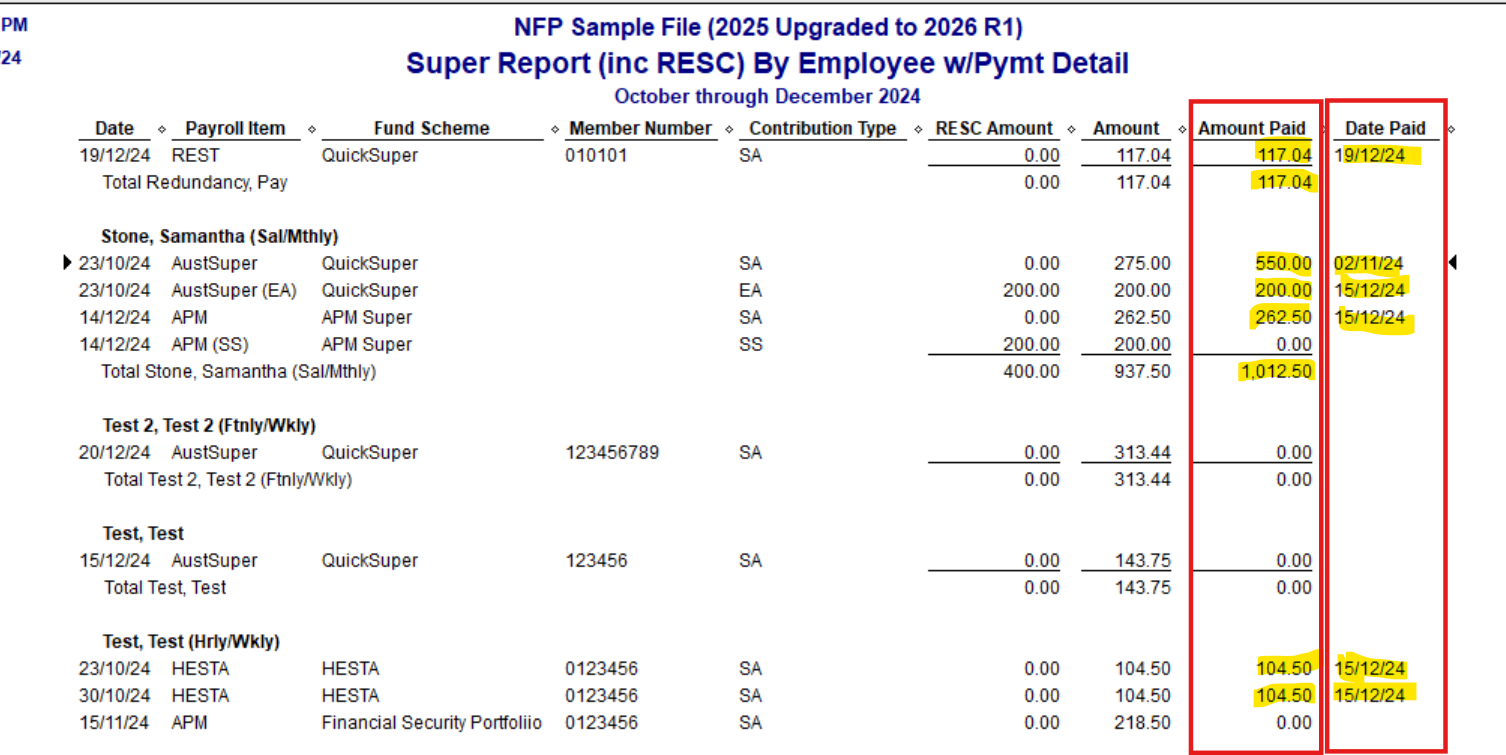
Yes, if you run your Super reports, you can add the Amount Paid & Date Paid columns, which will reflect this :
(This is just a modified version of the default Super Report by Employee)
You can also create & customise your own, like this one :
… created from a specific Find search:
TIP: Once you have your reports displaying how, you want them, make sure you Memorise them so they can be easily generated - pre-customised - as needed ! 😊
Clicking on the History button on a Liability Cheque, will also display the Paycheques that particular payment has been generated from ! :
Thank you, that was very informative.
Thank you for your detailed instructions, it was very helpful.