
A new release for Reckon One has just landed with more significant upgrades, including the 2026/27 tax updates and an all-new bank accounts screen! Check out the full inclusions below.
✨ 2026/27 Tax Updates
The 2026/27 legislative tax updates are now available in Reckon One!
This includes:
- Latest PAYG withholding tax tables.
- An updated Maximum Contribution Base (MCB) annual value for Super Guarantee to ensure Qualifying Earnings (QE) are capped correctly for reporting.
- Confirmation that Superannuation Guarantee (SG) calculations continue to be applied at 12%.
- A refreshed End of Financial Year (EOFY) checklist which you can access directly from the EOFY screen.
There is nothing you need to do, these updates are applied automatically in Reckon One and will take effect for any pay runs dated in the 2026/27 financial year.
✨ Bank Accounts - New & improved!
Your bank accounts screen in Reckon One has been given a makeover, but its more than just a flashy new look, we've packed in a bunch of new features as well!
Unified bank accounts & bank feeds
Bank accounts and bank feeds have been merged into one streamlined experience! Linking a bank feed to a bank account is now part of the setup process, no separate extra steps required!
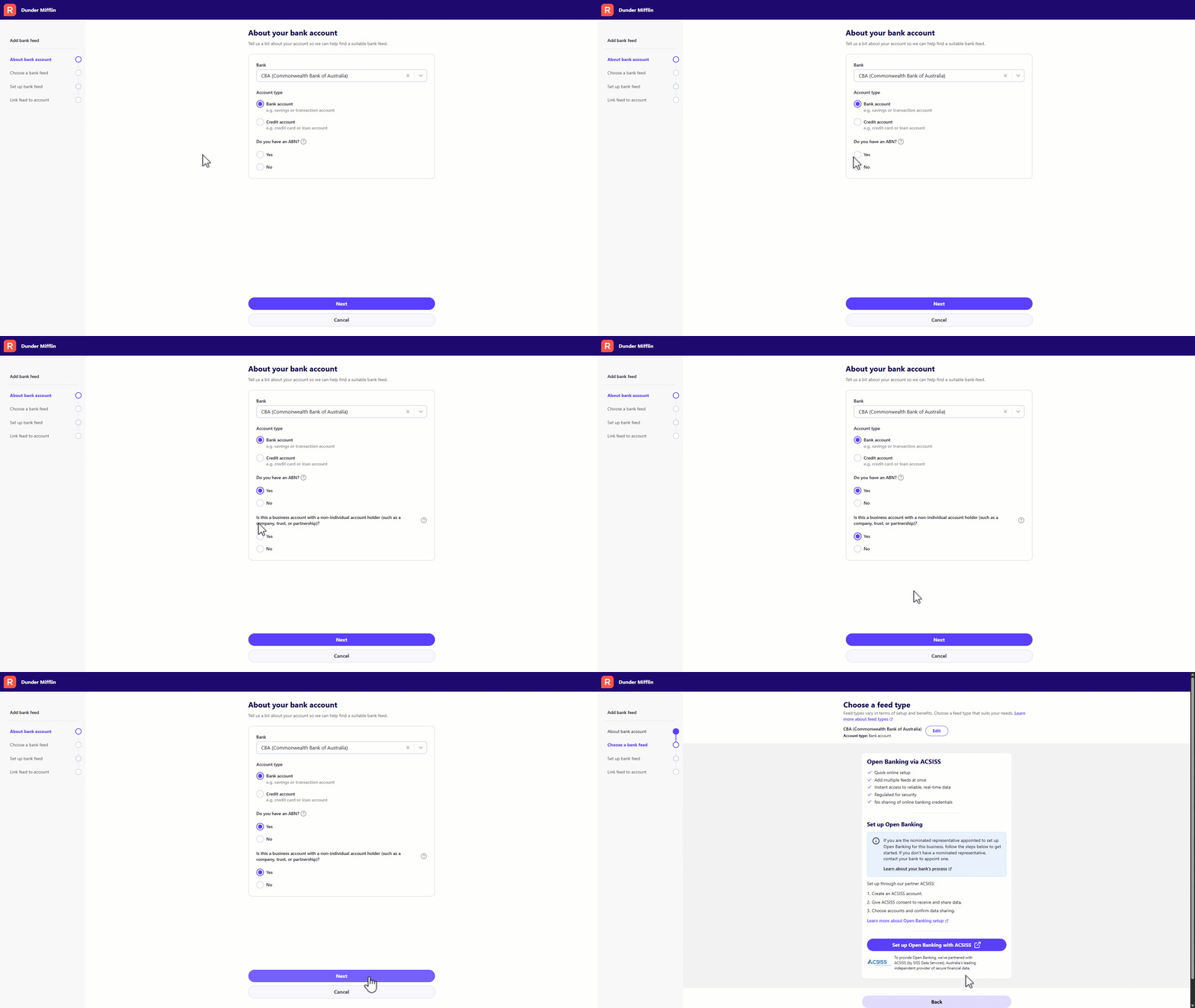
Simplified Navigation
A new Manage Bank Feeds button is now available that will take you directly to your bank feed management and replaces bank connections in the menu.

Cash Accounts
You can now create bank accounts that function as cash or clearing accounts. These accounts are often used for accounting purposes that doesn't represent a real bank account and cannot have a bank feed linked to it.

Improved display of bank accounts
The display of bank accounts has received makeover and now display more detailed information at a glance:
- Chart of Accounts code (if applicable)
- Book Balance - the balance of transactions that have been allocated
- Bank Balance - latest bank balance sourced from the bank feed connection (if active)
- Difference - highlights how much remains to be allocated
- Bank Feed Status - hover to see the last sync date and feed type. If there's an error, you can action it directly from the Manage Bank Feeds page.

Monthly Action Tiles
The most recent 3 months are displayed as action tiles on each bank account card, showing you exactly what needs attention.
Action Tile | What it means | What it does |
|---|
Allocate

| Transactions are awaiting allocation. If using a bank feed, the number of pending transactions is shown. | Opens the Bank Transactions screen filtered to that month. |
Reconcile

| All transactions for the month have been allocated and the account is ready for reconciliation. | Opens the Reconciliation screen with the bank account pre-selected. |
Reconciled

| The most recent reconciliation date is after that month. You will always see the last reconciled month. | No action required. |
View

| Appears as a grouped tile when the last reconciled date is more than 3 months ago, covering the dates in between. | Opens the Reckon One Transactions screen filtered to those dates. |
Locked

| A lock-off date has been set for this account and falls after that month. | No action required. |
N/A

| No transactions exist for that month in Bank Transactions or Reckon One Transactions. | No action required. |
The new 'More' menu
A new More menu option is available on each bank account which provides quick access to:
- Edit account
- Upload transactions file (manually upload bank transactions)
- Lock transactions
- Quickly access relevant bank reports for that account

Filtering & Sorting
- Search - Use the search box to find a specific bank account by name.

- Show closed accounts - By default, only open accounts are displayed. Toggle the Show Closed Accounts checkbox to include closed accounts.
- Sort options - Reorder bank accounts to suit your workflow. The selected order persists wherever you select a bank account across the application.
Available sort options:
- Account name
- Bank name
- Custom order - You can set your own custom order for accounts. Simply click the Edit Custom Order option then drag and drop accounts or use the arrow controls to arrange accounts in your preferred order.

✨ Totals displayed on SuperStream batches
We've heard your feedback and have added some changes to make it easier to review and manage your SuperStream batches by adding Total Contributions info to key screens.
- Total Contributions is now displayed on the SuperStream list screen which makes it easy to compare batches at a glance. This is available on the All, Draft and Lodged tabs and is shown by default.
- You can sort batches on the SuperStream list screen by Total Contributions in ascending or descending order, along with filtering batches by values above, below or equal to an amount you specify.
- The Batch Summary info screen now displays Total Contributions and the number of employees included in the batch to give you a clearer overview of the batch total before lodging.

✨ Updated pay run messaging for employees under 18
We've added clearer messaging within a pay run for employees under 18 to align with current Super Guarantee requirements.

The message now clarifies that qualifying earnings do not need to be reported when an employee works 30 hours or less in a week.
✨ Qualifying Earnings now displayed on STP YTD report & EOFY finalisation screen
A dedicated column for QE is available on the EOFY finalisation screen and the STP YTD report. This will give you clearer visibility of QE earnings reported to the ATO over the course of the 2026/27 financial year.

🐛 Bug Fixes
- We've fixed up a couple of headings in the SuperStream batch info which caused confusion for employees paid Member Voluntary or Employer Additional contributions.
- We've added a list of institutions offering Retirement Savings Accounts (RSA's) for super fund contributions which are now available for selection when creating a super fund.
- Updated the From bank account/Refund bank account dropdown to display the default account selected in your payroll settings first when lodging a Beam submission.
- Resolved an issue affecting sign-up to a BNZ bank feed.
- Fixed the Tax column missing from the Profit & Loss by Detail report for NZ Reckon One books.
