How do I enter an account customer payment within Sales Receipt

Tracey_6940971
Member Posts: 1 Novice Member 
Sometimes part of our daily banking of cash & cheques will include a payment from an account customer. How do I handle this in the Sales Receipt window
1
Comments
-
Hi Tracey
If you created an "Invoice" for this Customer, you need to enter the payment via "Receive Payment". This window will show all outstanding invoices to which you can apply their payment accordingly. You can then choose to move this payment ("Deposit to") either to your "Undeposited Funds" account (if it's Cash or a Cheque to be deposited) or directly into your Bank Account (if paid to you by EFT)
Sales Receipts are for "Cash Sales" or where the customer pays at the time of the sale, as opposed to Invoices which are used for customers who pay later.
Hope that clarifies ...
1 -
Hi Tracey
- create a new bank account and call it "Clearing Account"
- Create a new other charge item as per screenshot below

- When you process the sales receipt, Account Payments are processed as a separate line on the receipt. Here I have also used Payment items to direct EFTPOS to the bank account and Cash.and Cheques to undeposited funds. Note the zero transaction total. You can also process payments from the till and cash discrepancies in a similar manner.
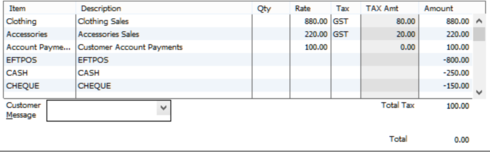
- Once this transaction is processed, the Clearing Account balance will be negative $100. you can then process a receive payment for the customer, and deposit the funds into the clearing account. The balance will then return to nil.
Reckon Accredited Consultant
graham@reckonhelp.com.au
www.reckonhelp.com.au/remotesupport
Graham Boast | 0409 317366 | graham@reckonhelp.com.au
1 -
Hi Graham
Could I ask a follow up question from your advice.
How is the Clearing account managed after the transaction is processed?
Jose
0 -
Hi Jose Once you have entered the customer payment and set it to deposit it to the Clearing account, the clearing account will go back to zero, Clearing a/c should always go back to zero after both sides of the entries are finished. The physical deposit was picked up in either the EFTPOS, Cash or Cheques. Hope this helps you understand it. Carolyn Long | Bookkeeping Trainer | Reckon Accredited Partner| BA S Agent | Regional Qld | cbts53@bigpond.com or 0434 163 266|1
-
txs Carolyn
0





This discussion has been closed.