 https://www.youtube.com/watch?v=uksWet84niw
Receiving an Cash Refund from a Supplier
Sometimes you’ll receive a cash refund from a Supplier
For example, we will receive a refund as compensation for poor workmanship – say $100 (a fraction of the original payment)
First check the original bill and get the key information, such as service item, tax code and date.
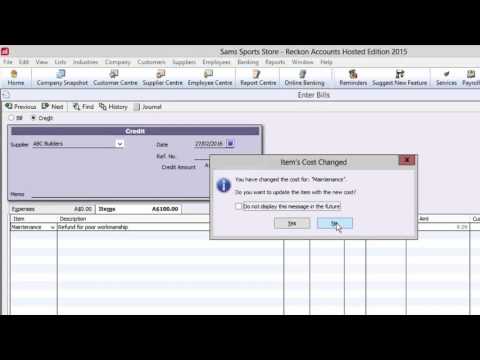
We then enter in a credit note.
We enter the same service item and tax code entered on the original bill.
Enter in the amount to be refunded and a description – including a reason.
We get prompted to update the default price of the item – as this is a one of adjustment to the amount, we select ‘No’.
As this is a cash refund, we deposit this amount into a bank account using the ‘make deposits’ windows.
Enter the name of the supplier in the ‘Received From’ column and ‘Accounts Payable’ in the ‘From Account’ column. Then enter the refund amount.
You can also enter the cheque number and payment method of the refund
To clear this credit, choose ‘Pay Bills’
Select deposit created; we get prompted to apply the available credit this customer has – that is the credit we just put in.
This completes the supplier refund.
This money has now been refunded into the bank account and the service item will be seen as refunded.
If you have further questions on this process please visit
www.reckon.support/support



