stp - how do you delete an upload file in draft status if you don't wish to upload it

tony finch
Member Posts: 2 Novice Member 
The file is in draft status. It had errors so I recreated and upload again, which I successfully submitted. How do I delete the one in draft status?
0
Comments
-
Welcome to the Reckon Community, Tony.
At the moment you cannot delete a PayEvent submission that is in draft status. We are working on a delete feature that we expect will be ready next week. This draft one will not impede you sending other PayEvents.
regards,
John1 -
Hi John, when do you think the delete function will be ready?1
-
Hi Sari,
Its still very much in the works, its been delayed a bit from our initial timeframe but it shouldn't be too far off. We'll have info on the Community as soon as its ready.1 -
Thanks Rav. I notice too there is no report function either. If I go into print, I only get the first page of what i have submitted. I think it would be a good idea to be able to print off some sort of report as "evidence" for an audit file.
Sari'
0 -
I am interested in knowing how to delete STP files in draft also.
Thanks
0 -
the delete function has now been implemented. Thanks Reckon support
1 -
Thank you!! Works too...
0 -
Hi Rav/John
Any likelihood of being able to delete "submitted" files that contained errors so didn't go through to ATO?
I currently have 2 "Submitted" files for 05/07/18 - However, the first one never made it to the ATO end (I have confirmed this with ATO) The "Error" status of this file isn't apparent on the Home screen, it only shows after clicking on that file's "Details" link.
0 -
Hi Shaz,
No we will not be allowing this for audit purposes. The transaction was sent to the ATO for processing and whilst yes a error occured, it was still submitted for processing and so we believe should be kept as audit log.
0 -
Thanks Simon. That makes sense but the current display doesn't easily identify a "failed" submission. Currently it looks like I have 2 identical lodgements on 05/07/18:
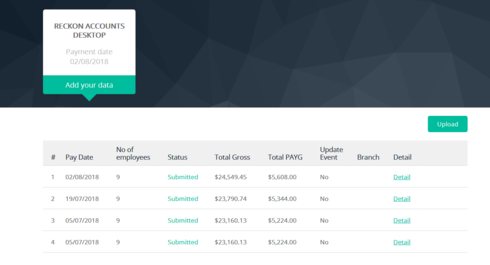
Would be good if the 'failed" one with errors could be shown as such or similar on this main screen ...?0 -
True,
 we are looking at ways to better display status to avoid something like this.
0

 Reckon Staff






This discussion has been closed.