How do I categorise an Invoice according to job type?

Lachlan_9812298
Member Posts: 3 Novice Member 
I have set up job types via lists > customer and supplier lists but I can't figure out how to 'attach' or 'add' a job type to an Invoice. My end goal is to filter each invoice according to job type in the Reports Centre.
0
Comments
-
When you create the invoice you use the customer AND the job. Same as when you enter expenses. The JOB should appear under the customer. I hope you havent put it on the same level. It wont work.0
-

For Invoices, I can see the 'customer:job' field in the top left hand corner but there is no separate 'job type' field. Is there a way to display the job type field separately?0 -
The job comes after the customer name thus
Customer:Job
This is all documented in the help files
Its also documented in the test file Reckon Enterprises What do you mean "job type"?
Kr0 -
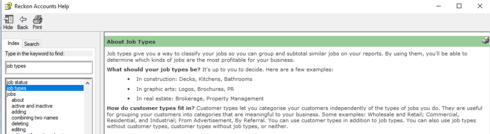
The above is the definition of a job type...
Maybe I'm not asking the right question. I'm looking to 'tag' an Invoice with the type of work that we do such as bathrooms, kitchens, laundry. Then, I want to run a report that shows all the invoices related to the bathroom tag or all the invoices related to the kitchen tag. I can then compare to see whether bathrooms or kitchens are more profitable for our business for example. What is the best way to do this?
0 -
Hi Lachlan
The Job Type relates to each job as a whole rather than individual invoices.
Providing you have assigned Job Types in each Job record, you should be able to generate/modify a variety of reports based on this.
You can add this filter in to the Sales by Customer Summary & P & L by Job reports. Alternatively, you can build/create your own via the "Find" feature.
Hope that helps.0





This discussion has been closed.