LSL accrual set up for WA casual employees


Comments
-
I would think you will have to manually enter in the correct amount as of the last pay date that has been processed and then enter it just like ordinary leave, possibly on a weekly basis, or as you suggested an hourly basis.0
-
Hi Rosemary
I always recommend accruing all leave “Per Hour”. Any other accrual will result in inaccuracies when hours worked fluctuate.
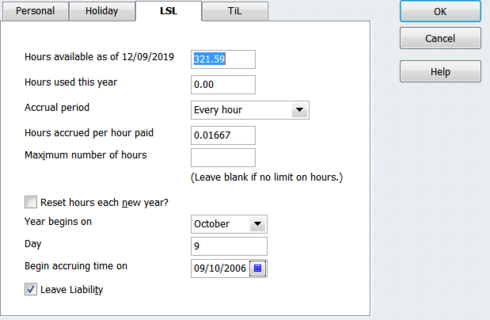
The hourly accrual for LSL (in WA) calculates out to 0.01667 Hours per Hour worked.
You will need to edit the “Hours available as of …” value by manually entering in the correct balance, then configure for accrual per hour going forward as per below.
IMPORTANT: On an “Every hour” basis, the system auto-calculates Leave based on the hours entered on an employee’s Pay. Therefore - even if someone is paid a fixed Salary amount each pay - the Hours MUST be entered in order for the Leave to calculate!
Shaz Hughes Dip(Fin) ACQ NSW, MICB
Reckon Accredited Professional Partner Bookkeeper / Registered BAS Agent (No: 92314 015)
Accounted 4 Bookkeeping Services
Ballajura, WA
0422 886 003
 0
0 -
Hi Shaz
I have tried to setup the LSL leave according to the pic above, however it keeps changing to 0:01:00 ????
I can not get it to stay as 0.01667
Hope you can assist?
Thanking you in advance
Cherie0 -
Hi Cherie
You have your overall Preferences set to "Minutes" instead of "Decimal"
To change this:
* Click on Edit (along top toolbar)
* Click on Preferences in the dropdown menu then as per below: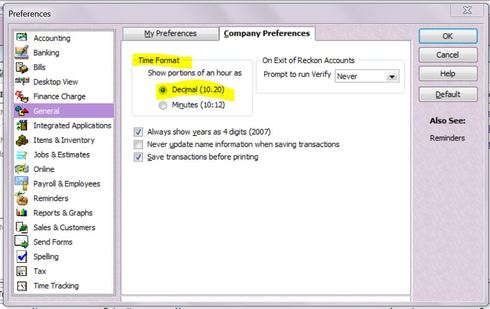
NOTE: This will change ALL your time formats including timesheet/paycheque hours. This means you will need to use DECIMALS for 15-minute part-hour entries
eg
"15.00" minutes > "0.25"
"30.00" minutes > "0.5"
"45.00" minutes > "0.75"
Shaz Hughes Dip(Fin) ACQ NSW, MICBReckon Accredited Professional Partner Bookkeeper / Registered BAS Agent (No: 92314 015)
Accounted 4 Bookkeeping Services
Ballajura, WA
0422 886 003
0 -
Thank you so much ..... it was driving me crazy !1




