Reckon Hosted

Annette Schuit
Annette Schuit Member Posts: 3 Novice Member Novice Member
edited June 16 in Accounts Hosted
Hi, I have just purchased Reckon Hosted and I am trying to set up GovConnect for STP, I currently use Reckon One for Payroll which is set up with GovConnect STP. How do I add my new product as I would like to start using STP with Reckon Hosted from 1/7/20 and stop using Reckon One Payroll on 30/6/20.   

Also I am trying to add STP to my Preferences in Payroll, the box to tick is not there to tick ???

Thanks

Comments

  • Zappy
    Zappy Accredited Partner Posts: 5,256 Accredited Partner Accredited Partner
    edited June 2020
    Have you created the account in portal.reckon.com?
  • Annette Schuit
    Annette Schuit Member Posts: 3 Novice Member Novice Member
    edited June 2020
    Hi Kevin, yes there is an account already set up with the Reckon One Version. 
  • Zappy
    Zappy Accredited Partner Posts: 5,256 Accredited Partner Accredited Partner
    edited June 2020
    Did you look at the govconnect help guide? When I export the STP file I'm directed to the STP portal.
  • Tanya Briggs
    Tanya Briggs Accredited Partner Posts: 68 Accredited Partner Accredited Partner
    edited June 2020
    You don't need to turn on STP in Preferences anymore, it is automatically included in the file (it's not optional for the vast majority of employers, it's now mandatory).
  • Annette Schuit
    Annette Schuit Member Posts: 3 Novice Member Novice Member
    edited June 2020
    Thank you
  • Rav
    Rav Administrator, Reckon Staff Posts: 14,222 Reckon Community Manager Community Manager
    edited June 2020
    Hi Annette,
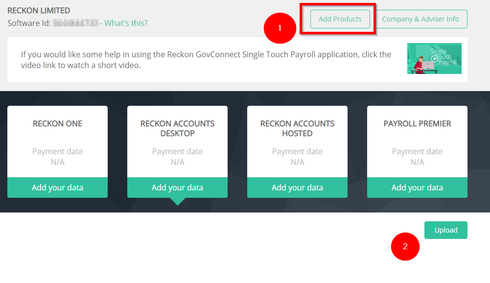
    One other thing I'll add is, you just need to add the new Reckon Accounts Hosted product to your STP entity.

    I'll add a screenshot below of my GovConnect but it shows all products selected. In your case, just click the 'Add Products' button and tick Reckon Accounts Hosted then use that option to upload your STP files.


This discussion has been closed.