Maintain rules created during file import/upload

UjjwalJ
Member Posts: 4 Novice Member 
in Reckon One
When doing an import via Manual Upload, one can create rules for import. But can I view all the rules that I have created. Also, can I modify them. If not, how can I delete them?
0
Best Answer
-
Hi UjjwalJ,
You can view, edit and delete all the Transactions Rules you have created by going to Banking> Transactions Rules on the left Menu.
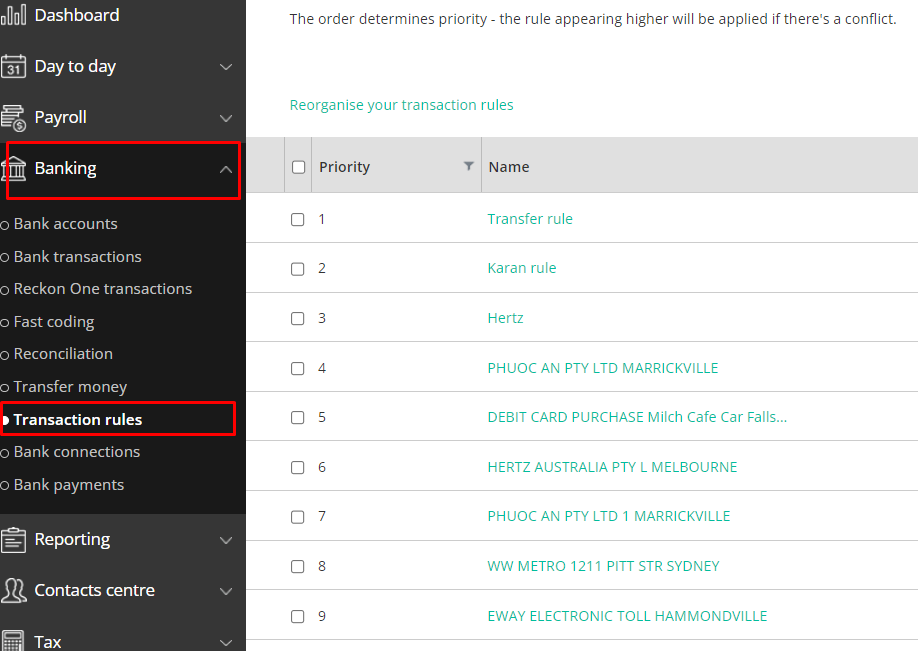
Also, you may check these helpful guides for more information.
Transaction Rules - Reckon Help and Support Centre
Transaction rule does not pick up the transaction - Reckon Help and Support Centre
Best regards,
Kind regards,
 1
1

 Reckon Staff

Answers
-
Thanks Klaura. I saw your answer but forgot to acknowledge. It was a great help.
1