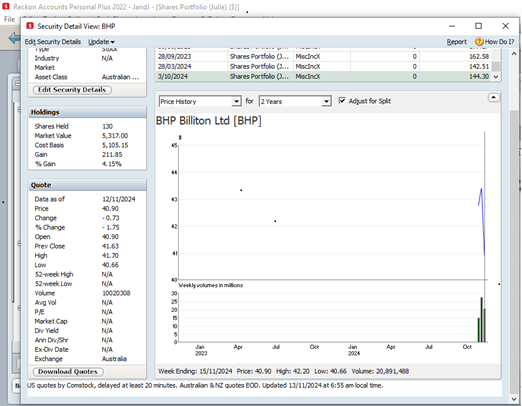
Over the last few weeks I’ve been trying to solve a couple of issues –
- Error message ‘Transfer Cancelled” when attempting to transact across accounts.
- Failure in the process to download share prices from the ASX
The only thing I found ongoing success with was the fixing of problem 1. above, by uninstalling Reckon PP and reinstalling via the ISetup.exe from the HAB>Disk1 folder in the Reckon PP 2022 Installation Application downloaded from my Reckon Account. The procedure is outlined via the following link -
https://community.reckon.com/discussion/8030880/i-keep-getting-the-message-transfer-cancelled#latest
Regarding my ‘still existing’ problem with share price downloads, I can only manage partial resolution!
By using the procedure outlined above re point 1., the reinstallation allows me to successfully download the latest ASX prices. BUT, if I exit from Reckon, and re-enter again, my problem has returned!!
I have performed the uninstall/re-install numerous times since, and on an intermittent basis, I either get the ability to download prices, or I don’t. But, on all occasions that I have exited Reckon and re-entered, I lose the ability to download prices. I’ve even tried the reinstall using the Setup.exe (as opposed to ISetup.exe) installation file, with similar results.
Other things I have done to try and solve my problem are-
- ‘Validate’ and ‘Super Validate’,
-a deep clean of the entire PC to identify and delete any malware and/or viruses, and
- a clean up of all Reckon files, using Revo Uninstaller, prior to a fresh re-install of Reckon PP.
The interesting situation I have is that all the above is in relation to using my HP Desktop PC which runs Windows 10 Home and it’s specs are such that I am unable to upgrade to Windows 11. But, I run many other applications on this PC without any issues whatsoever!
The other interesting thing is that I also have a HP laptop with Windows 11 Home installed, and since having these issues, I installed Reckon on it and it seems to run without any hitches. But, I want to use Reckon on the desktop PC! Which I have successfully done for the last 8 years on this machine, until recently!
I’ve also consulted a local IT business, and the person there suggested, after telling him my story, that without actually physically examining my system, I should firstly consult the Reckon technicians.
Sorry if I have been longwinded in describing my issue, but I’ve tried to give you all the relevant facts.
Hopefully, there is someone, be it a Reckon technician, or someone out there in our Reckon Community, that can help me.