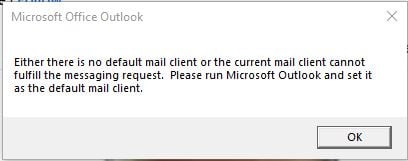
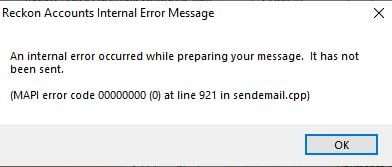
Good Afternoon
I've spent all day on the computer and even to reckon support and now that Outlook has upgraded it is not compatible with reckon
It's not possible to keep using 2 outlooks just so I can send payslips.
There has to be a better way!
We're using Outlook without any trouble in conjunction with Reckon Accounts.
Might be worth advising more details about your specific circumstances
I was having no issues as well
Windows did an update and prompted me to use the new Outlook.
My email won't set up anymore on the old Outlook.
Lady today from reckon support said the accounts plus does is not compatible with the new Outlook.
So I've left that email which was used primarily to send out payslips on the old version and had to set up my business email on the new Outlook.
Yahoo email is where my payslips get sent from but if I put that email on new Outlook reckon won't send them.
My business email is admin@paulyssecurity.com.au but this is no longer compatible on the old Outlook.
So NEW OUTLOOK for my business email to work efficiently and OLD OUTLOOK just to send payslips!
Dear @Rachael Bonello ,
Are you having any errors appear when you try to email these payslips out?
If you can, try the following:
If this fails, let me know the error, and I'll try to assist further.
Kind regards,
Alexis McKeown
Reckon Senior Technical Support
i tried that and it said oops something went wrong and then nothing, doesnt work
Did Reckon bring up "Something went wrong"? Or did Outlook?
Is it possible to provide a screenshot of the error message?
Reckon brought it up but then it just disappears straight away and email won't send.
I have to have the old and new Outlook running to send emails as it keeps sending from old Outlook because new one doesn't seem compatible. All my business stuff is now on the New Outlook.
The only thing that doesn't work on the NEW Outlook is reckon
This is mostly due to how Windows has the New Outlook not as an executable, but programmed more as an in-built application.
At the current time, I'd recommend still using the old Outlook for the foreseeable future.
If you do not wish to do so, I'd recommend saving anything you wish to send as a PDF copy, then attaching it as an email via the New Outlook.
But this is not practical? Is there no other solution
At the current time, Microsoft has not updated their 32-to-64-bit Handshake Protocol in the in-built version of Outlook (aka: the New Outlook).
As such, it is not currently compatible with Reckon Accounts 2024 in certain scenarios.
I can understand this is frustrating or not entirely practical, and apologise if this is detrimental to your experience with Reckon.
We are unfortunately beholden to Microsoft's updates as they roll out, and can only offer the workaround of keeping both versions active at the same time.
Will this be fixed soon? May have to change to MYOB which I really don't want too.
Just need to know if reckon is going to do something to fix this?
Hi @Rachael Bonello
Just out of curiosity on the above, is there something specific preventing you from setting up your email on the 'old' Outlook that Reckon Accounts is using?
Just spoke to someone on here and partner and apparently Microsoft is not compatible with the new Outlook and reckon
@Rav my computer automatically updated to the new outlook and as much as ive tried, it does not work on the old one anymore as my business email is a domain email through local directories.
Yahoo works on both and is the one that reckon sends payslips out of but its only compatible on the old outlook.
Whilst I understand it's not reckons fault..
This is not a cheap program but one i have used since 2007 with no issues.
Now I'm faced with using two outlooks and the constant lagging it takes now to send payslips.
A simple task one who runs a business should be able to do.
I mean surely there are thousands of ppl on here in my situation????
And when you pay extra for support and ring up and they are not really useful or aware and waste 2 hrs more of your time? It's absolutely frustrating and appalling. Why were we not informed? Why does the ppl on the support line not know what to do?
Why am I wasting money on a product that can't do a simple task?
That's where I'm at after nearly 20 years of quickbooks/reckon. I'm pretty annoyed.
we've just paid for the license to move our old version and upgrade to reckon 25 desktop to a new computer and everything is going well except for the email option in outlook. Called support, no help what so ever, been googling and trying multiple fixes, nothing working. Have you had any luck sorting anything out? Like you it is so impracticable to run two computers to do such a simple task, scanning and attaching is way too time consuming. Actually going to start pulling my hair out.
I had a look at the New Outlook about a week ago, but I could not readily see much that there was different for my circumstances. As a result, I noticed that there was a toggle button on the top right hand corner of Outlook which enabled me to switch back to the Old Outlook. The only suggestion that I could offer is that you use that option to switch back to Old Outlook for the time being. I am not aware if you can do such a switch after you have been using New Outlook for some time, but it is worth a look to see if you can.
John L G
I found the following:
I am using Office 2021 Pro.
I am most impressed.
It appears that all emails from Reckon go through the Reckon servers for authentication irrespective of your host. It would be interesting to hear about that.
Robin W
Hi Robin, your post sounds very promising to all of us with this Outlook MAPI error after MS changed something, but I'm a little unclear on some points and would like to go over these please…
Before all of this occured, we used to be able to email from Reckon Accounts Premier 2025 (desktop) either with "display each email before sending" ticked or not…. (edit>preferences>online>company preferences>display each email before sending). We have multiple email addresses in Outlook 2021 and I have been told (by Reckon support) this problem will not occur if we had only one email address in Outlook, but that is not an option for us.
The errors that occured are as follows;
By switching to Outlook Classic V2 (edit>preferences>send forms>my preferences>email provider) we are now able to send emails but only if "display each email before sending" is ticked otherwise it errors, but each email must manually click "send"….so not good for batch emails and just wastes time otherwise.
How many email addresses are you running in Outlook?
I don't know whether my circumstances will fit anyone else's but here goes.
Initially Outlook was working fine but suddenly it ceased to work with Reckon. I tried to contact Reckon but found that my login there was not operational so therefore I had to re-establish my credentials with Reckon. Once back again into the Reckon fold Outlook was still not working.
The background of how we have got our emails set up is that we created our own domain like www.ourclub.com.au and within that domain I have set up 3 email addresses for the president, secretary and myself as treasurer. For example my email is treasurer@myclub.com.au, the president & secretary are similar. All emails to those addresses are redirected in our host to the respective addressees personal email address so that any emails to treasurer@ourclub.com.au are redirected to my own personal email address. I use Outlook personally so that I have the option to both receive and send from my personal email address using the treasurer@ourclub.com.au address. I like this as it means that for non accounting issues I don't have to use Reckon to do so.
To do this entailed that given the set up on our host I had to change the email password for treasurer@ourclub.com.au once I opened it up on the host. On other hosts in the past I have found that I could see what the password was but in this case I can't so I had to reset it.
Once reset, I opened up our version of Reckon Accounts Plus 2024 and then opened the instance of Outlook that is associated with Reckon (our accounts are kept on a laptop which has Outlook set up on it). Outlook asked for the password, I copied & pasted it in and from then on everything worked seamlessly. This led to my assumption that all emails from the software go through the Reckon servers but I could be totally wrong about that.
Because we are a small club with a membership base in the 150s I don't bulk email. I have no need to do so and in the one instance I could (invoices for the new year's membership) I still individually send them once the invoice is saved in Reckon - in fact I don't know how to do it in bulk and would have to come back here to ask for help to do so.
To answer the questions above.
I hope this gives some clarity to you.
Cheers
Robin
Thank Robin.
Sounds like you are running Reckon Accounts Plus (hosted), we are using Reckon Accounts Premier "desktop", so totally different, good to know and that you got it sorted.
Mike
For clarity, the following are the locally installed desktop products:
The web-browser accessible product is:
Reckon Accounts Premier uses the same file format as Reckon Accounts Plus.
Data files opened or created in the Reckon Accounts Plus product:
Data files opened or created in the Reckon Accounts Premier product:
Reckon Accounts Hosted uses the same file format as Reckon Accounts Enterprise
Data files opened or created in the Reckon Accounts Hosted product:
Data files opened or created in the Reckon Accounts Enterprise product: