Reckon Hosted: How to find an out of balance amount in a balance sheet account
My client has a data file that is perfectly in balance on 30-09-2024. The balance sheet and trial balance agree. If I run the balance sheet on 01-10-2024 the Inventory Asset account no longer agrees with the trial balance when the Balance Sheet display is set to Total. If I change it to day, week, month or year, the totals agree.
30-09-2024 - Trial balance on left, balance sheet set to Total Only on right. Both agree.

01-10-2024 - Inventory Asset after combining two businesses. Trial balance on left, balance sheet set to Total Only on right. Totals are different. If I drill down on the transactions, the transactions total agrees with the trial balance.

01-10-24 Trial balance on left, balance sheet set to Year on right: Both agree.

If I change the date range to All, the totals agree but if I set the report to the date the All setting produces, the totals do not agree.
I have created a portable file, restored and verified. No errors reported.
Anyone struck this problem? Could it be a reporting issue?

Best Answer
-
I never updated this. Finally the rebuild worked. Thank you.
0
Answers
-
Try rebuilding your file 3 times in succession. That seems to work wonders on niggly issues.
0 -
Hi @CDK
On the 01/10/2024 how many transactions are present?
What type of transactions are present?
Consider modifying report and:
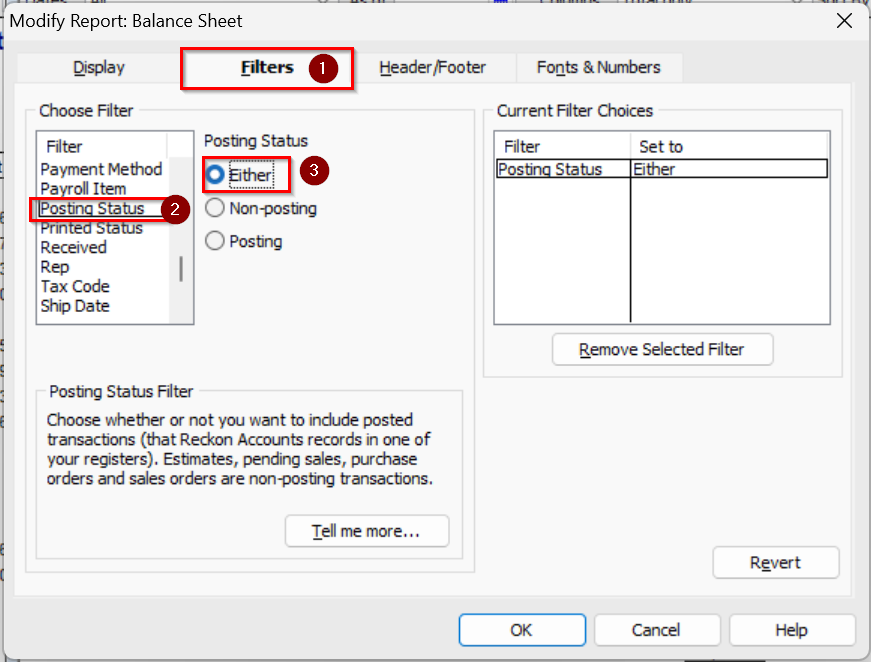
a) change the Posting Status filter to Both, check to see if there is any change to the report comparison
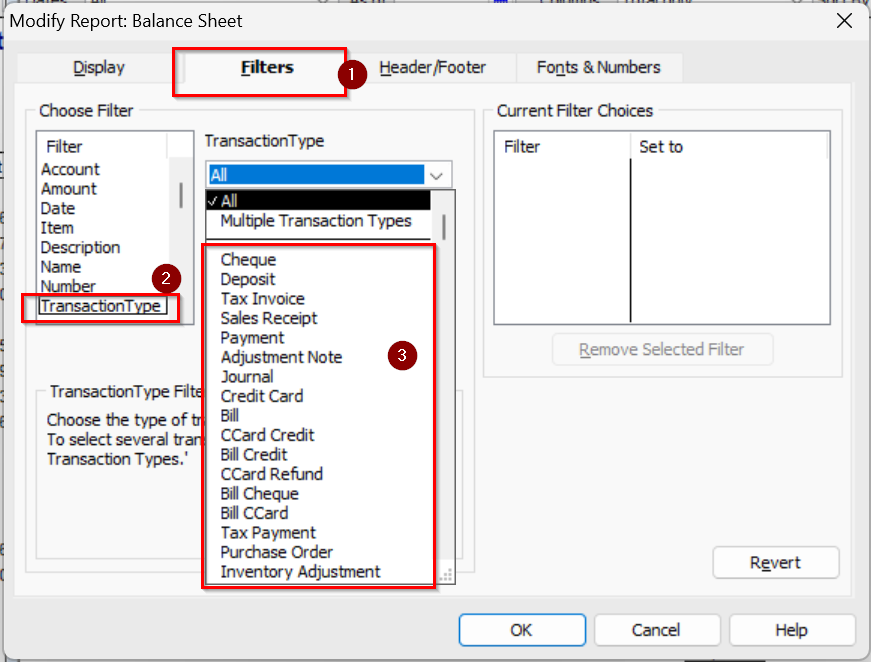
b) change the Transaction Type filter and select a group of transaction types at a time (or even one at a time)a, check to see if there is any change to the report comparison
Play with the filters as it may allow you to identify a specific transaction type which if removed temporarily from being displayed as part of the report, shows the figures matching the way you expect.
Once you know which type of transaction could be contributing to the issue, you can investigate each one.
Example: if you find that the problem with the figures not matching no longer occurs if Bill are excluded from the report, then it points to one or more bill transactions as the contributing factor.
You could then temporarily 'future-date' bills one at a time to exclude them from the date 01/10/2024 to see which one may be the specific bill that makes the figures not match between the Balance Sheet and the Trial Balance.
Searching the Reckon Help and Support Centre | Asking good questions on the Community
#TipTuesday: Picture Paints a Thousand Words | How do I add screenshots to my discussion?
1 -
I am trying both solutions in a test company. Thank you. Will report back once I've finished, which could be a long time away. 😪😪 If anything works, will have to repeat in the live company!
1 -
I ran the backup and rebuild once but that took 2 hours, I don't have 6 hours to spare.
I tried filtering the reports by transaction type. I tried every single transaction type listed. It was in balance for each type. Went to back to filtering on All transaction types and immediately out of balance again. I can't future date every bill, there is nearly a year's transactions in there, I'd be here until Christmas.
Would it be worth getting my client to raise a ticket with Reckon? Does Reckon have tools to look at the file to see if there is something wrong with the reporting, or the data integrity? I've spent 3 days checking manually.
0 -
Hi @CDK
You've indicated that you have performed a Verify and Rebuild operation.
Did you take a look at the resulting QBWIN.LOG file?
How do I find the QBWIN.LOG (error log) in Reckon Accounts (Desktop) — Reckon Community
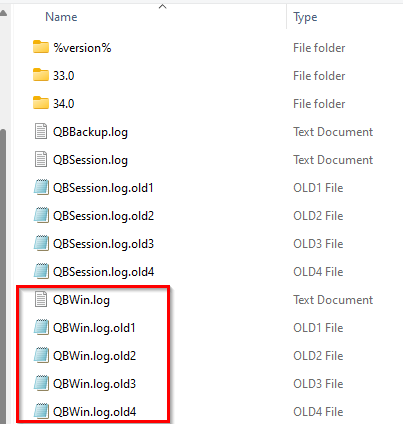
If you go to the location where that QBWIN.LOG file is found on the computer on which you had performed the Verify and Rebuild Data, you may also find additional files.
Example:
You can raise a support ticket. Support Hub | Reckon AU
We can take a look at the file.
Include a link to this Community discussion.
Be prepared to send us a copy of the QBW (company data file) and those QBWIN.LOG's so we can take a look.
Note: Fees will apply if the problem can be identified and work is required to resolve it.
Searching the Reckon Help and Support Centre | Asking good questions on the Community
#TipTuesday: Picture Paints a Thousand Words | How do I add screenshots to my discussion?
0 -
Thanks. I was able to run the rebuild on the restored portable copy file but not the live file because Shopify was still synching. I've made a decision to stop the Shopify synch tonight, make a portable backup, restore to the live file and then try the rebuild on the live file. It can run in the background. If I encounter errors, I'll check them and try it three time as suggested. If all else fails, we'll create a ticket for Reckon support. Thank you for your help so far.
0 -
An inventory asset balance discrepancy occurs when the general ledger balance (shown in the trial balance) does not match the physical stock on hand. This usually arises from timing differences, recording errors or mismatches between system records & actual inventory quantities recorded on individual transactions.
Causes
- Goods received but not invoiced (or vice versa)
- Missing, duplicated or incorrect entries
- Differences between book value & physical count
How to Resolve
- Run reports to compare transactions with stock on hand
- Review records for missing or unrecorded invoices/receipts
- Perform physical counts to confirm quantities &values
- Adjust the general ledger to match verified stock
- Use accrual entries to manage recurring timing issues
0 -
Advised that this was eventually resolved with a rebuild.Not sure where to close the discussion.
1