RECKON ACCOUNTS HOSTED is driving me nuts!
Why oh why oh why does Reckon shut down every time I click on another screen etc…those of you who have this issue will know what I mean and how frustrating it is. It is driving me insane signing in constantly because I have been away for 30 seconds doing something else. Does Reckon think I sign in there and don't do anything else all day, hence I am inactive? NNNNOOOOOOO, LEAVE ME SIGNED IN! help

Answers
-
What browser are you using?
Edge is the best
Kr
0 -
Sorry to hear you're having a rough experience with Hosted at the moment.
We'll need some more specific details to understand what's happening here to give us a better idea so I'll list a few questions below.
- You've mentioned Hosted shuts down, what exactly happens on-screen? ie. does an error message appear and if so, what is it?
- You've also mentioned that it occurs when you move away to another screen. Are you actively working in your file prior to this? Are you clicking to another tab within your browser or another app on your PC?
- Does it occur when you're doing something specific in Hosted ie. a specific function/task?
- Which browser are you currently using when this occurs? Have you tried any other browsers just as a test to confirm whether the same behaviour occurs there? Note: Google Chrome is the supported browser with Reckon Accounts Hosted.
- Is there a specific example you can provide of this occurring that includes the date/time and screenshot of the error message?
- Have you had a chat with our technical support team as yet? If so, do you have an existing case number in regard to this issue?
0 -
I am using Edge…maybe I'll whiz over to Chrome
1 -
How's your internet connection? Is it stable?
1 -
Internet connection stable, just says I am inactive usually
0 -
Rav, next time it happens, probably in about 10 seconds, I will let you know. I work between other tabs, Excel files, Microsoft Teams (which annoys me in itself) and emails
0 -
Does it happen with any other apps?
Kr
0 -
No Zappy, Only Reckon because it likes to challenge my patience. Lucky I have plenty :(
1 -
I use them all Suzanne
I use Brave probably ninety percent of the time
Have you tried using a private window for Hosted?
Kr
1 -
There you are Rav…one of the messages
0 -
Thanks for that. Can you please also provide details on the other questions I've outlined above when you encounter this issue.
Cheers
0 -
i'LL HAVE TO GET BACK TO YOU rAV…DIFFICUTLY TYPING A LOT AS I have a torn shoulder and it hurts to type
0 -
I have the "issue", it's not a browser issue, the problem with Reckon Hosted is the time out setting. It signs you out way too frequently. I can have someone walk into my office and after having a conversation my login has timed out. I then need to go through the painful login process from login in to the server and after that login in to the reckon user name as well again. It's painful and uses up so much of my time.
Please extend the automatic log out time from the server. This is not efficient at all and super frustrating.1 -
Hi all
Just wanted to jump on and clarify some details just so we're on the same page in terms of expectations and understanding.
When you login and launch your Reckon Accounts Hosted file, you connect to our servers and start what we call a ‘session’. When you are logged into your Reckon Accounts Hosted file and working in it, your session will remain logged in indefinitely provided you are actively working in the file.
There may be occasions where you need to work on something else away from your Hosted file which is absolutely fine. Just something to note is, if you’ve left your session idle for an hour, your session will disconnect and you'll need to login and start a new session. For that to happen, it means you haven't used or worked in your file for over an hour.
If you are noticing your session is disconnecting anywhere short of an hour since you've last actively worked on your file, which it sounds like what is being reported here, then that is outside the norm.
If you're certain that's occurring then it requires some troubleshooting and specific examples for us to investigate further so I'd encourage you to reach out to our technical support team as soon as the issue occurs so that our technicians can collect obtain info, screenshots and a HAR file where applicable.
There is no 'one' reason for disconnected sessions, they can be caused by a myriad of factors including drops in connection particularly if you're on Wi-Fi, security/firewall settings, VPNs, browser extensions, or even background timeouts set by your local network or internet provider.
Our support team will be able to review the details of your environment and help narrow down what’s causing the premature disconnections so we can get things running smoothly again.
1 -
I did contact tech support Rav but I didn't understand a word of what they wanted me to do and it seemed to be all about my internet connection, of which is fine as you would know. I asked tech support if they could log into my file and sit with it a bit to see if it happened but I didn't understand what I was being told, so I gave up because I'm busy. A cop out? Maybe, but if it's a reckon problem they should sort it in my opinion :)
1 -
Thanks for the clarification. I will be watching the time out now that at least I have been given the set time for it to happen. I belief it's much shorter than 1 hour and I will keep track of that including my other coworkers that all seem to agree that it does not take 1 hour of idle before we have to go through the whole login process again. Thanks for that information and I will contact the tech support with more details.
1 -
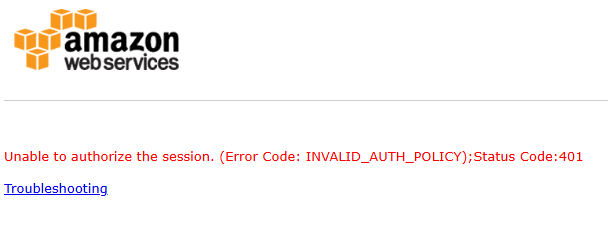
One of my connection dramas comes from Amazon - I posted it earlier, others just say session times out and it's way shorter than 1 hour…if I'm lucky, I log back in using my password or sometimes not…if it's been left longer then I have to get another authenticator code as well…so much time wasted and I do a heck of a lot more than just sit on Reckon all day long - hence it's very frustrating
0 -
Ensure that you are regularly performing a backup of your data file on the Hosted platform.
Creation of backups is the responsibility of the user.
If you are using Microsoft Edge try the following:
How to Keep Pages Active in Microsoft Edge
- Open Microsoft Edge.
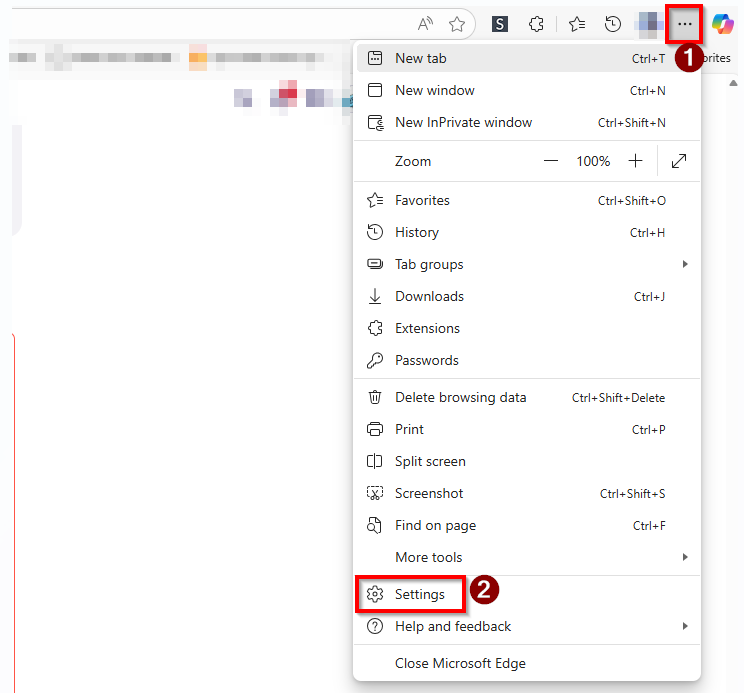
- Click the three-dot menu (1) in the top-right corner
- then select Settings (2)
On the left sidebar:
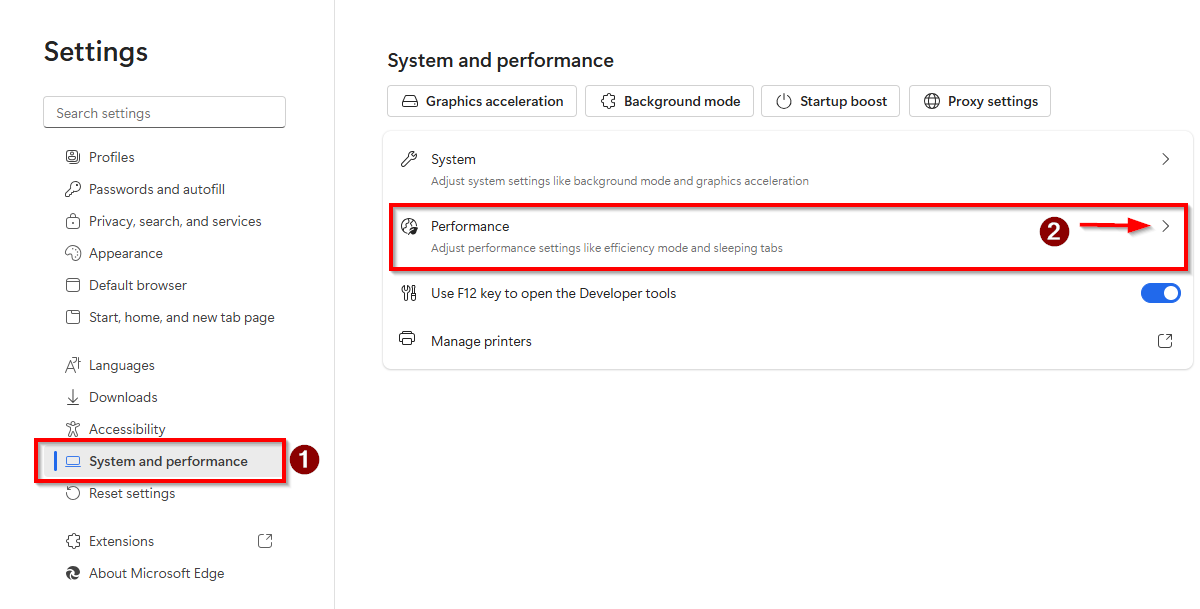
- go to System and performance (1)
- Click to expand the Performance (2) section
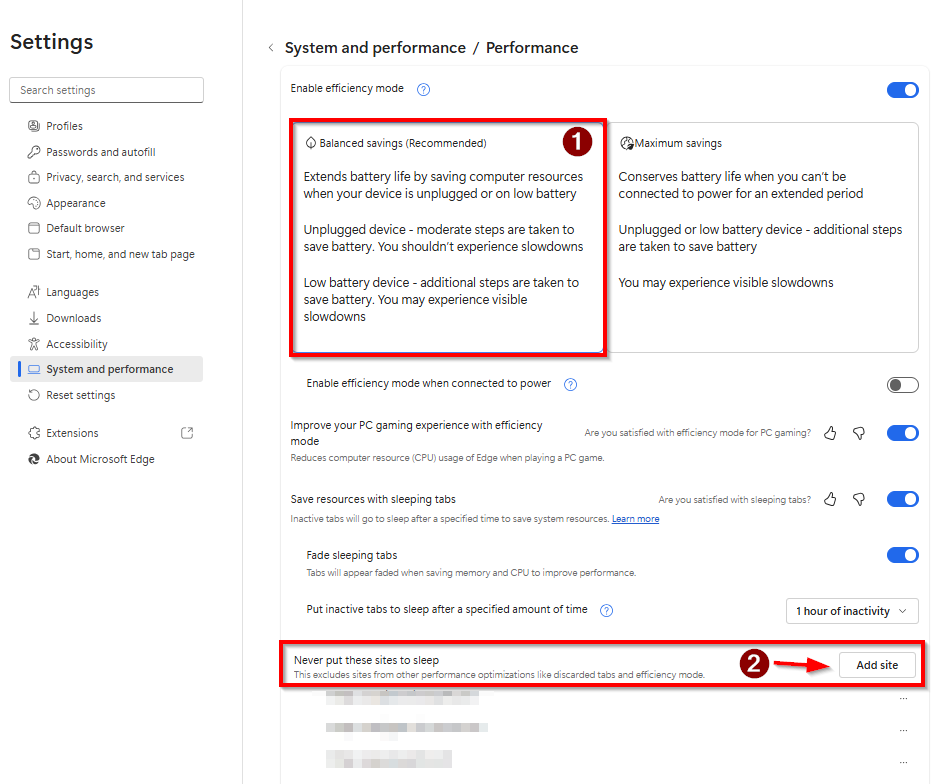
- If you have Enable efficiency mode enabled, choose Balanced saving (Recommended) (1).
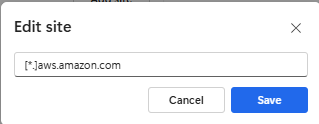
- In the section Never put these sites to sleep (2) click on the Add site button.
In the Edit site dialog type [*.]aws.amazon.com, and click the Save button.
Close your web browser.
Close any open applications as needed
Restart your computer.
Launch the web browser.
Login to the Hosted platform and open your data file.
Confirm whether if you leave the computer alone, without touching anything for at least a minute whether you experience a time-out like in the past.
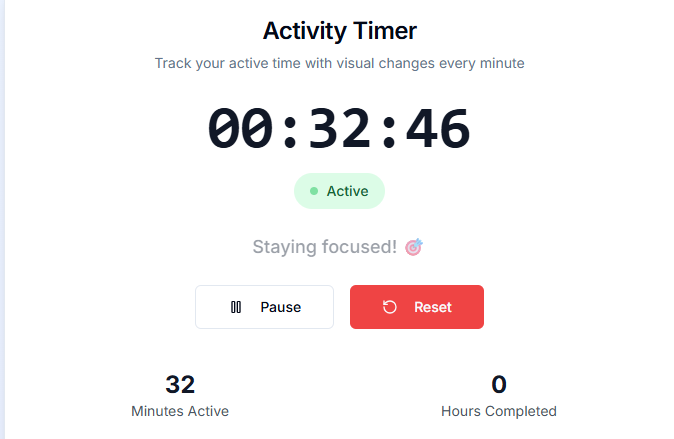
As another test, set a timer on your watch/phone or other timing device next time you would be stepping away from your computer to see if you encounter the situation where the session has timed out and confirm how much time has elapsed since the time you left the computer alone and when you returned.
Searching the Reckon Help and Support Centre | Asking good questions on the Community
#TipTuesday: Picture Paints a Thousand Words | How do I add screenshots to my discussion?
2 - Open Microsoft Edge.
-
Fantastic Datarec - hopefully a pain free, easy solution. I will close down tonight hoping for a wonderful day tomorrow when I come in. Thanks again xx
0 -
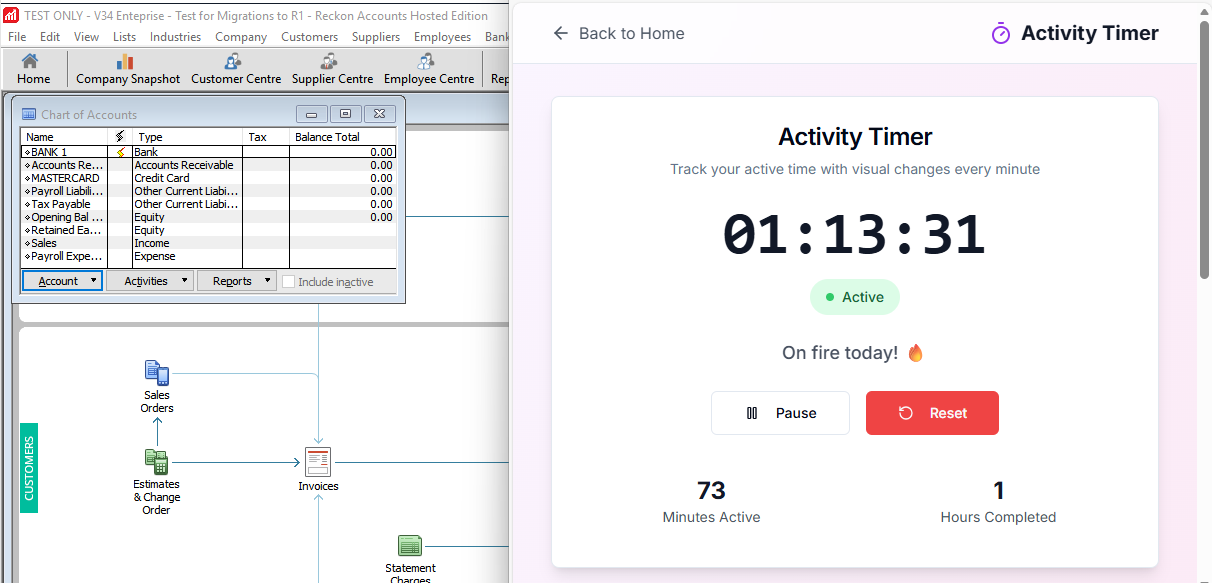
Using a timer (web based) so far, my Reckon Accounts Hosted session has not yet timed out.
Searching the Reckon Help and Support Centre | Asking good questions on the Community
#TipTuesday: Picture Paints a Thousand Words | How do I add screenshots to my discussion?
0 -
I HAVE BEEN ACTIVE FOR 6 MINUTES - BEYOND EXCITED 🤩
0 -
-
Data
Youre amazing
Well done Sir
Kr
1 -
Thank you everyone for your time and understanding and help…I think I'm sorted now after Datarec's suggestion - seems to have worked perfectly 😍
2 -
It's a pity this knowledge isn't more widely shared. This is literally the very first time Ive seen this
Kr
2 -
So.. it's an overzealous browser setting and nothing to do with the RAH service?
1 -
What exactly was the fixWith the browser @Eric Murphy. Is it just using the timer?
0 -
@Kris_Williams see the info from datarec from the Reckon team
Although, I thought Chrome is the recommended browser but I imagine there's something similar in chrome as well
1 -
Hi @Kris_Williams the timer was just to help confirm how long the session was active from the time a user makes a deliberate move away from their computer to see when their session disconnects.
The browser settings for Microsoft Edge is what has helped @SusanCairney with the Hosted session timeouts interval being so short in her experience, compared to the normal 1-hour timeframe.
Searching the Reckon Help and Support Centre | Asking good questions on the Community
#TipTuesday: Picture Paints a Thousand Words | How do I add screenshots to my discussion?
2 -
Copilot says:
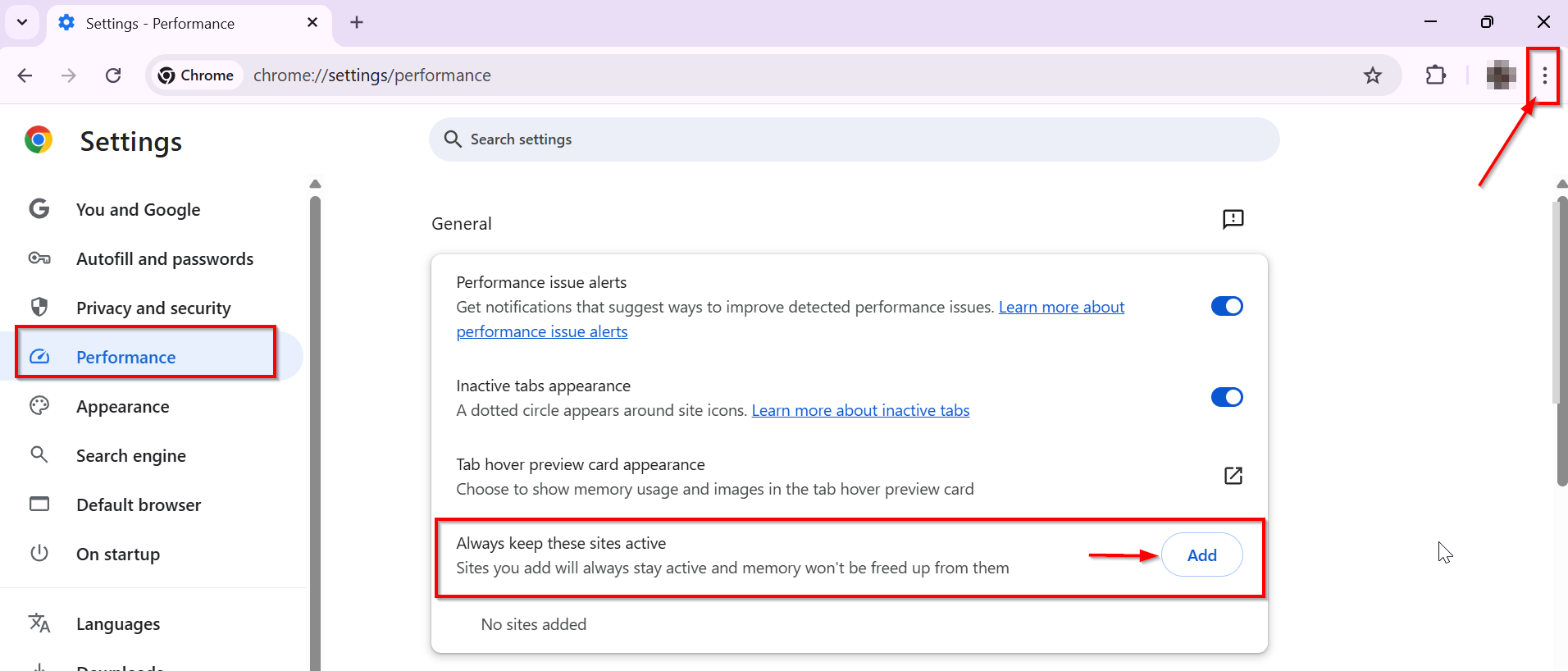
To keep a site active in the Chrome browser, follow these steps:
1. Open Chrome and click on the three-dot menu in the top-right corner.
2. Select Settings from the dropdown menu.
3. Click on Performance in the left sidebar.
4. Scroll to Always keep these sites active and click Add.
5. You can either add current sites from the list of open tabs or enter a URL manually to keep the site active.By following these steps, you can ensure that the specified sites remain active in your Chrome browser, preventing them from being discarded by the browser's memory-saving feature. This is particularly useful for websites that require a constant connection, such as online banking or streaming services.
Searching the Reckon Help and Support Centre | Asking good questions on the Community
#TipTuesday: Picture Paints a Thousand Words | How do I add screenshots to my discussion?
2 -
this has done it for me as well. Brilliant and yes something that needs to be spread more. The customer care told me they can't change the time out on the server (which is I guess correct) but they didn't seem to be aware of the browser "issue" that can impact on the time out.
Thanks for the help. No more frustration with login processes here. :-)1 -
thanks @Eric Murphy, I don’t seem to have the same problem fortunately and I use Firefox on PC
0 -
Thank you for confirming that the changes to the browser settings have also helped you.
Searching the Reckon Help and Support Centre | Asking good questions on the Community
#TipTuesday: Picture Paints a Thousand Words | How do I add screenshots to my discussion?
1