Slow performance with desktop Enterprise

prasanna
prasanna Member Posts: 99 Reckoner Reckoner
edited November 19 in Accounts Hosted

Hi Team,

We use Reckon Hosted with a multi-user pack accessed by approximately 25 members. I also have the desktop version installed so I can run reports when needed without interrupting others. For this purpose, I work from a QBW file stored locally on my desktop (C drive).

However, when I open the desktop version, the system runs extremely slowly, significantly slower than the online version. It takes hours to generate a report, and the system keeps running for a long time before the report finally appears.

Could you please advise whether this level of delay is expected when using the desktop file? If not, I would appreciate your assistance in identifying the cause and resolving the performance issue.

Thank you,
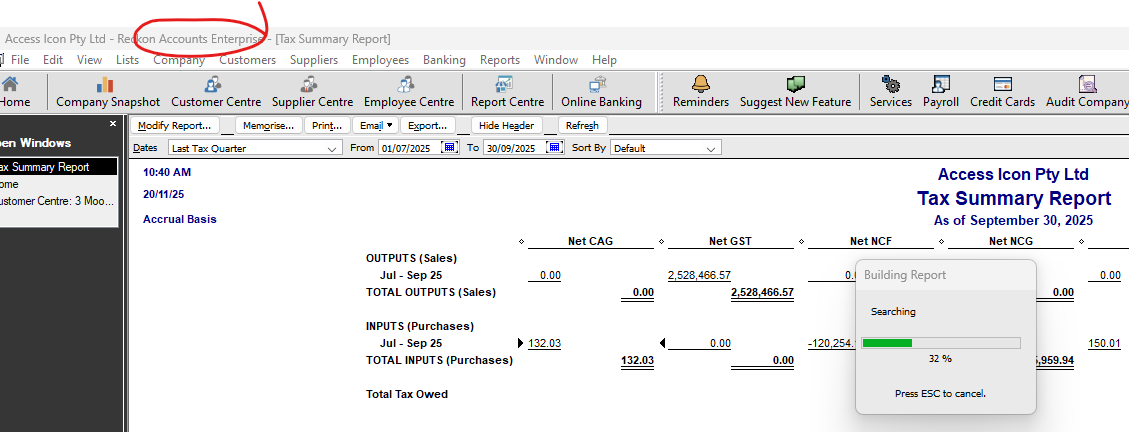
image.png

Comments

  • Zappy
    Zappy Accredited Partner Posts: 5,252 Accredited Partner Accredited Partner

    There's loads of things you can do to improve the performance of Desktop.

    Give me a call

    Kevin 0407 744 914

  • prasanna
    prasanna Member Posts: 99 Reckoner Reckoner

    Hi Kevin

    prasanna@accesscoversaustralia.com.au

  • Jason_Z
    Jason_Z Reckon Staff Posts: 311 Reckon Staff Reckon Staff

    Hi @prasanna

    The speed and efficiency of your company file can be affected by several factors, including:

    • The condition and size of your company file
    • The performance and health of your PC
    • The stability and speed of your network (especially in multi-user mode)

    You may find this help article useful, as it outlines steps you can take to improve overall performance:
    https://help.reckon.com/article/enbroipis8-kba-294-quick-books-qbi-program-performance-is-slow-in-multiple-areas

  • Zappy
    Zappy Accredited Partner Posts: 5,252 Accredited Partner Accredited Partner
  • Eric Murphy
    Eric Murphy Member Posts: 574 Reckon Hall of Famer Reckon Hall of Famer

    You're not storing your file in a folder that is synced up to an online storage service like Google Drive are you?

  • prasanna
    prasanna Member Posts: 99 Reckoner Reckoner

    Hi eric ,

    file stored in Local drive

    Thanks

  • prasanna
    prasanna Member Posts: 99 Reckoner Reckoner

    Also,

    I am getting support from Kevin

  • Zappy
    Zappy Accredited Partner Posts: 5,252 Accredited Partner Accredited Partner

    @prasanna

    Thanks Lets make this happen

    Kr

  • prasanna
    prasanna Member Posts: 99 Reckoner Reckoner

    Hi Kevin ,Thanks for your support. You are a legend !

  • Jason_Z
    Jason_Z Reckon Staff Posts: 311 Reckon Staff Reckon Staff
    edited November 20

    Nice one @Zappy!

    Did you end up working through that help article with @prasanna, or did something else improve the performance?

  • prasanna
    prasanna Member Posts: 99 Reckoner Reckoner

    Hi Jason,

    please give your input on how to enhance performance and it will be invaluable,

    currently, I am trying to rebuild the file and fix the errors. hopefully that will resolve the issue

    one of the file size is 1.9GB and 20 users other 1.4gb with 10 users

    sales order processing is the hardest hit part and take ages to changes or update

    Thanks

  • Jason_Z
    Jason_Z Reckon Staff Posts: 311 Reckon Staff Reckon Staff

    Sorry, I was under the impression from your last message that the issue was resolved.

    Did you have a chance to go through the article that Zappy and I shared? That would be my first recommendation.

  • Reeta
    Reeta Reckon Staff Posts: 383 Reckon Staff Reckon Staff

    Hi @prasanna ,

    In addition to the Jason's suggestion , I would also like you to check the .TLG file size, as this can indicate whether it’s contributing to the slowdown. You can try resetting the .TLG file, as this often helps improve the performance of your Reckon Accounts company file.
    If a backup hasn’t been done for a long time, the .TLG file may become quite large, which can slow down the process. Resetting the .TLG file can help reduce this impact and improve overall performance.
    I’ve attached an article below with detailed steps on how to reset the .TLG file for your reference.

    https://help.reckon.com/article/87mkjxf1fa-how-to-reset-a-tlg-file

    I hope this helps.

    Regards,


