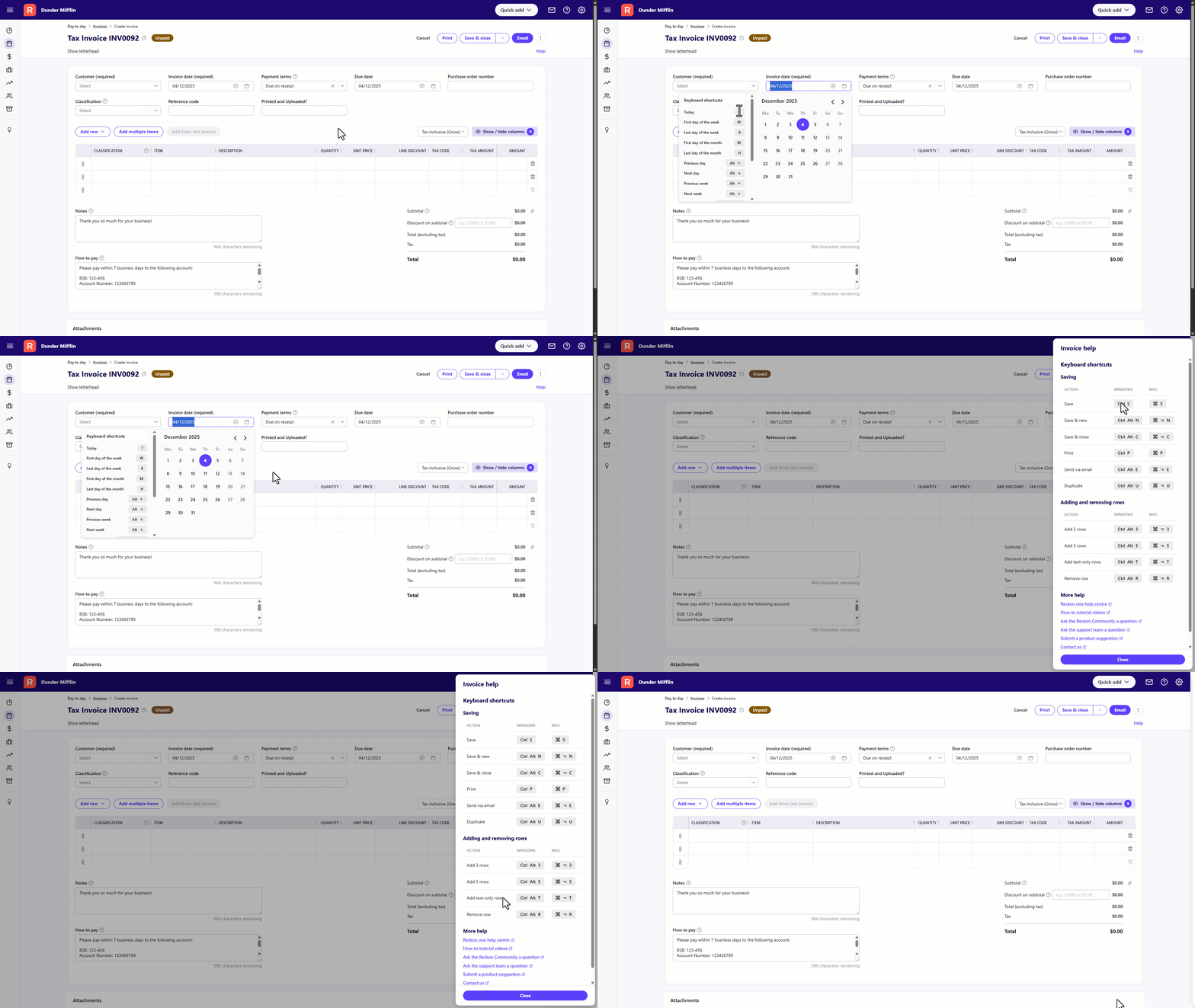
Keyboard entry into Reckon One
As a new regular user of Reckon One after 30 years of using Reckon Accounts - can I please request some changes to keyboard entries into Reckon One? I am finding that I am unable to quickly enter dates and item codes into my invoicing as I do with Reckon Accounts - I seem to be forced to use the Calendar and the mouse to click back to previous month - then click the date - I have tried various ways of entering the date via the keyboard and none of them will allow me to then hit tab and move to the next field with the date savedโฆ
The same goes for Items - if I type in the item code and hit tab - nothing is saved - I have to see it in the list and click it with the mouse - then try to tab (but the list box seems to get in the way)โฆ
Can development please take a look at this and make some changes to quicker data entry is enabled?
Thank you!

Comments
-
Hi @Linda ABC
When entering an item in the invoice, when you type a few characters to narrow down the item list to reflect the item you are looking for, you can use the arrow keys to select the item from the filtered list instead of using the mouse to select it.
Here are some useful guides related to keyboard shortcuts.
Use keyboard shortcuts in Reckon One - Reckon Help and Support Centre
#TipTuesday - Keyboard Shortcuts and built-in Calculator for invoices! ๐ ๐งฎ โ Reckon Community
Searching the Reckon Help and Support Centre | Asking good questions on the Community
#TipTuesday: Picture Paints a Thousand Words | How do I add screenshots to my discussion?
1 -
Hi @Linda ABC, great to see you back on the Community ๐
Thanks for raising this idea and love to hear you're using Reckon One.
In regard to keyboard shortcuts, we've recently introduced a number of keyboard shortcuts in selected screens to allow quicker data entry. You'll find dedicated keyboard shortcuts for a number of actions when creating a new invoice, pay run or journal.
For dates specifically, there are several shortcuts when entering dates that allow you to quickly add in dates or jump to specific time periods. I'll add table below of date shortcuts specifically but you can also see them on-screen in Reckon One when clicking the date field in invoices.
Keyboard shortcuts for entering dates in Reckon One
Today
T
First day of the week
W
Last day of the week
K
First day of the month
M
Last day of the month
H
Previous day
Alt โ
Next day
Alt โ
Previous week
Alt โ
Next week
Alt โ
Previous month
Alt Shift โ
Next month
Alt Shift โ
Previous Year
Ctrl Shift โ
Next Year
Ctrl Shift โ
First Day of the Year
Y
Last Day of the Year
R
In addition to dates, we've also got a range of other keyboard shortcuts for various invoice or journal actions which you can see on-screen by clicking the Help option in the top right corner when creating a new invoice or journal entry but I'll also add a guide here which outlines them in full -
Note: The above keyboard shortcuts are currently available in the invoice, payroll and journal screens in Reckon One but we're looking to progressively expand this.
Also, as a little sneak peek, in our next update for Reckon One you'll be able to find items by item code, more info on that to follow soon so stay tuned.
Hope that helps but let me know if you have any questions.
2 -
Thanks Rav - and yes, good to be using this community a bit more after more than five years since David's accident sidelined my time on the computer! I will try and get a handle on the shortcuts available - none of which are as simple as the + and - key for moving backwards and forwards through a few dates!
One suggestion would be an option for Save & New on any type of transaction - to keep the last date used? When creating invoices for end of month - its a pain to have to change the date every time!
0 -
Hi @Linda ABC
An alternative suggestion is a keyboard shortcut for a 'last used date'
Last Used Date
L
Searching the Reckon Help and Support Centre | Asking good questions on the Community
#TipTuesday: Picture Paints a Thousand Words | How do I add screenshots to my discussion?
0