LSL Accrual calculation error involving overtime hours


I'm hoping someone can help me here! The LSL accruals for each employee is being affected by overtime hours. For some reason the overtime hours are being dumped in the 'LSL hours taken' field and then reducing the LSL hours available. This is then also affecting the LSL AAccrual total in the enter pays screen. I've checked the payroll item setup and can not see how that would make this happen. This has only been happening since the last upgrade I think. Is anyone else having this problem?
Best Answer
-
@Barbara Day-Dresen It sounds like your OT Payroll Item was incorrectly linked to LSL here:
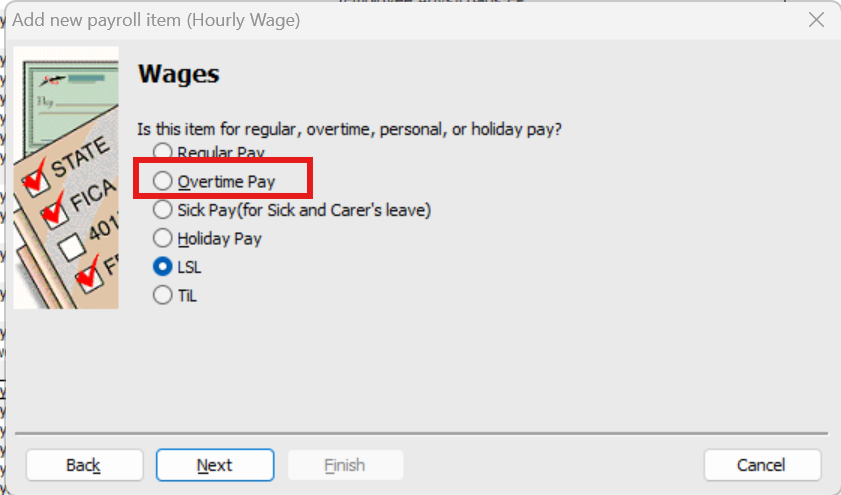
(NOTE: The 2 at the bottom - on this screen snip, "LSL" & "TiL" - are the default Other 1 & Other 2 tabs under each employee's Leave section, so they may not look the same as this on yours. They will either show as the default ("Other …") labels or will be whatever you have re-named them!)
Unfortunately, correct configuration on this window is crucial but is ONLY shown during initial Payroll Item setup & can't be accessed after 😩 Therefore, you'll need to create the OT Payroll Item again & ensure Overtime Pay is selected instead, as marked here 😬
0




Answers
-
Thank you, Shaz. I did as you suggested, I created a new item and tested it. Problem solved. Much appreciated.
1 -