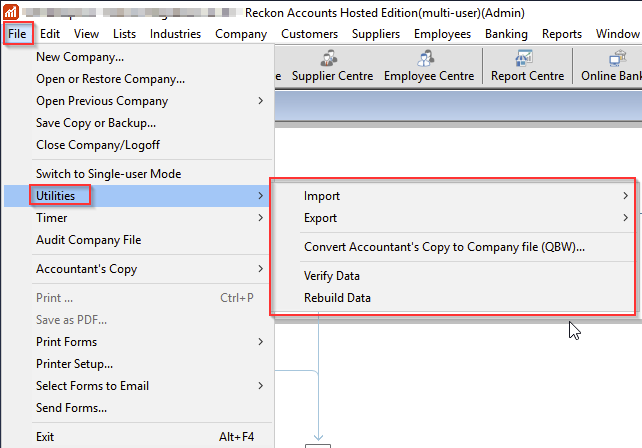
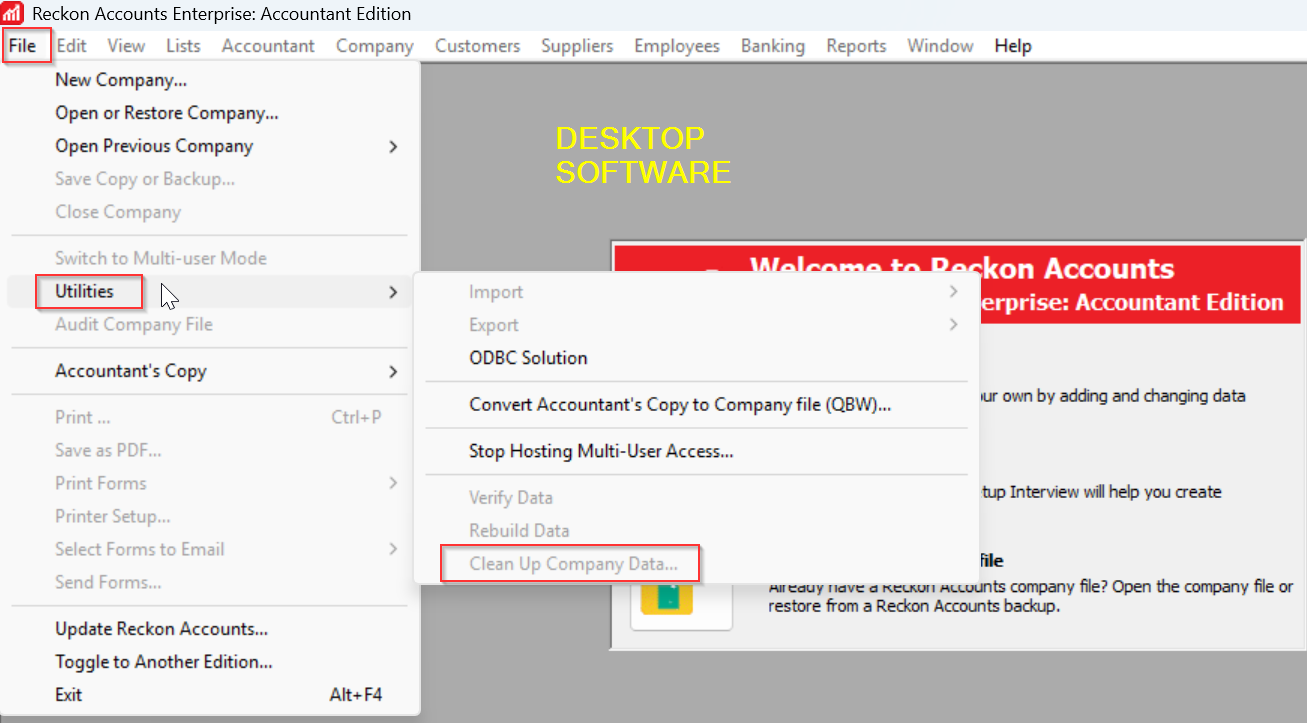
Cleanup file Utility is no longer an option in our Reckon Hosted file
This feature is missing from "File" Utilities" "Cleanup Company Data"??
When I Google this issue, AI says the following:
Access Cleanup Tool:In the menu, go toCompany>Utilities>Clean Up Company Data.Set Criteria:Choose to "Remove transactions as of a specific date".Select Data:Tick boxes for transactions and, optionally, unused list items.Run Cleanup:ClickBegin Cleanupto remove old data and reduce file size.
I note this search refers to the "Company" menu but it's not there either.
What has happened to this option? I have a client who has a huge file and we want to "Clean it up" for them to make it more operational. I also clean up our own data file and it was always there but is now missing.
Comments
-
It's still under the File > Utilities submenu.
I was wanting to export a report to Excel & noted the Export button was suddenly missing from the report. I logged out (in Google Chrome) & logged back in again (using Edge) … & it reappeared! 🤦🏻♀️
Try logging in with a different browser instead 😁
1 -
Reckon Accounts Hosted
Reckon Accounts Enterprise (Desktop)
Contact the Customer Service Team and let them know that you are a Reckon Accounts Hosted subscriber and would like to acquire a single-user Enterprise desktop licence.
Install the Reckon Accounts Enterprise software
Ensure all users are logged off the data file on the Hosted platform.
Download a copy of your QBW from the Hosted platform onto your local desktop.
Perform your Clean Up Company Data, backups, data file Verify and Rebuild Data operations on the local Enterprise desktop software.
If your file goes through that process error-free, you can then rename the file that is on the Hosted platform, upload the QBW file that has gone through the Clean Up Company Data process and it then becomes your live-day-to-day data file.
Note: Typically, the Clean Up Company process can take a long time. Doing it on the Hosted platform can result in the Hosted session timing out (if that process extends longer than 1 hour)
Searching the Reckon Help and Support Centre | Asking good questions on the Community
#TipTuesday: Picture Paints a Thousand Words | How do I add screenshots to my discussion?
0 -
Hi @Judy_9812908 ,
Our @Datarec has shared a few recommended steps on how to reduce the size of Hosted data files, which are outlined in the link below.
How to reduce data files in Reckon Accounts Hosted ?
These suggestions are designed to help improve file performance and manage large data files more effectively. I hope this helps. Please feel free to reach out if you have any questions.
1 -
If you have had success in the past with making use of the Clean Up Company Data function and it had reduced the size of your data file, then that is great.
For users who make use of Inventory Items, the Clean Up Company Data feature does not significantly reduce the size of the file.
It is important to compare the reports generated from the data file BEFORE and AFTER the Clean Up Company Data, such as Balance Sheet, Trial Balance, Customer Balance Summary, Supplier Balance Summary.
If there are differences, then it is important that you investigate and understand what may have changed BEFORE making use of the data file for any new data entry or changes.
Searching the Reckon Help and Support Centre | Asking good questions on the Community
#TipTuesday: Picture Paints a Thousand Words | How do I add screenshots to my discussion?
1 -
We are professional partners of Reckon for several years now and have had success using the clean up data option. We are also Accountants who have used Reckon at least 15 years and are very familiar with the software.
It's a shame to have to spend hours creating a new file as you suggest rather than the convenience of using the utility clean up option.
Of course we do a backup and save locally. As suggested I will try a different browser first.
If the option is not available in a different browser as suggested, I might just open the file in our desktop enterprise V34 R1 and clean up that way then move the cleaned up copy into the cloud. Of course keeping a backup of both data files before and after.
Please confirm that V34 R1 is newest Desktop version of Enterprise.
0 -
The support article provides options.
Creating a new file is an option, it is not mandatory.
It is useful for those do not experience a significant decrease in the data file size after the completion of a condense / clean up data operation.
Since you are experienced Professional Partner, you can certainly make use of the current version of the Reckon Accounts v34 R1 Enterprise (which is the 2025 version, same version as the current Reckon Accounts Hosted 2025) and make use of the Clean Up Company Data functionality.
As indicated previously:
Note: Typically, the Clean Up Company process can take a long time. Doing it on the Hosted platform can result in the Hosted session timing out (if that process extends longer than 1 hour)If you have in the past been able to make use of the Clean Up Company Data and have it complete, without the Hosted session timing out then that is good, as other users have experienced Hosted session timeouts.
Searching the Reckon Help and Support Centre | Asking good questions on the Community
#TipTuesday: Picture Paints a Thousand Words | How do I add screenshots to my discussion?
1 -
Yes I tried another search platform with no luck. The cleanup utility is missing period.
I will use my PC desktop version to do the cleanup as suggested.
Just want to make sure I do this correctly.
- I make a backup of the "big" file on Hosted and export this backup to my PC
- I export the full copy of the "big" file on Hosted as well - not sure if this is necessary. Just easy to open this file rather than the backup?
- I create a 2nd copy of the backup file and rename it (on my PC) so I can clean this renamed one
- I do the cleanup of the 2nd copy using my Desktop version and then import this file back into Reckon Hosted. I make sure I name if with a new date as well.
- I save the file in my folder - using the same folder member number.
- I move the file that is showing in the folder that is now the "old file" into an "Old files- Backup" folder I have saved in Reckon Hosted.
1 -
I had a look at the size of the file and its about 180MB. Our file does not have the performance issues one of my clients have. Would this "cleanup" help with performance issues?
0 -
Personally I never use the Cleanup … feature as I don't like losing all the detail but yes, it can help. Creating & Restoring a portable file is my preference as this condenses the file size without losing any transactions, especially if you do a Rebuild of it afterwards.
You can just download the actual (.qbw) file itself if you prefer (rather than taking a backup) - This will download a "copy" of the working file for you. If you want to, you can also just create a copy of that one locally, so you have the original & one for cleaning up 😊
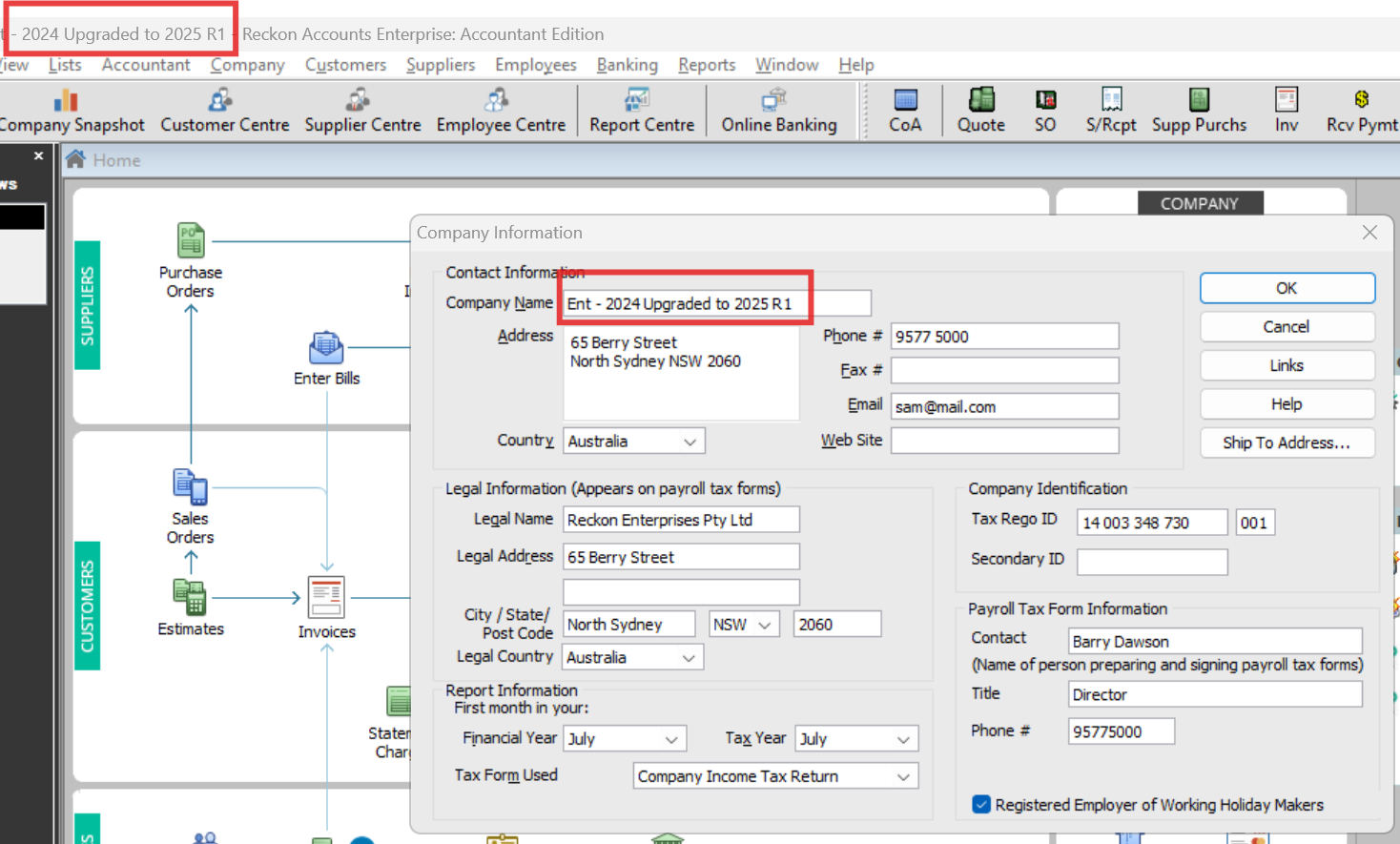
TIP: I would RENAME these copies accordingly - both on the .qbw file name AND in Company Information > Company Name - so you know which one you're in at any time ! :
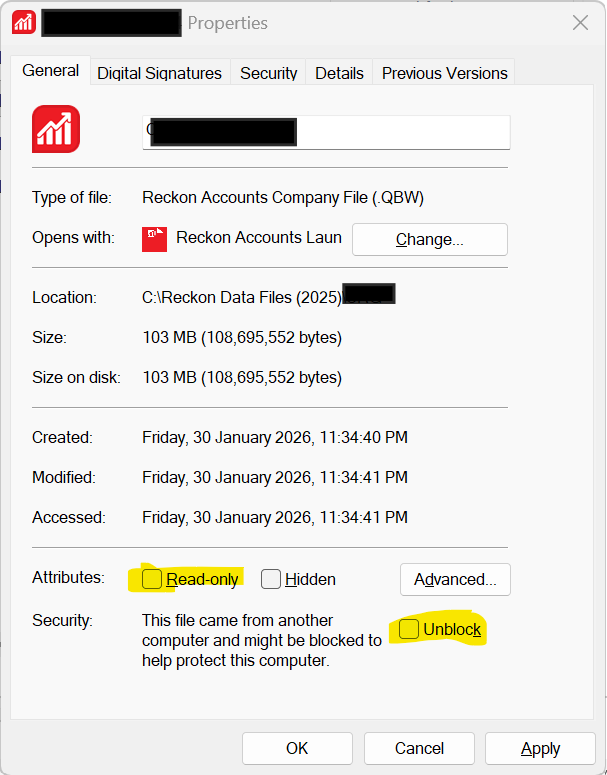
Sometimes, the file download process from Hosted will revert a file's status to being "blocked" or "Read-only". (If this happens, you'll get an error message when you try to open it in your desktop program) To resolve it, just right-click on the file, select Properties & untick the relevant boxes here > OK :
You should then be able to open it as normal 😊
2 -
Ok so the current file in Reckon Hosted can be "converted" to a "portable file"? I understand that was designed for Accountants to review a much less "clunky" file.
If so, I will give that a go.
0 -
Not specifically. It's just a highly-compressed version (copy) of the company data file so is ideal for emailing, moving between computers, or sharing. It's smaller than a standard backup (.qbb) & excludes non-financial data like templates & logos, so often allows for faster transfer 😁
3