Transfer of Funds Transactions Between Currencies - Not Balancing


Hi I'm trying to create a transfer of funds transaction, transferring AUD to USD, but the transaction result amounts don't correspond to the bank statement.
From AUD Bank Acc
To USD Bank Acc
Amount = A$61.73
Exchange rate = 0.664.
As per bank statment this transfer equates to US$36.41.
Examples of Entering and their results
#1: From AUD, To USD, Exchange Rate 0.664, Amt A$61.73, Transfer Currency AUD
Result: AUD account A$61.73, USD account US$92.97 (instead of $36.41)
#2: From AUD, To USD, Exchange Rate 0.664, Amt US$36.41, Transfer Currency USD
Result: AUD account A$24.18 (instead of 61.73), USD account US$36.41
#3: From AUD, To USD, Exchange Rate 1.506 (estimated equivalent to 0.664), Amt US$36.41, Transfer Currency USD
Result: AUD account A$54.83 (instead of 61.73), USD account US$36.41
#4: From AUD, To USD, Exchange Rate 1.506 (estimated equivalent to 0.664), Amt A$61.73, Transfer Currency AUD
Result: AUD account A$61.73 (instead of 61.73), USD account US$40.99
I also find if I try to go back into the transaction and try to change the Exchange Rate I receive a message saying that the exchange rate must be equal to 1, eventhough the previously saved exchange rate was, say 1.506. So then I have to delete the transaction and try again as it won't let me do any substantive changes.
I'm clearly missing something from a logic perspective. Can anyone give me some insight about what I may be doing wrong?
I understand this is only a small amount. But I am working with many transactions and would like to get to the bottom of this if possible.
Many thanks in advance for your support, Lee
Comments
-
Can anyone from Reckon help me with this?
0 -
Hi @Lee_8688889
Between AUD 61.73 & USD 36.41, the exchange rate is either 1.69541 (61.73 / 36.41) or 0.58983 (36.41 / 61.73) (rather than 0.664), depending on which direction the exchange is.
As exchange rates can fluctuate - even over 24 hours - these rates often change between when the shown rate was calculated v when the transaction was actually processed.
That particular message usually comes up when the account/supplier/customer has been set up as a different currency to what you're trying to use.
Make sure your Home currency is correctly set in your Preferences (under the Edit dropdown menu):
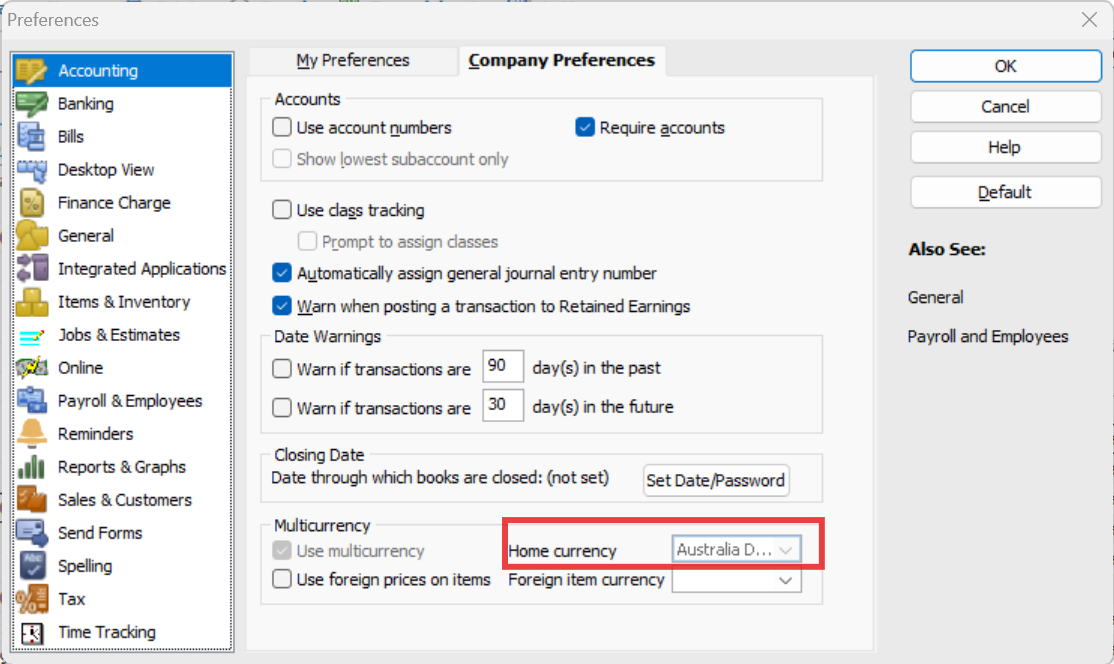
I always use Write Cheque for transfers between bank accounts as this allows for more detail & for autofill. However, with different currencies this is even more relevant as the Transfer Funds option only allows for the use of 2 currencies in that window, so if your Home currency isn't one of them, it's unable to determine which currency the exchange rate is for. Transfer Funds can only be:
AUD > foreign currency
Foreign currency > AUD
Another useful tip is that the Exchange Rate displays up to 5 decimal places, HOWEVER it actually allows up to 13 decimal places. Therefore, to balance exactly, use your calculator to determine the FULL exchange rate & enter it in RAH to more decimal places. (It will still display to only 5 decimal places but will calculate at the full rate entered 😊)
0 -
Shaz, I wanted to thank you for your suggestions. It was so helpful 🎉
2 -



