IIF transaction Imports - Amounts Include Tax Flag
![[Deleted User]](https://us.v-cdn.net/6032430/uploads/defaultavatar/nYL0URD1O9BW9.jpg)
[Deleted User]
Posts: 10 Novice Member 
Hi,
I'm looking at creating IIF files to import transactions to Recon Accounts. I can't find any information how to set the "Amounts Include Tax" flag in IIF (see the picture).
I am just an IT person with no understanding Reckon or accounting. I was asked to find a way to automatically import transactions to Recon accounts to avoid manual work.
I know all column headings that I need to define in IIF except for the one that allows me to set the "Amounts Include Tax" flag.
Does anyone know anything about it? Any help would be appreciated.
Masha

I'm looking at creating IIF files to import transactions to Recon Accounts. I can't find any information how to set the "Amounts Include Tax" flag in IIF (see the picture).
I am just an IT person with no understanding Reckon or accounting. I was asked to find a way to automatically import transactions to Recon accounts to avoid manual work.
I know all column headings that I need to define in IIF except for the one that allows me to set the "Amounts Include Tax" flag.
Does anyone know anything about it? Any help would be appreciated.
Masha
0
Comments
-
Yes. Yes I do. Send me an email kevin@zappy.com.au0
-
Thank you very much Kevin!
Have you received my email? ?0 -
Just sent that through0
-
Kevin, thank you so much for your help!!! You are great!
I am sorry to bother you again, but do you know which particular column headings in IIF file are responsible for "Amounts Include Tax" flag?
May be this is a silly question because of my lack of knowledge in accounting.
This is my IIF file:
When I import IIF file I receive:
but I want to have this: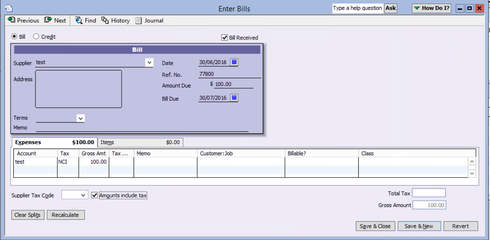
Thank very much again
Masha
0 -
If you set the Amount in the TRNS line to be inclusive of tax and then the AMOUNT in the SPL line to be exclusive of tax then add the tax amount in the TAXAMOUNT column of the SPL line, at least the amounts will balance correctly, so ticking and unticking "amounts include tax" will not try and re-balance things.0


This discussion has been closed.