Best Of
Re: Announcing billsy.ai
Thanks Rav. Just had a name change from billsybot.com to billsy.ai, along with a new logo. I have a request in to update the marketplace entry.
Re: STP still pending
Thanks for your help guys. All sorted now. Your information was very helpful.
 FNQPEST
Re: GST Registration
GST can be enabled or disabled at initial creation of your Company File - via the Setup Wizard - or later, under Company Preferences (located under the Edit dropdown menu > Preferences):
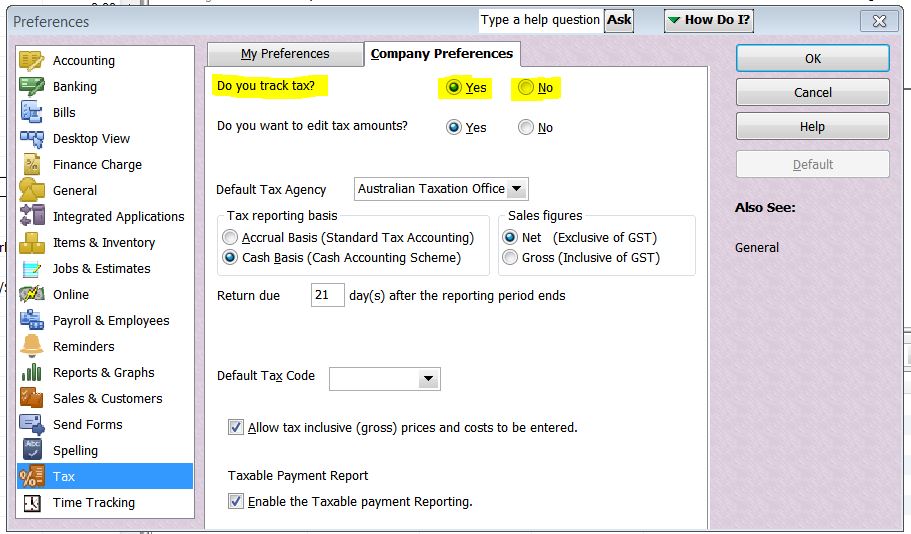
Once you change tax tracking to "No", the Tax Code/Amount Column(s) no longer display on screen.
 Acctd4

Re: Terminated employee leave balance zero
No problem.
I also did a reset on the Maximum accumulation for his leave balance. This can be done by changing the Maximum accrual rate in employee settings to 1, saving the change, then clearing the value to leave the section blank and then saving again.

This seemed to fix the issue.
Doing a new pay run now shows this for Ivan's leave summary

Was there any other employees not accruing leave?
 Jason_Z
Re: Terminated employee leave balance zero
While in a Pay Run, there is an option to View and edit leave balances when you click the pencil icon and select it under Earnings & Leave


Ronald's leave should now be accruing as well. I've left a test pay run so you can take a look at that. 😁
Jason_Z
Re: More of an accounting question than system problem
Great to hear @Chris_7677427 ! Glad you got it sorted 👏👌😊
Acctd4
Re: More of an accounting question than system problem
Awesome, thanks so much. Where I was going wrong was not selecting 'Accounts Payable'.
Happy, happy! Have a great weekend :-)
Re: More of an accounting question than system problem
Both the Bill Credit AND the Deposit are required, as per my original instructions.
" … the deposit does not enable you to code to a stock item only a G/L code ..."
Yes, that's why the Bill Credit is required - to reduce the expense & GST:

The Deposit to Accounts Payable:

… will then sit in your Pay Bills list for you to allocate the Credit against:

NOTE: Due to a long-term glitch in the program, the payee name on stand-alone Deposits drops out. Go into your bank register, locate the deposit there, select/add the Supplier name again & save it (Record This ensures the deposit transaction is also listed under the Supplier's name in your Supplier List.
Acctd4
