Best Of
Re: How to delete Bill Credit without programme crashing
Hi Tanvi
Thank you for your reply, I was able to delete from Accounts payable register. All good now😊
Regards
Pia
 Pia
Pia
Re: Import bank statement to Accounts Desktop 2024 Enterprise
Dear @JuliaSanders ,
It may be possible your file is suffering from a minor corruption. In this case, I'd suggest the following:
- Go to File.
- Go to Utilities.
- Click Rebuild Data.
As for support and access, if you can submit a ticket through our ticketing system:
From here, we can get a technical support agent to assist you further.
Kind regards,
Alexis McKeown
Reckon Senior Technical Support

Re: How to delete Bill Credit without programme crashing
Morning @Pia
If you are not able to delete the Bill directly from the Bill Credit Feature and end up with an error message, it means the transaction/entry is corrupted.
If you can please confirm whether you have tried to delete the Bill Credit in Single-user access or Multi-user access?
Also, try closing all the Reports and then try deleting the Bill Credit. In addition to that, please go to the Accounts Payable register to see if you can locate that Bill Credit transaction, then instead of opening it simply have it selected in the account register and then delete it without attempting to open it first.
(I assume the keyboard shortcut is "CTRL+D" to delete transaction).
If it still crashes, please let me know, and will investigate further. Please let us know if that helps. Thank you!
Regards
Tanvi

Re: Announcing billsy.ai
Thanks Rav. Just had a name change from billsybot.com to billsy.ai, along with a new logo. I have a request in to update the marketplace entry.
Re: STP still pending
Thanks for your help guys. All sorted now. Your information was very helpful.
FNQPEST
Re: GST Registration
GST can be enabled or disabled at initial creation of your Company File - via the Setup Wizard - or later, under Company Preferences (located under the Edit dropdown menu > Preferences):
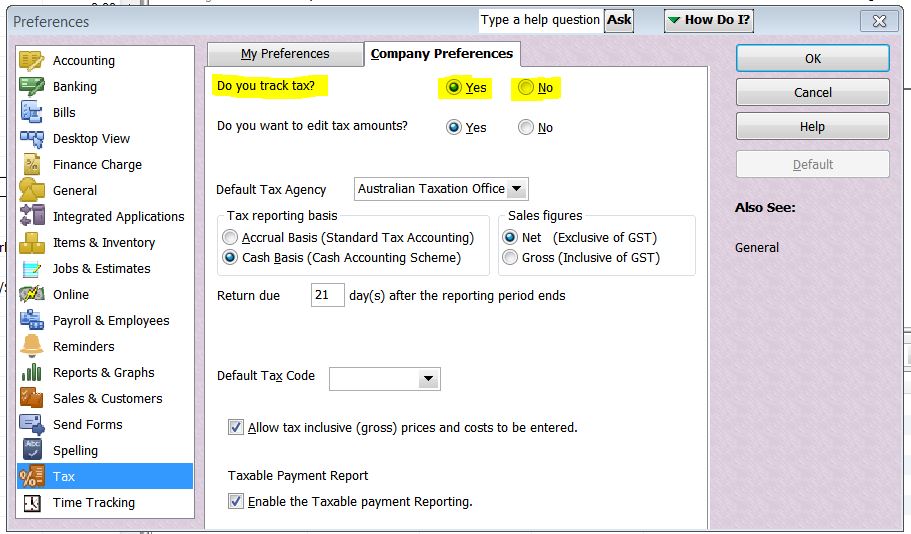
Once you change tax tracking to "No", the Tax Code/Amount Column(s) no longer display on screen.
 Acctd4

Re: Terminated employee leave balance zero
No problem.
I also did a reset on the Maximum accumulation for his leave balance. This can be done by changing the Maximum accrual rate in employee settings to 1, saving the change, then clearing the value to leave the section blank and then saving again.

This seemed to fix the issue.
Doing a new pay run now shows this for Ivan's leave summary

Was there any other employees not accruing leave?
 Jason_Z
Re: Terminated employee leave balance zero
While in a Pay Run, there is an option to View and edit leave balances when you click the pencil icon and select it under Earnings & Leave


Ronald's leave should now be accruing as well. I've left a test pay run so you can take a look at that. 😁
Jason_Z
Re: More of an accounting question than system problem
Great to hear @Chris_7677427 ! Glad you got it sorted 👏👌😊
Acctd4