Hi everyone,
Reckon One has received an update this morning which has brought in a number of enhancements which are now live.
Check out the details of today's update below.
*NEW* PAYROLL SETUPPayroll has a new basic and advanced setup area which can be accessed from the side bar under the Payroll menu and is now the default setup option.
If you'd like to access the previous setup menu this is still available by going through the Settings menu.

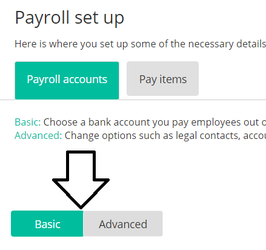
Payroll setup is now split into a Basic and Advanced mode.
- Basic setup asks you for the minimal information required to be able to complete a pay run in terms of the company setup.
- Advanced setup asks more questions that a bookkeeper or accountant is more likely to setup, and those required for ATO forms.
To flick between the two setups is easy, just click between the two options shown below. All fields that you had access to previously in the old setup can be accessed here.
The new payroll setup also contains a Pay Items tab.
This tab allows you to view the pay items by category or as a whole (including leave items) easily and in a list format. From there you can open the existing item and edit it, or create a new item if required.

 REQUEST ADDITION OF SUPER FUNDS
If your Super fund is not listed in our APRA provided lists, you can now request to have it added directly through Reckon One rather than contacting the contact centre. Adding a request through Reckon One will go directly to our development team and they will add it as soon as possible.
To submit a missing Super fund request, just click the 'My super fund is not listed' link and you will be asked for more information about the fund.

 UPDATED TERMINOLOGY IN BANKING/RECONCILIATION PAGES
The tab previously named 'Allocate' is now named 'Reckon One transactions' and contains additional summary text to explain the uses for this area.

The tab previously named 'New' is renamed 'Transactions from bank' and contains additional summary text to explain the uses for this area.


