HOW TO ADD PAYMENT NUMBER ON EMPLOYEE PAYSLIPS
Sue Jones
Member Posts: 63 Reckoner
How do you add a Payment Number on Employee Payslips that are paid as a Batch through Oneline Banking Section?
0
Comments
-
Hi Sue. Is this something within Accounts Hosted as I have never seen it?
Secondly, what is so important about a Payment Number?
John L G0 -
Yes its on the Employee Payslips so when you email Payslips both the Employee's & myself know what Batch Payment it refers to.
Just like if i pay by Cheque. The Cheque Number is the reference.0 -
Sorry Sue, I have been using payroll within Reckon/Quickbooks for more than 20 years and never have I seen the headings that you show above. What steps are you going through to get to that point?
John L G0 -
Sue, as mentioned, I have never seen this before. However, there is provision for you to add a Payment Number to a pay slip. Go to ?Lists>Templates? and then click on the pay slip that you use, to open it. The click on ?Additional Customisation ?and then place a tick in the box against ?Payment Number.?
John L G0 -
Hi Sue
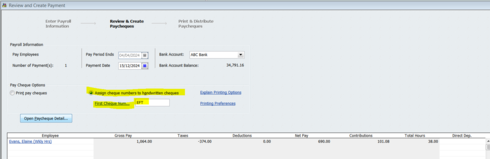
In the standard payroll process, a Payment Number can be allocated here:
However, I’m not sure if there is a separate number generated during batch processing online as I’ve never utilised that.
(John, this is what shows on the default Pay Slip template … Maybe you’ve always created your own customised one ?)
Shaz Hughes Dip(Fin) ACQ NSW, MICB
Reckon Accredited Professional Partner Bookkeeper / Registered BAS Agent (No: 92314 015)
Accounted 4 Bookkeeping Services
Ballajura, WA
0422 886 003
0 -
Thank you, Shaz, for some enlightenment. Yes, my pay slips are highly customised. Whilst there is provision to show a number on payslips, I still cannot find the screen that Sue has provided.
John L G0
This discussion has been closed.