EOFY Report doesnt have figures from Employees Terminated in Payroll Premier
Hi
As a result of Payroll Premier not being supported, we had to move from Payroll Premier to Reckon Payroll mid financial year - In the time before we transitioned 4 employees were terminated but had been paid in the FY
These employees haven't come across to Reckon Payroll and as a result are not appearing in the EOFY data for submission and I cannot work out how to add them?
Please help
Comments
-
Did you complete an EOFY finalisation in Payroll Premier prior to your migration? I know that sounds a tad strange and its a bit of a long-winded explanation but I'll try to add some context; employees who were previously terminated in Payroll Premier were not migrated to Reckon Payroll. This should have been advised when your migration was being carried out and there's info on this in our migration article HERE.
Moving forward, there's a couple of separate options;
1️⃣
If you still have access to Payroll Premier, you can send through an EOFY finalisation generated from there which will include the terminated employees and send it through. Once you've done that, create an EOFY finalisation from Reckon Payroll which will overwrite that previous finalisation for the active employees (this is important)
2️⃣
The second option is a little more involved depending on how many terminated employees there are. That is to recreate these terminated employees in Reckon Payroll with the EXACT details from Payroll Premier eg. TFN, employee number, name etc and enter their balances as an initial YTD in Reckon Payroll. Terminate them in Reckon Payroll and complete the EOFY finalisation within Reckon Payroll.
⚠️ IMPORTANT: You need to take extra care to ensure the employee details are exactly as listed in Payroll Premier, particularly with TFN, employee names and employee numbers to avoid a duplicate income statement being generated on the ATO end.
I know that's a fair bit of info so if you have any questions let me know.
0 -
Hi @Rav
Thanks for your prompt response - I am assuming I didnt do an EOFY finalisation when migrating (It was a terrible process with very little info from Reckon)
There are only 4 employee but I also still have access to Payroll Premier so I could do either option
Just cannot recall how to for an EOFY finalisation in Payroll Premier
0 -
@Samantha_9713244 it took me a little while to find but THIS might help.
0 -
Thanks @Rav - Thats perfect
As soon as I seen the first step I remembered what I had to do in Payroll Premier
Lets see how I go
1 -
Hi @Rav
Doing EOY in Payroll Premier didnt work (its no longer linked to ATO)
I have loaded one employee back into Reckon Payroll and added their YTD but when I try to run STP for EOFY his figures arent appearing - Please help! I really need this reconciled today as per ATO requirements
0 -
Ok, lets focus on the Reckon Payroll side of it.
Before you do anything else, I just want to stress how important it is that the details you've entered for this employee(s) is exactly the same as what they were in Payroll Premier, specifically the employee number, TFN name and DOB so that it matches up with the existing income statement on the ATO end.
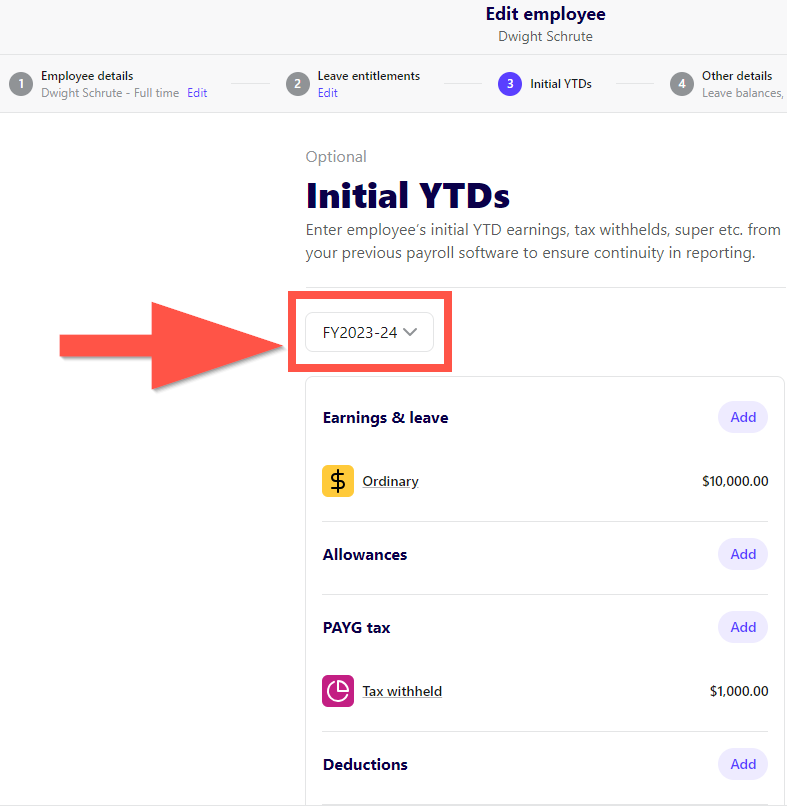
Now with that out of the way, when you enter in the initial YTD balance, ensure that you've selected the 2023/24 financial year from the dropdown when entering the balance (provided that the balance you're entering is attributed to that specific financial year).
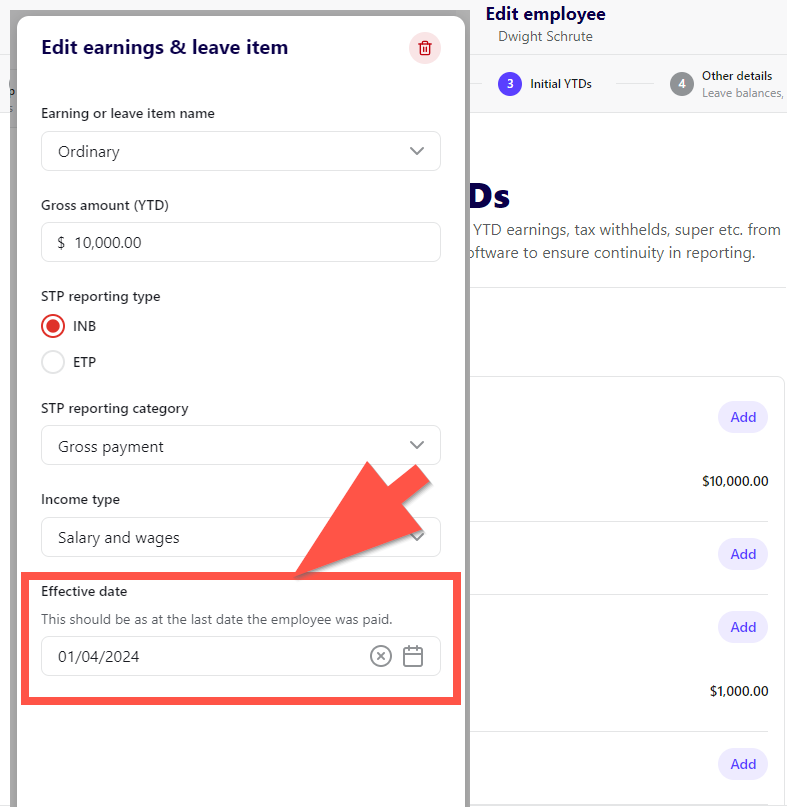
Also, when entering an effective date on a pay item that you're adding for a YTD balance, ensure that you're inputting a date that falls within the 2023/24 financial year.
Provided those two aspects are done, the employee should then appear in a new 2023/24 EOFY finalisation when you create one.
Let me know how you get on.
0