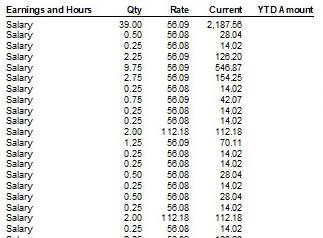
I would like to have just one line in the Payslip like "Salary - 38 hours) but I would like to keep all the time sheet entries as they are going to different jobs. Is this possible in Reckon Hosted?
Thanks Gitta
Hi @Gitta
Yes, the job allocation breakdowns aren't shown on payslips 😊
Hi Shaz and how do I set that up? At the moment all job allocations are shown on the payslip.
I think you might be confusing the PayCHEQUE with the PaySLIP.
The Paycheque is where you enter all the data when you create the pay:
You need to have the split on the Paycheque itself in order for you to enter/allocate the breakdowns as required. This record is internal (eg within your program itself)
The Payslip is the record you provide to the employee & this will only display the single-line total hours:
Hi Shaz, thanks for that but I am pretty sure the job details are on the payslip as well. I will be working for this company tomorrow again and will check it and will let you know.
I've just checked on all the Payslip template options & all only show a single line for the hours.
You might be thinking of the Payroll Items as it lists ALL Payroll Items used in the FY every time, because it displays YTD 😬
Hi Shaz,
Please see attached Payslip. It lists a lot of lines xx
Ah … you’re using Salary rather than Hourly Payroll Items 💡
There’s a checkbox option under the Preferences not to display Hours for salaried employees:
Click on Edit (along top toolbar) then Preferences in the dropdown menu. Select Payroll & Employees in LHS list. On the Company tab, click on Printing Preferences & untick Hours for salaried employees
NOTE: This de-selection will mean only Leave hours being paid will show on Payslips, no “Salary” hours at all.
Thank you - that makes now more sense. Perfect and have a great evening.
No problem @Gitta, you too 😊
I have done as you said, but it did not work. Please see attached.
Ah … that will be because you're using the Custom Payslip. You would need to select one of the default Payslips (highlighted below) for the salary hours not to be displayed 😬
Thanks Shaz, will try next payroll
Hello .. I have tried the suggestions above and it does not work. We use the Standard - One per page payslip template, I have unticked the box in the settings .. yet the hours appear.
Any other ideas? Thanks!
Hi @Bronwyn_9084030
It's a bit difficult to determine without seeing it all but I've just noted this reply on another thread, which I suspect may be the cause:
… I'm wondering if perhaps the Hours display Payslip preference in Hosted may not be able to consolidate imported time entries 😕
That doesn't sound like something that should limit it, because all the times are imported into the Timesheet section of Reckon. We could manually add them to different rows (for project allocations) and it would be exactly like using a 3rd party and syncing to Reckon.
It is almost like the setting in Preferences is broken, and that is what needs to be refined?
Normally, each Payroll Item is consolidated into a single line - even for project allocations - so the fact it's displaying all those "Salary" lines separately is what makes me think it's due to that 😬
Check out the latest important info & announcements for Reckon Accounts Hosted
Each Reckon software has its own dedicated category on the Community. Click below to browse all categories.