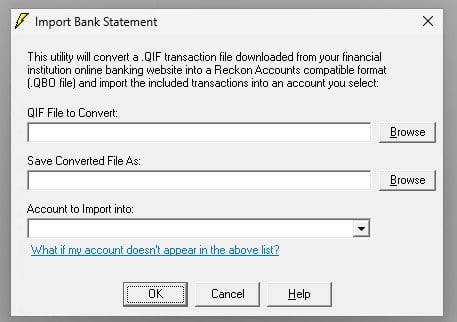
We updated to Reckon Accounts Premier v34 (the latest version) and since upgrade have been unable to import QIF files.
When attempting to import the QIF file (Banking → Import Bank Statement…), we enter the file location, select the correct account for import and the QBO file is created successfully.
However, after this, rather than importing the QBO file into Online Banking Centre for reconciliation, a second instance of Reckon pops up with the below error message. The transactions are not imported and no bank statement is visible in Online Banking Centre.
"An error occured when Reckon Accounts tried to create, open, or use the company file. Please try again.
If the problem persists, contact Reckon Technical Support and provide them with the following error codes: (-6150,-1006)."
I've tried the following which didn't solve the issue:
- Perform a rebuild (same error)
- Perform a backup and restore (same error)
- Create a new bank account and attempting to import a QIF file (same error)
- Create a new company file to test import (this worked - indicating that the issue is not generic to the new version, but to my specific company file since upgrading)
As mentioned earlier, we had no issue importing QIF files prior to the upgrade.
This also seems to have effected previous upgrades as I found the below thread which discusses the same issue back in 2017, however unfortunately there's no documented solution.
Looking for suggestiong on how we can resolve this or someone who can resolve the issue for us.