Migration hasn't included Salary Sacrifice


Hi, we have one employee with salary sacrifice. I went through the process of checking and amending payroll and employees after the migration and have just done the first payroll. But it didn't equal one employee's net pay. Found that it didn't include the salary sacrifice. But where do I go to fix that?
I thought his SuperFunds but that only seems to be his fund, and there is the word Salary Sacrifice there, but clicking on it doesn't open it up. It has a payroll item under Super set up.
Tried adding a new super here, and started to add it, then it said to delete the pay concerned, did that, then selected the super fund Rest and then it wants a Fund Product and it would be Rest Super but it won't let me select that.
I've looked at a few helps on this but it doesn't solve this.
Hope you can help, I just spent the last 4 hours on this payroll for 3 people.
Answers
-
Further to the above, I was used to being able to enter the Sal.Sac.figure under the employee. But I did see where where a fixed amount or percentage can be entered in Pay Items, without any reference to an employee. What if two employees want different rates of Sal.Sac.?
Thought there must be somewhere else to specify for one of the employees.But where?
thanks, Jean.
0 -
So I made the Pay Item for Sal Sac = $1000 so I could get the July pay run done. Go back to edit pay run, because I had deleted the pay because it said I couldn't change anything unless I did, but now when I go to edit the pay run hoping to add him back in, and it still says it is a draft, but when I go to edit it, it says I can't alter it - "
Also it says Company Details need to be updated before I can submit to the ATO. Now why wasn't I told about this earlier?
0 -
Hi @Jean_10862158,
For setting up a Salary Sacrifice Super Pay item, please ensure that a pay item is created in Payroll > Payroll Settings > Pay items > Superannuation.
Note: You could create an additional super pay item and select them to have two different fixed rates or precentages, but it will appear as messy in my opinion in the employee card.
If you confirmed that you have that pay item(s), please go into the employee record and add the Superannuation item and select it for Salary Sacrifice.
Payroll > Employees > Select Employee > Pay Setup > Superannuation
Once you have done that, you can go into the pay runs and add the Salary Sacrifice as you see fit for that employee.
Note: When attempting to add a Superannuation item, it may require that all pay runs are reverted to draft and not in paid. You may also need to revert them all to draft and remove the previous Super Item as it's present in a pay run, but it sounds like you haven't used it before so you should be fine.
Fixing the Company details for ATO submission
Unfortunately, sometimes the Company details may be missing key details that were not migrated across or in the original company file during migration.
However, there is a very easy fix and that's just filling out all details fields completely as they are required to make STP submissions by going to the following and entering them:
Payroll > Payroll Settings > Company Details
Once you have done that, you should be able to successfully submit your Pay runs to the ATO.
Thank you.
 0
0 -
Thanks Lucas,
The Sal Sac items were there in payroll settings, a general one “Salary Sacrifice for super” which I think is new and the migrated one being “Super-Sal Sc -G.
After much too-ing and fro-ing I add the $1000 to one, it wouldn’t take in the pay and so tried the other and put $1000 here in settings, and it still did not take.
Back to the employee – under the e’ee record it has SC and the now changed to “Salary Sacrifice for Super”. I couldn’t find anywhere to edit this here, so does that mean for every different Sal.Sac. I have to create a new item?
I go back to the pay run, the sal. Sac. Is not there. The pay run is still in draft mode.
Then I thought, what if I click on the pencil to edit it, and the Sal.Sac was there and I was able to add the $1000 to it. No now I should be able to got back to the payroll item and delete the $1000 from there.
Why such a roundabout way of doing things?
With the company details, it was my personal details they needed but up till now it wouldn’t let me add them. But just now, I found I needed to scroll off to the right and there HIDDEN off the edge of the screen was an edit button.With all the wasted space between information, why must you put buttons and other things way over the the right out of view?
Even the pay run, there is tons of spare space inbetween columns and yet it is all spaced out so that one has to scroll left and right to see things.
So I try zooming out until I can see it, but now everything is in very small print, and all the excess space is still there, being wasted.
I think the pay is ok now, but one more question on this -Bank Accounts – as we pay automatically each month into the bank, we don’t need bank accounts put into Reckon. So it seemed I had to make them all “Cash”. Is that ok? Will it still go as withdrawn from our Bank Working A/c?I did find in Payroll Settings – Payments (over the weekend), that all the bank accounts in there were “my bank account” which we don’t use, and I couldn’t see anywhere to change it. Certainly clicking on the “my bank account” didn’t open up anything.How do I fix that?
Many thanks
Jean
1 -
Another question in this area - looking at the payrun, it doesn't give me taxable income, only the gross before Sal.Sac is deducted. Then it doesn't specify the Sal.Sal. separate from SG super. Seeing I had to report this today, I had to print a screen shot and make to adjustment in pen, so I could report taxable income and PAYGW.
Pay is still in draft mode pending your reply to the above questions, particularly re the bank accounts.1 -
Hi @Jean_10862158,
You're more than welcome to leave employee bank account setup as the cash option if you're not going to create ABA files for bank payments or a SuperStream service like Beam for super payments.
In regard to your query on salary sacrifice, when adding salary sacrifice to a pay run, it will appear separately within an individual employee's pay run as shown below.
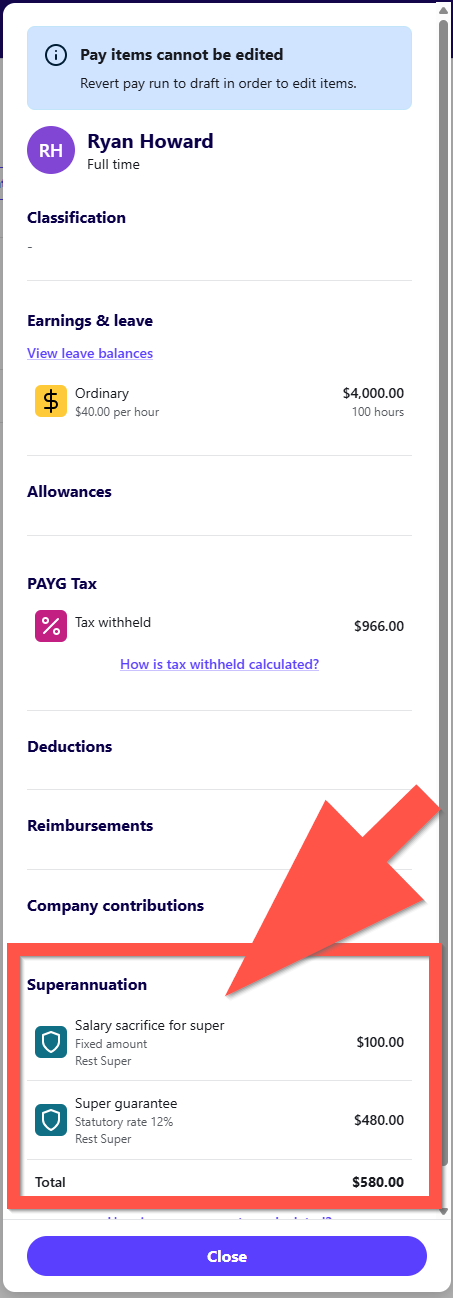
To also answer your question about the gross not having the Salary Sacrifice deducted after adding it to your employees pay run card. That's correct the functionality of Reckon One does not make the adjustment to the gross itself but the Net amounts. If that answers your question, unless I am misunderstanding.
Thank you.
0 -
Thank you Lucas,
As I added above, I finally managed to get the pay right, but as you would know, when you report wages to the ATO, they want to know the taxable income, which is gross minus salary sacrifice. I agree with the net pay, it just doesn't give me the taxable pay that I need to give to the ATO.
And to work it out, I had to hand write minus Sal.Sac. under Gross Pay, and since the Super at the end of the row, includes all types together, I had to know who much was salary sacrifice. If I had a big payrun, it would be quite time consuming to work out.
Anyway, what about bank accounts under payroll settings? Will it know to charge the wages to the CBA Working a/c rather than the "my bank account" that it currently has there?Thanks
Jean0 -
Just jumping in for Lucas here, from a Single Touch Payroll perspective, under STP Phase 2 requirements which we are now currently under, the ATO want to see total gross as is, not after any pre-tax deductions. There is no need for you to calculate this manually as this will be handled as part of the STP submission process.
The account selections that you see in the Payroll Settings menu are related to default accounts when creating new pay items. More info in your other post here.
0 -
Thanks Rav,
I had an Activity Report to submit to the ATO and the deadline was today for the July PAYGW only.
I submitted this to them today once I got the wages right. I have always only put in the taxable income and the tax deducted from that income.
STP reporting is a separate thing, which hasn't yet been done for July because I haven't worked out where to do that. I guess it is different from what I did in R.Accounts. But I haven't ask about this yet.I waiting on an answer about where it says what bank account that the payrun will be charged to in General Ledger.
cheers
Jean.0

 Reckon Staff

