you used to right click on the employees name and you would be able to rehire them.
Accounts hosted
Good Morning @ShelleyG,
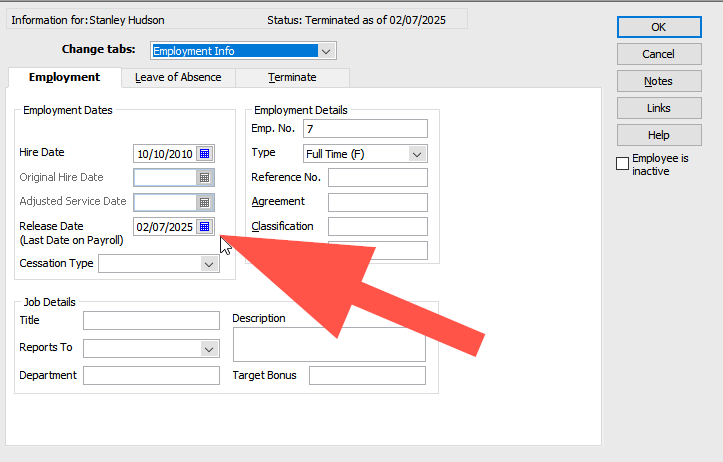
I recall that the rehire function was outdated and removed due to changes in ATO Single Touch Payroll. To make the employee available for payroll again, you can go to their profile and remove the release date.
Check out this thread:
if you edit their name and delete the date released and make them active if inactive they will appear in employees list
so you cant update this information anymore?
you delete the release date
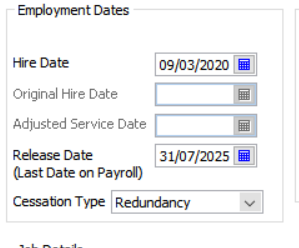
thanks but I wanted to have record of their original hire date and their new hire date. I suppose I will have to write it in the notes :-(
yes that is a failing. You can always just look at the pay dates from previous years to check that info
Also a failing is the Cessation Type isn't selected when terminating an employee
Yes, unfortunately, those fields were locked when the rehire wizard was removed since they depended on it.
I’ll make sure to note this feedback and pass it along to our development team.
Thanks, Jason
@Jason_Z From previous posts here, the removal of this function (& many have stated this was actually an issue even before that) appears to have also had a problematic, flow-on impact in STP2 as any prior ETP payment data gets removed in the subsequent STP submissions after rehiring! 😩
This is presumably because that data relies on the permanent presence of Release (Termination) Date(s) !!!! 😣
@Acctd4 please correct me if I'm wrong as you'll likely know better, but couldn't that situation be avoided by just creating a new employee record rather than reusing the same one?
@Eric Murphy Creating a new employee isn’t ideal & should be a last-resort-workaround only. This is because STP relies on the Employee Number & may not simply merge, but instead may create a new/duplicate submission!
You also end up with 2 Employee List name records - instead of 1 - making reporting - & later historical lookup - more cumbersome 🤨
I have also removed the Release Date to re-hire an employee, however his employee card still shows 'Status: Terminated as of …..' at the top. Will there be any issues processing this Employee's pay and uploading the STP file if his status still shows as terminated?
@Kyle
Yes - It sounds like the Release Date hasn't been properly removed then. Check the Employment Info tab in the employee record to confirm that field is definitely blank, in case you forgot to OK out (to save it)
If it's definitely removed there, try Rebuilding the company file 3 times (via File > Utilities > Rebuild Data). (For some reason THREE rebuilds can solve a lot of issues !)
Don't miss announcements and important info for Reckon Accounts Hosted
Do you have an idea for a feature in Reckon Accounts Hosted? Let us know here!