Hi All
I'm using Reckon Hosted and setup my supplier with bank details but cannot find a checkbox for EFT payment. I use ABA files for payroll so I'm used to using the online banking centre but I'm at a loss how to pay suppliers using an ABA file.
Hi @Loretta Wisdom-Zagon,
If you want to setup ABA file payments for your suppliers, you need to ensure that you have done the following:
Let me know, how you go and if you require any assistance.
Thanks Lucas
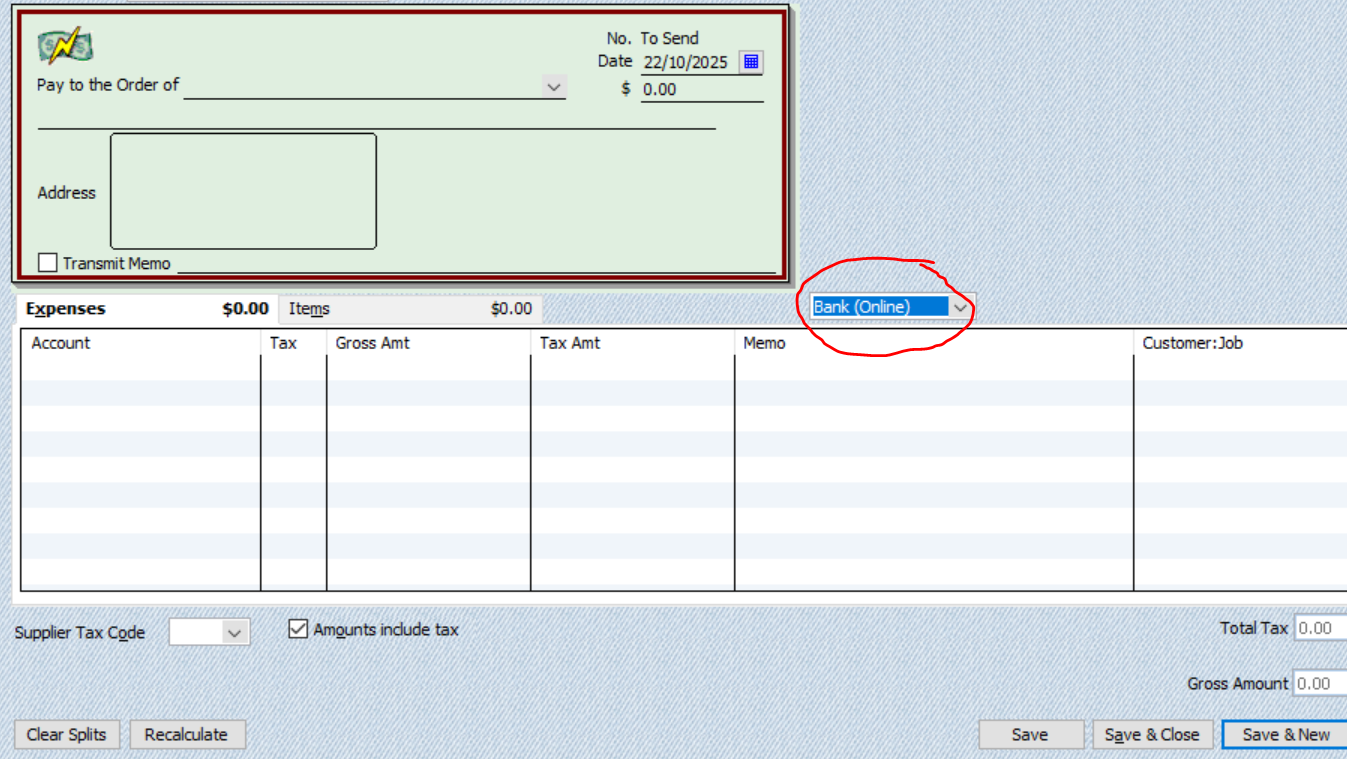
That's an extra step I wasn't expecting!. However I found instead of using 'Direct Deposit' I've used 'Bank Online' then when in Online Banking Centre, payment appears ready to create ABA. Hope that's the correct process.
That should be fine using the Bank Online option when creating a bill.
Let me know, if you have any questions.
Can you also use BPay via Online Banking?
I don't think you can unfortunately. The only thing I could recommend is asking this as a feature request for https://community.reckon.com/categories/reckonaccountsideas .
Thank you.
Hi @Loretta Wisdom-Zagon
Yes, The Pay Method on any transaction needs to be set to Bank (Online) in order to generate an ABA file from it 😊
You can also create ABA files for stand-alone Write Cheques, again, as long as the payment method is set to Bank (Online) :
… Not yet available for BPAY unfortunately though, only EFT 😬
Don't miss announcements and important info for Reckon Accounts Hosted
Do you have an idea for a feature in Reckon Accounts Hosted? Let us know here!