
We've identified an issue where Qualifying Earnings (QE) could not be enabled pay items using the Post June 1983 Untaxed Element (Low Rate Threshold) (O) type in Reckon Accounts Desktop 2026 v35.
This pay type is used when processing a Payment in Lieu of Notice which is a QE item under Payday Super starting 1 July 2026.
Our teams have created a fix for this with a small update file that you can download and we've outlined step by step instructions below.
Do I need this update?
You only need this update if you downloaded and installed Reckon Accounts Desktop 2026 v35 earlier than v35 R1.1. The fix is already included in v35 R1.1 and later.
To check your version
- Open Reckon Accounts Desktop
- Press Ctrl + 1 to open the Product Information window.
- Look in the top-right corner for your version and release. If you don't see Revision 35R1.1 or later listed, you can download and install this update.
If you see v35 R1.1 or later listed, you do not need to do anything further and can stop here.

I need this update, what do I do?
1️⃣ Close Reckon Accounts Desktop
Fully close Reckon Accounts before you start. The DLL files are in use while the program is open and cannot be replaced until it is closed.
2️⃣ Locate your installation folder
By default, Reckon Accounts v35 is installed here: C:\Program Files (x86)\Intuit\Reckon Accounts v35
Your path may be different. This is the default location. If you chose a different folder when you installed Reckon Accounts, browse to that folder instead.
If you have a different path, take note, as you will need it later.
3️⃣ Back up your existing files
Before replacing anything, make a backup of the current files so you can restore them if needed:
Open your installation folder using File Explorer and locate the following 3 files:
- Features.DLL
- paycore.DLL
- PAYRES.DLL.
Copy these three files to a safe location for example, a new folder on your desktop named Reckon DLL Backup.
Don't skip this step. The fix will overwrite these files so keeping a copy in a separate location means you can roll back if anything goes wrong.
4️⃣ Download the fix
Download the fix HERE and save it to a local destination on your PC.
5️⃣ Install the fix
Once downloaded, right click on the downloaded .exe file and choose Run as administrator.

You must run as Administrator.
Since the files are updated inside C:\Program Files (x86), the update will not be able to write to that folder unless it is run as an administrator.
⚠️ If you skip this, the update will appear to run but the files will not be replaced. If prompted by Windows User Account Control, choose Yes.
Click Yes when prompted to Would you like to install now?
If you installed to a different location, replace the Unzip to Folder path with the one you noted earlier. Click Unzip
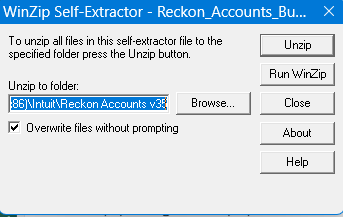
If prompted to override files, click Confirm or Yes
6️⃣ Reopen Reckon Accounts Desktop 2026 v35 and confirm your version
Reopen Reckon Accounts Desktop 2026 v35 then open the Pay Items list.
Add or edit a pay item with the Post June 1983 Untaxed Element (Low Rate Threshold) (O) type selected. You will now be able to designate this item as QE by ticking the Qualifying Earnings checkbox in its settings.

Questions?
For a detailed help guide on the above click HERE and if you have any questions, please ask in the comments below and we'll do our best to assist.




