Reckon One UPDATE (26 August 2019) - Email Status on invoice list screen

Rav
Administrator, Reckon Staff Posts: 14,222 Reckon Community Manager 
Hi everyone,
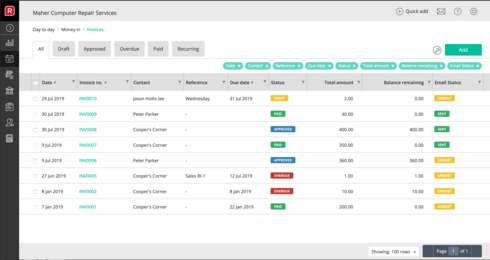
We've released a new Reckon One update which brings in the addition of an Email Status to your invoice list.
This allows you to quickly identify and differentiate which invoices have been emailed from the main invoice list screen!
A 'Sent' status will be shown for an invoice that has already been emailed and conversely an 'Unsent' status for invoices that have not.
The new 'Email Status' column will be enabled by default for new Reckon One books. If you have an existing Reckon One book, you can enable this new feature simply by selecting the 'spanner' icon and adding the 'Email Status' option to your column display.
We've released a new Reckon One update which brings in the addition of an Email Status to your invoice list.
This allows you to quickly identify and differentiate which invoices have been emailed from the main invoice list screen!
A 'Sent' status will be shown for an invoice that has already been emailed and conversely an 'Unsent' status for invoices that have not.
The new 'Email Status' column will be enabled by default for new Reckon One books. If you have an existing Reckon One book, you can enable this new feature simply by selecting the 'spanner' icon and adding the 'Email Status' option to your column display.
2
Comments
-
0
This discussion has been closed.