Importing share data via a CSV file.


Hi All,
I am looking into importing my share tranactons into Personal Plus via CSV. I have read a HELP articile at:
However I find the article lacking critical format information. It provides some number examples, but without a header line, I don't know what part of the days prices the numbers are referring to. This is the example given:
RKN,2.34,---,2/2/12,---,2.36,2.30,150123,*
I would like to see a header string like:
TICKER, DATE, OPEN, HIGH, LOW, CLOSE, VOLUME.
Does anyone in our community know what the format should actually be?
Cheers Kevin
Comments
-
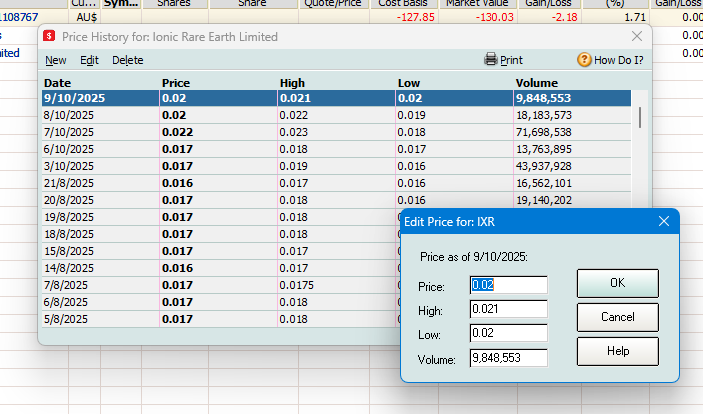
It can be done here for manual entry.
Gerry id 6376
Gerhard Winter
Ph. 0418907140
Reckon Store Next Door
"Always at your Service"
Email: gwinter0808@gmail.com
0 -
Thanks Gerry,
Appreciate the prompt reply. One question, "Price", would that be for the "OPEN" or "CLOSE"?
Cheers, Kevin
0 -
There is no header line.
SECURITYNAME, PRICE, SEPARATOR, DATE(in DD/MM/YYYY), SEPARATOR, HIGH, LOW, VOLUME, END-OF-LINE
THE PRICE value would be the closing (Close) amountThe SEPARATOR consist of three dashes ---The ENDOFLINE marker consist of an asterix *The VOLUME value needs to be Volume/100Example:AMC,14.55,---,23/03/2015,---,14.7,14.47,22149.18,*
Some related help articles.
Converter for ASX price data in CSV format to QIF File — Reckon Community
How to Import Securities - DATE, PRICE, HIGH, LOW, VOLUME- Data into Quicken? — Quicken

Searching the Reckon Help and Support Centre | Asking good questions on the Community
#TipTuesday: Picture Paints a Thousand Words | How do I add screenshots to my discussion?
1



 Reckon Staff