Best Of
Re: Unable to open Reckon Inventory
Did you use a 3rd party uninstaller to remove ALL components of the install OR did you just use the in-built Windows uninstaller via Control Panel?
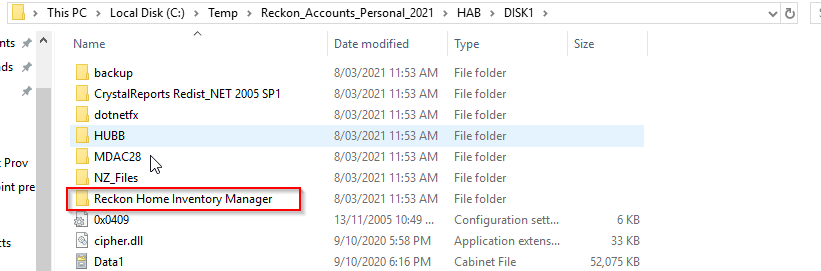
Just to clarify your earlier attempt from one of my previous replies. Did you attempt the install of RHIM from the folder specified below? (your install location may vary depending if you've opted to change the location of the install).
 Rav
Rav
Re: Sales Order Template and Invoice templates
If you have multiple Sales Order templates:
- Consider renaming the templates in alphabetical order or putting a number at the start of the template name to give them a sequential order and make the one that you want to be the default be the first one.
- Make any Sales Order template that you do not use, inactive

Re: Reckon One search "facility"
I've got the same problem. I've used Quickbooks/Reckon for over 20 years. I just want to type in an amount or a name and have Reckon One find it, simple. A good search engine is a must in any business software
Re: A Program is Trying to Send an Email Message on your Behalf - Office 2019 and Reckon
Laptop 1 - 6 years old, Reckon Accounts Premier 2019 (upgraded through the years), Outlook 2019 (upgraded though the years) - works fine
Laptop 2 - brand new, bought to replace Laptop 1 - Reckon Accounts 2019 Premier (fresh install), Outlook 2019 (fresh install) - issue described as above
AV installed and up to date (same corporate licence on both)
W10Pro on both machines
Done the Programmatic Access thing
Only happens with Reckon Accounts
"have a chat with your IT professional" <- I AM the IT Professional ............

Re: Employee Superannuation
Go back into the pays, unlock and change the pay item, e.g. hours, then change it back and it should adjust super. I always write down or take a photo of the screen to make sure only the super changes and nothing else

Re: Employee Superannuation
Yes it will but it will be picked up in your next submission
Re: Salary Employees
No worries at all, I'll move it over to the right place.
In regard to setting up the pay items, I'll link a how-to video below which should get you headed in the right direction.
Its a fairly older video but the concept of how to setup the pay item is still relevant.
Rav
Re: Accounts Hosted Connection Drop outs
I use Firefox successfully as well, but as Gerry suggested you could download and use on Enterprise to get your work done and test your file. You could try a different browser just in case some updates have caused a glitch.
Re: General Journal not tracking in Tax Liability/Summmary Report
Is the loan account in your accounts? If so, then why not enter the individual payments made by going to "Banking" menu and select "Write Cheques", selecting that Loan A/c as the one to be paid from. That would debit the relevant expense accounts, and go to the credit of the Loan A/c.
The GST would be picked up from those payments made under "Write Cheques".

Re: How can I Disable the Forced Backup when upgrading to 2021
What is particularly annoying about this is that we don't even want to upgrade and had purchased a full license for Reckon 2016 which was adequate for our needs. But we since discovered that Reckon is a form of ransomware and they sent us an email telling us that they are going to cripple our product if we don't pay them more money for a new license.
Then after being blackmailed into buying and installing an upgrade that we don't need or want, we discovered that the QODBC driver that is essential to our operations doesn't work with this new Reckon version, so we had to shell out another $1000 to upgrade it as well.
Now, we're looking at loosing thousands of dollars in lost wages because our operation has now ground to a halt because Reckon insists on trying to create backups that it is actually unable to create.
I don't know where we go for here .... thanks Reckon, your ransomware has successfully crippled our business - well done!
 chaimw