Best Of
Re: ACTIVE STAFF LISTS AS AT DD/MM/YY
Cant be done. Ive never heard of "active staff list". Kris solution might be the only work around. You'll need to filter for termination date.
 Zappy
Zappy
Re: ACTIVE STAFF LISTS AS AT DD/MM/YY
Reports -Employees - Employee contact list - Modify and add Hire date to report. Sort by hire date - the rest has to be manual, or export to Excel and customise in there

Re: Matching single banking entry to multiple register entries
You should be using a clearing account. Call me i can talk you through it 0407744914
Zappy
Re: Salary Sacrifice
Ahhh ... OK - If it's SUPER SS, that has it's OWN specific Payroll Item Type(s) in order to report correctly as RESC in STP/at EOFY:
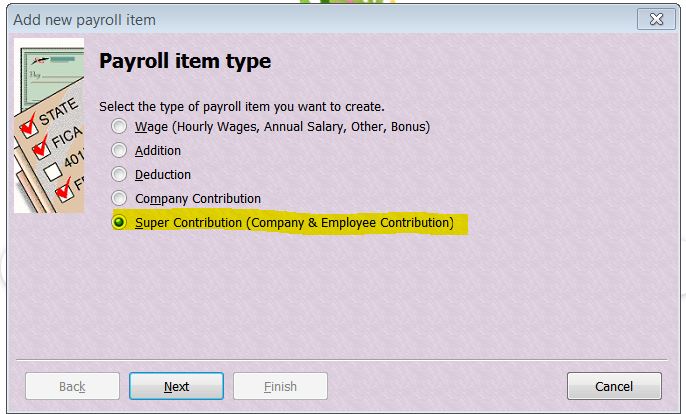
Then on the the 3rd screen:
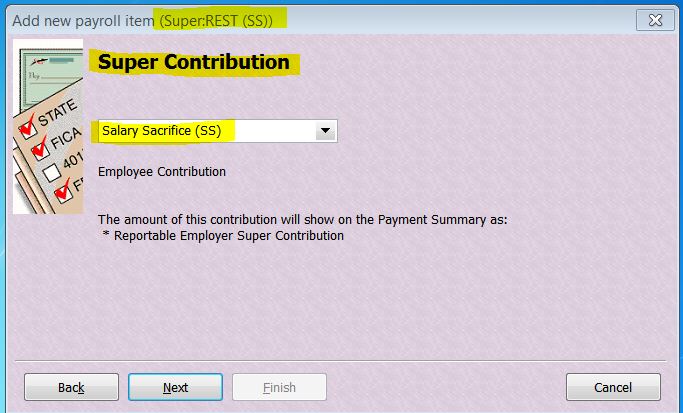
So unfortunately - if this isn't how you've already set it up - then yes, you will need to recreate it in order to achieve this. However if you go into each applicable pay, Unlock ... it & delete the old SS/overwrite with the new one & re-save ("OK"), if it's only this current FY, it won't take long 😁
No, Payroll Items are not employee-specific, they're designed to be applicable to any employee so you should be creating one per relevant type/payee eg If this employee is SS'ing to REST Super, create one for "REST (SS)" - It can be used if any other employee also decides to SS to REST.
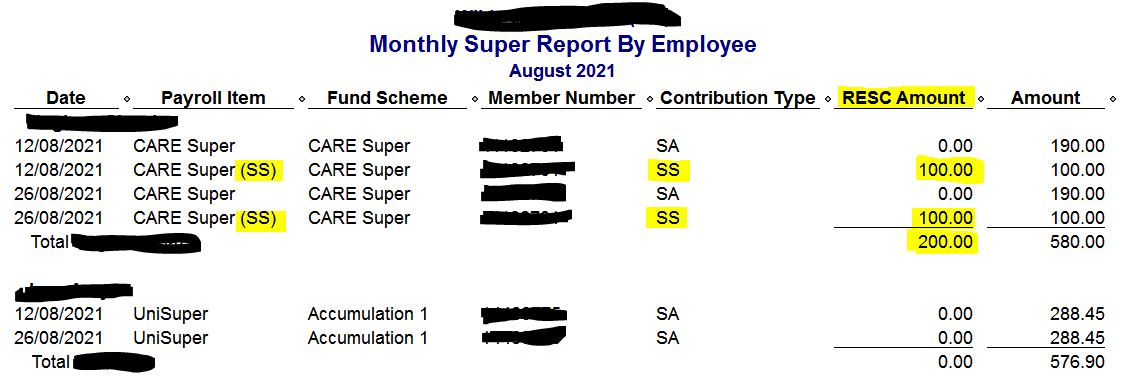
I tend to use the "Super Report by Employee" report rather than " ... by Fund" as the totals have to be reported per employee anyway. This report gives you the total for each employee (incl their SS eg RESC total) as well as the overall monthly/quarterly total too.
The "SS" in the name & it's Payroll Item type are easily identifiable on this report:
 Acctd4
Re: Salary Sacrifice
I've not ever set one up based on quantity as a SS deduction is normally based on a % or $ amount:
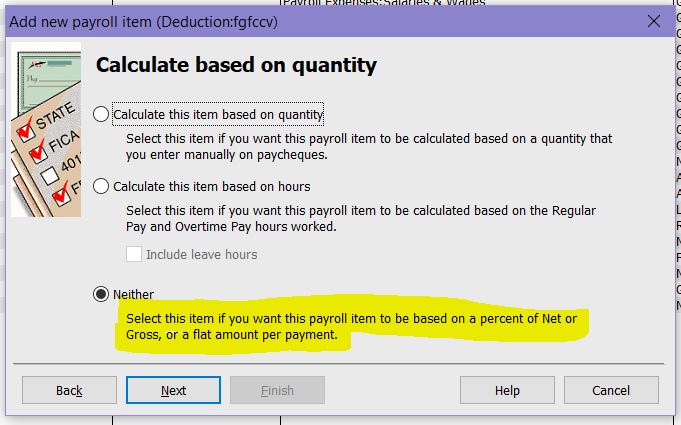
I'd recommend setting it up this way ^
Acctd4
Re: Email of Pay Slips not working with Reckon Hosted
It might be worthwhile giving our technical support team a call so we can have a technician take a closer look into your setup to see what could causing this for you. When you have a moment can you please give us a call on 1300 799 150
 Rav
Rav
Re: Problem with QB Premier 2008/09 - Customer ID 71117
Hi @rhondac
I've checked in with a few folks on our end in relation to that message you're receiving.
It essentially means that the NEW installation of your 2008/09 software that you've put on the new laptop has not had any tax or other updates installed on top of it which the version on your previous laptop did.
As a long shot, if you still have the installer .exe file for those updates you could potentially try to install it on the new laptop, unfortunately I can't guarantee that this will work. There is the added issue of activation of this older software which is not possible so it might render the conversation about the required updates as a moot point.
Looking forward, the best option I could suggest for you to consider is moving to the current version of Reckon Accounts (2021 currently) and use that. I believe your file will upgrade directly to the current version of Reckon Accounts without the need for a stepped upgrade process in intermediary software versions.
I know that's a fair bit to take in so it might be best for me to organise a call for you from our Customer Service team for a chat about some options. If that's something you'd like to do, please feel free to send me a Private Message with your contact details and Customer Number and I'm happy to organise it.
Rav
Re: cant send my file to Gov connect
Thanks for getting back to me @peter24468
Ok this makes a lot more sense now. You can't change the branch number on your STP entity yourself and there are a few reasons for that but we can organise this for you from our end.
Before we can make any changes though, I'll need to confirm a few things.
Firstly, what is the ABN in question here?
Secondly, you've sent submissions to the ATO using this STP entity that does not have a branch number, correct? If so, before we can make any changes to the configuration you'll need to bring any current/active balances that have been sent back down to zero.
Has the 2020/21 year been finalised successfully already or is that what you're currently going through to do?
Rav
Re: Can you show invoice numbers next to payments on customer statements
As Charley suggested, use the Inv # in the payment detail (I always enter "Inv xxx" in the Customer Payment Memo field as I prefer to use the payment's "Reference #" as the Pymt No. (eg "EFT", chq # etc):
 Acctd4
Re: Salary Sacrifice
Doesn’t matter what the super company is, those details are in his name and personal details. Yes I would do want Shaz suggested and unlock pays, keeping a note of the gross, tax and net so that when you replace the item nothing else changes