Hi,
Attempting to use CDATA to interface with Reckon. When Reckon is open, everything works perfectly, however this is not ideal.
I have checked the usual suspects here:

The integrated app settings:
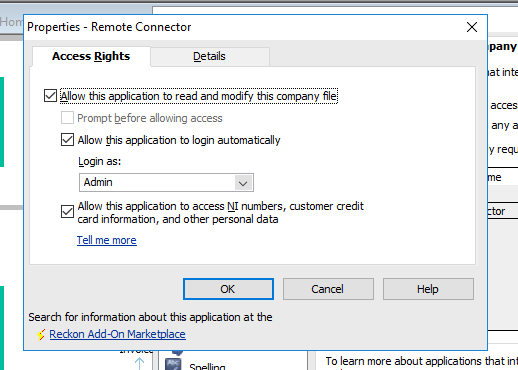
'Login as' has been attempted as Admin and other users.
When adding in:
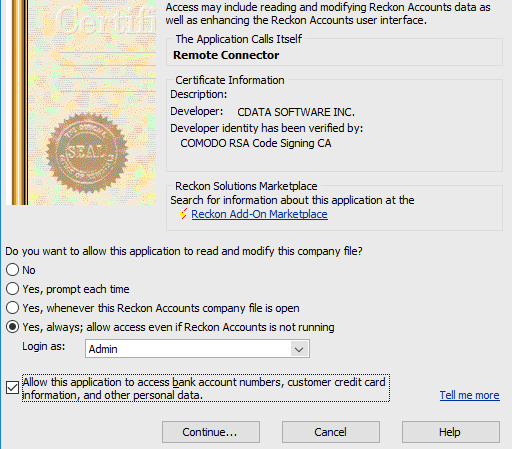

The SDK log file for the failed connections shows:
20200918.132402 I 1284 RequestProcessor ========= Started Connection =========
20200918.132402 I 1284 RequestProcessor Request Processor, QBXMLRP2 v6.1
20200918.132402 I 1284 RequestProcessor Connection opened by app named 'Remote Connector'
20200918.132402 I 1284 CertVerifier The Authenticode signature validated OK.
20200918.132403 I 1284 RequestProcessor Opening the file in the DoNotCare mode.
20200918.132403 E 1284 RequestProcessor Begin Session error = 80042585, This application is not allowed to login automatically to this Reckon Accounts company file. If automatic login is required, the Reckon Accounts Administrator can grant permission through the Integrated Applications preferences.
20200918.132403 I 1284 RequestProcessor Connection closed by app named 'Remote Connector'
20200918.132403 I 1284 RequestProcessor ========== Ended Connection ==========
I've cleared out the approved application and tried adding it via various methods to try and get this authorisation to work - but it doesn't seem to get past the above error any time.
Are there any other settings / registry that can be checked here as it really appears that QB/Reckon is stopping this from occurring?
The CData Service runs as system which has full access to both Reckon and the Company File.
I found another post on here from Mar 2018 where the it was suggested to follow a guide - but links to a broken website.
I followed the CData guide here: http://cdn.cdata.com/help/RQB/sync/pg_rctroubleshooting.htm but these steps did not resolve.
Please help.