TFN electronic lodgement from Reckon via GovConnect

Dianita
Dianita Member Posts: 116 Reckoner Reckoner

Hello morning Team,

We would like to move away from sending ATO new starters paper TFN declaration forms TO lodging it online/ electronically. Found some really useful information but still not quite sure whether it contains the entire thing we will need to be doing or if a different more complex way is required.

The link we found is here and it is extremely simple:

Because it is extremely simple to do in employee setting, my question is: is this the only thing we need to do? As in, is this automatically done for the staff and we will not be required to do anything with the submitted paper forms (other than just keeping them in our records)?

image.png


Also and equally important, in the same snapshot above, do we need to do anything with our current staff members since it says 'if ticked, the TFN declaration will be added to future exported STP submissions'?

As always, any feedback at all if one has the experience will be greatly appreciated. Thank you very much.


Regards,

Nita

Best Answer

  • Rav
    Rav Administrator, Reckon Staff Posts: 14,209 Reckon Community Manager Community Manager
    Answer ✓

    Hi Nita

    Yep, its super simple!

    Just tick that option and your new employee's TFN declaration will be sent to the ATO with your next STP submission once you've sent that through. You don't need to untick it after sending that submission (the ATO will ignore it as they already have the TFN declaration).


    For your existing staff members, if they've already made their TFN declaration there's no need to tick them.

Answers

  • Dianita
    Dianita Member Posts: 116 Reckoner Reckoner

    Many thanks Rav,

    This is so great! Much appreciated.

    Happy Monday and have a good day

    Regards,

    Nita

  • Junebroome
    Junebroome Member Posts: 1 Novice Member Novice Member

    Hi Rav,

    We have finalised 2023 STP but some employee's MyGov account doesn't even show the employment details and income statement with our company; and then we realised the TFN declaration box hasn't been ticked.

    What is the best way to fix the problem now? Does the employee need to fill out new employment details in MyGov account?


    Regards,

    June

  • Janine Borg
    Janine Borg Member Posts: 5 Reckoner Reckoner

    I use Reckon Accounts Hosted and it doesn’t seem to have the Lodge TFN decoration via Govconnect option. So I assume I can lodge TFNs via Reckon. Any advice would be appreciated. Thanks.

  • Kris_Williams
    Kris_Williams Member Posts: 4,277 Reckon Hall of Famer Reckon Hall of Famer

    it’s automatically lodged now with STP

  • Acctd4
    Acctd4 Accredited Partner Posts: 4,209 Reckon Accounts Hosted Elite Expert Reckon Accounts Hosted Expert
    edited June 1

    @Janine Borg

    Agree with @Kris_Williams

    I think the checkbox was subsequently removed (maybe some people were forgetting to tick it ?) as I've not seen that in a long time.

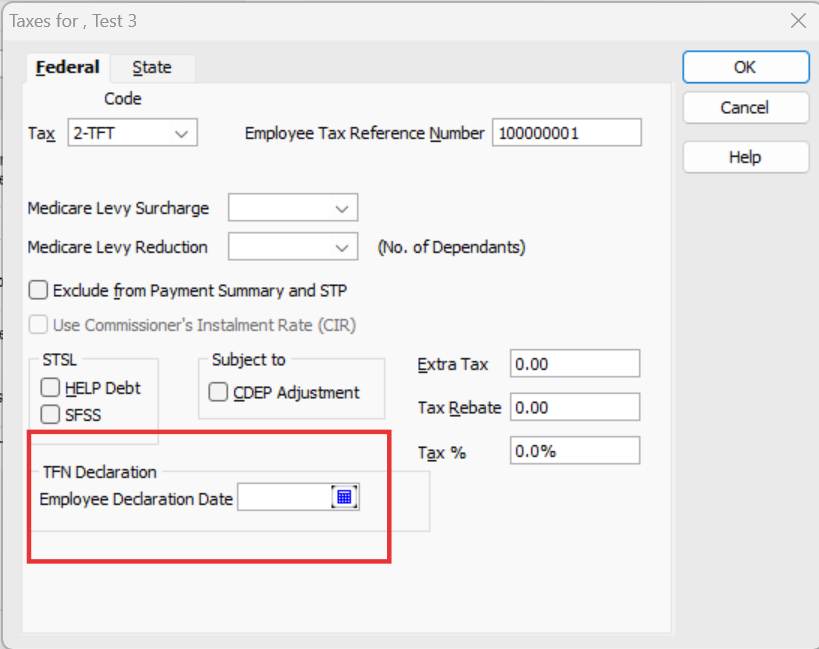
    This is how all my files look:

    image.png

    Now, the Decl is auto-submitted … but I believe it still only happens if a Employee Declaration Date is entered !

  • Janine Borg
    Janine Borg Member Posts: 5 Reckoner Reckoner

    Awesome - thank you so much!