Login to hosted account on galaxy tab a8 not working


I leave for overseas in a week and was checking that I can use accounts hosted on my Samsung Galaxy Tab a8 but it's not working. I can get to the 2nd login stage but the keyboard to enter the password doesn't pop up and it keeps losing connection.
Last time I travelled I could login on my phone or older tablet no problem, it was brilliant and was expecting the same now. I'm in a world of trouble if this doesn't work so please help.
Answers
-
Hi @FRP4WD
Just to clarify, do you mean the keyboard isn't appearing on-screen when you attempt to type in the credentials to the file itself after logging into Hosted service?
Which browser are you using on your tablet?
While I don't have a tablet on-hand to test out, I just tried it out on my Samsung Galaxy Note on the Google Chrome browser and the keyboard appeared normally.
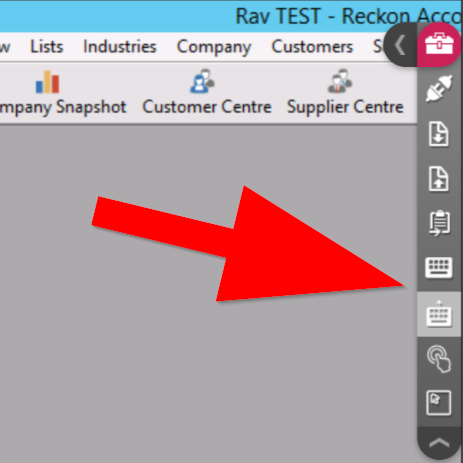
There is also an option in the Floating Toolbar that will bring the keyboard up if you select it. Screenshot example below 👇
 3
3


