Attaching documents to new invoice format
I am very new to Reckon One (3 days) and I am using the new invoice format. However, when I attach a document, although it shows as an attachment, it doesn't get sent. I did click on the share button so it turned green and I changed the email of the customer to mine so I could see what happened. The invoice arrived beautifully but I couldn't find the document I had attached. What am I doing wrong?

Answers
-
Hi @palmerea
Welcome to the Reckon Community and glad to hear you're using the new invoice experience in Reckon One! 🙂
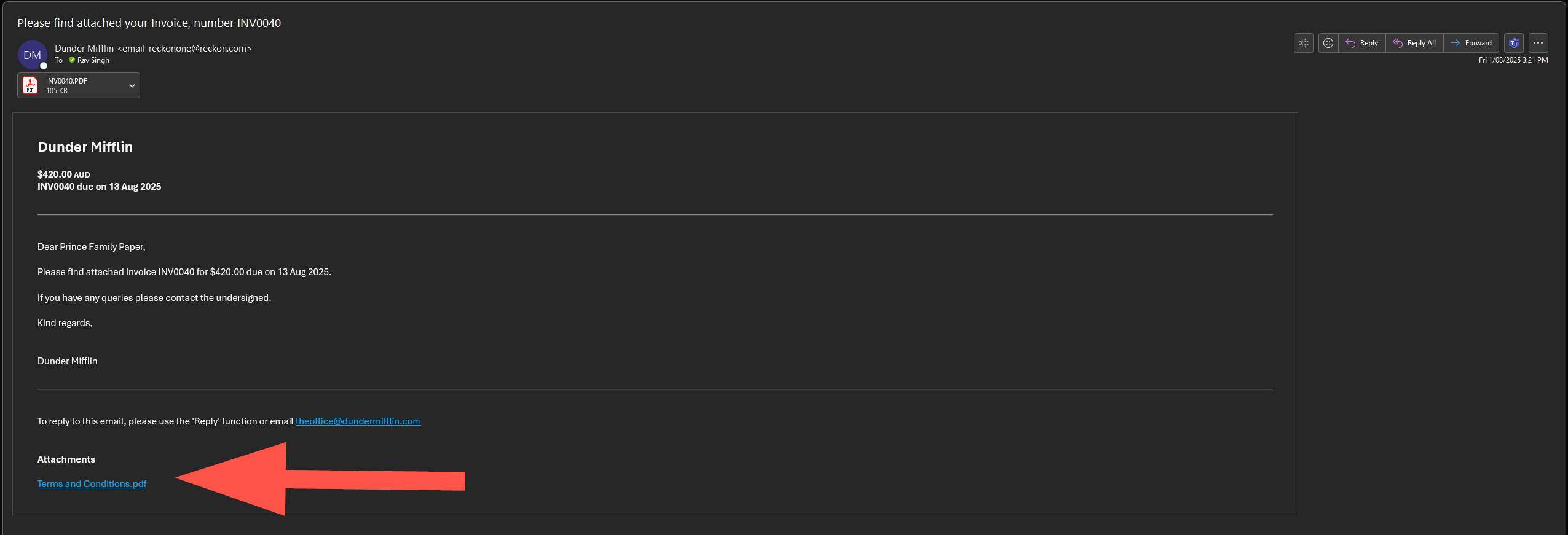
When you select the option to share the attachment it will be included in the email and appear as a link. Clicking the link will open the attached file.
If you recheck the email you sent to yourself today, do you see the attachments section along with a link that looks like my example below? You'll see I have a file included in conjunction with my invoice.
0 -
More info here - #TipTuesday - Add and send attachments with your invoices! 📎
0