Backup when license expired


Hi
My software has expired and I cannot access files. How do I back up data files before installing new software?
Background
This year I was invoiced & paid for Reckon Home & Business V31 Annual License.
Previous years invoices was Home & Business 2022 annual license renewal.
Reckon staff
- Told me to backup files before installing new software.
- Said I could no longer run 2022
- Did not know what are the new features were on V31
Reckon software message says "your license has expired" Software will not t let me access files unless I renew the license. I have renewed the license. How do I backup files before installing new software?
Regards Kay
Answers
-
Hi Kay,
Firstly, welcome to the community. To learn more about the changes and new features in v31, I recommend taking a look at this post from Rav here.
If you're unable to create a backup using the old software, one workaround is to locate where the file is stored and manually make a copy. Here's a post (link) explaining the different file names and types, which might help.
Let me know if you need help finding the file location or have any other questions.
 0
0 -
Give me a call and we can do this together. 0418907140
Gerry id 6376
Gerhard Winter
Ph. 0418907140
Reckon Store Next Door
"Always at your Service"
Email: gwinter0808@gmail.com
0 -
Hi Rav & Gerry,
Thanks you for your responses.
I have started the process but cant find any written instructions on how to uninstall 2022?
Step 1 Copy data files into another folder - Done
Step 2 - Uninstall 2022 software -
Step 3 - go to members.reckon.com load customer number + pin ((I sourced mine from Reckon customer service) . Download software
Is there written steps for step 2?
I opened the installation & upgrade guide and cannot find any where steps to do this.
In my program files there is a folder "Reckon Accounts Personal" with nine sub folders including "Answer works", "certs","convert03", .
My search via google said
To uninstall Reckon Personal Plus, use Windows' built-in uninstallation tool. Open the Control Panel, go to Programs and Features, find Reckon Personal Plus, select it, and choose "Uninstall/Change". Follow the prompts in the uninstallation wizard to complete the process.
Questions
- Is the google instructions the right next step?
2. After this step + before I install (Step 3) will the Reckon Accounts Personal program folder or + sub folders be empty of files?
3. Reckon data files are on a shared drive. Will the other user have to carry out the same steps & upgrade program so they can access the data files?
All guidance / suggestions are very appreciated.
Regards Kay
0 -
Ops apology Jason. I should have greeted you (not Rav.)
(I had surfaced from reading a rabbit hole of comments on a post by Rav)
0 -
Google was correct, Your data file should be on C:Drive only, as far as sharing we need to have a look at how you are doing this.
Gerry id 6376
Gerhard Winter
Ph. 0418907140
Reckon Store Next Door
"Always at your Service"
Email: gwinter0808@gmail.com
0 -
Hi @Kay, thanks for your response.
- Yep google is correct. Depending on your version of windows as well, you can also go to Settings > Apps > Installed apps, and uninstall it there
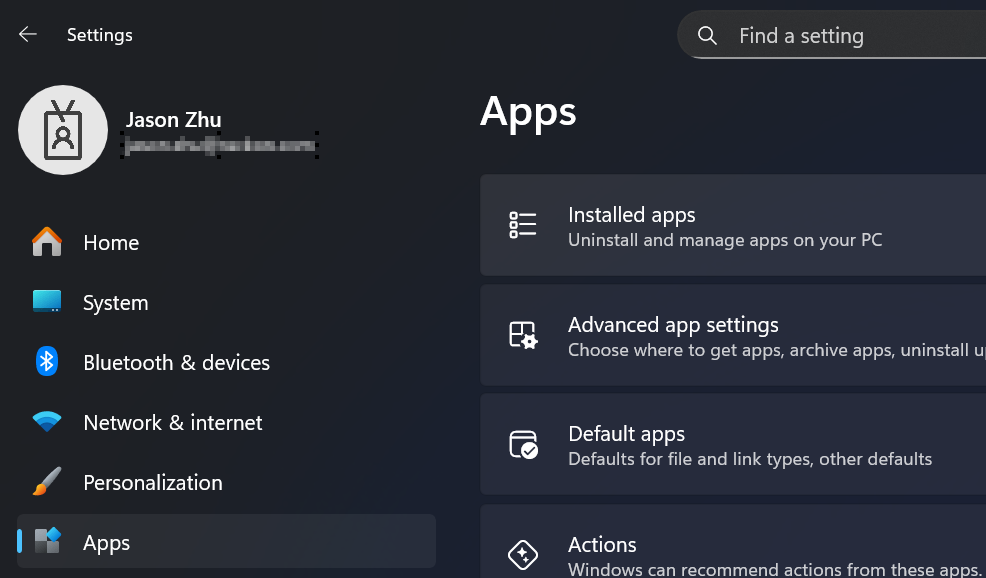
2. Usually following the regular uninstall process is enough but we would look into the leftover files/folders if there are any issues.3. We don't recommend datafiles to be stored in shared drives. We have found that it can cause unexpected issues and it has not been tested to do so. To answer your question though, if you upgrade the file they will also need to upgrade to access it.
I hope this helps!
Jason
1 - Yep google is correct. Depending on your version of windows as well, you can also go to Settings > Apps > Installed apps, and uninstall it there
-
I had the same problem as Kay - I paid my renewal on July 1 for a renewal that was due on Aug 14. I also couldn't gain access to save my old data because the licence was shown expired on my Reckon 2022 today and I couldn't sav e the file. Luckily I had backed up last time I used it and eventually got it to work - over 20 years of data.
I can't believe I've paid $220 for software that again looks unchanged over the last few years. And I have had to call product support to get a new installation key and lic number - and then manually uninstall Reckon 2022 and install version31. This all took over an hour.
Why can't there be a more modern and less clunky software version for the price we pay - its ancient software! And ancient having to ring to 1) pay 2) get installation key 3) licence key and then all the software uninstalling and reinstalling.
0 -
All your details including the new software and installation key is on YOUR members site at members.reckon.com just use your id and pin to access it, I normally take about 15 min to do the total upgrade which i do free of charge.
Gerry id 6376
Gerhard Winter
Ph. 0418907140
Reckon Store Next Door
"Always at your Service"
Email: gwinter0808@gmail.com
1 -
HI all,
Gerry / Jason - Shared Drive.
To date this has worked OK. My data is not on C Drive. I work in a shared office with a wired in NAS (Network Attached Storage) drive that is used only for the Reckon files. (we have an IT support person that suggested this option instead of saving files on flash drives. He set this up for me)
Jason - Thanks for the confirmation & feedback. Last night I installed new software and all looked OK. I could open one company last night .
Next step is to open each file / entity and check the pathways for file saving & auto back ups. I plan to direct these to new folders V31 Current and V31 Backup.
Megan - Yes disappointing that the enhancements are negligible. Looking at the transition instructions Reckon still seem to be "accommodating" a client base running a long legacy of different versions of this product. I cant see more resources going into this product until it is cloud based so that all clients are "kept up to date" .
I believe there is a gap in the market for a product, that handles active "investment" but with more accounting features ie an audit trail, double entry and multi currency ledgers. I have work arounds to use the product but also substantial excel spreadsheets .
Gerry - Thanks for being there in the wings. I wear a number of hats (including IT generalist). Now I have found this community space I will be coming back!
1 -
This might be of interest -
https://forums.whirlpool.net.au/archive/974pjl40
Seems to me that Reckon is purposefully pushing us to voluntarily change our accounting software away from Reckon, possibly because providing workable annual backups with annual subscriptions is becoming too difficult/costly for them …but they don't want a class action from their subscribers.
0

 Reckon Staff


