HOW TO: Find and view the log file showing email messages sent from Hosted

Datarec
Reckon Staff Posts: 1,442  Reckon Staff
Reckon Staff
There is a log file showing the email messages sent by the Hosted platform.
Login to the Hosted platform.
Launch the Hosted application.
Click on the Toolbox icon and click the download icon
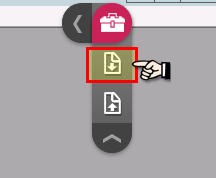
Select the Q:\Log folder
In that folder you would find the log file describing emails that have been sent.
File name format: QBMailClient_xxxxxxxx.log
(Where xxxxxxxx will be the date email sent.)
eg.
Example:
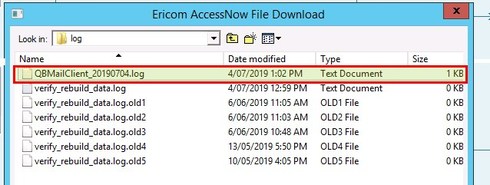
If you download that file to your computer and open it in a text editor or Excel you can see something like the example below.
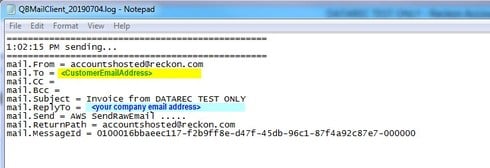
A new log file is created when the first email of the day is sent and is updated throughout the day. A new file is created each day.
See this KB article for additional details.
http://kb.reckon.com.au/issue_view.asp?ID=5313
Consider adding your own email address in the BCC field of the Invoice template.
In the Hosted application click on the menu bar:
Select Edit
Select Preferences
Then Send Forms
Then Company Preferences
Then Bcc
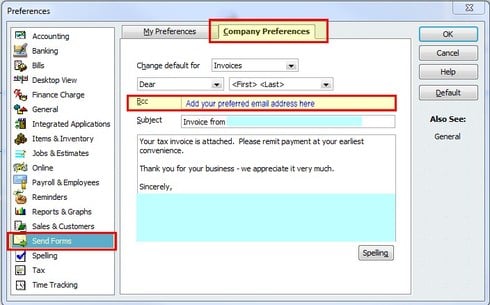
This will send a copy of any invoices you send out to your own email address.
In your email software, you can create rules to automatically place these in an email subfolder.
This will give you a copy of all the invoices that are sent out.
Regards,
Data Recovery Team
Login to the Hosted platform.
Launch the Hosted application.
Click on the Toolbox icon and click the download icon
Select the Q:\Log folder
In that folder you would find the log file describing emails that have been sent.
File name format: QBMailClient_xxxxxxxx.log
(Where xxxxxxxx will be the date email sent.)
eg.
Example:
If you download that file to your computer and open it in a text editor or Excel you can see something like the example below.
A new log file is created when the first email of the day is sent and is updated throughout the day. A new file is created each day.
See this KB article for additional details.
http://kb.reckon.com.au/issue_view.asp?ID=5313
Consider adding your own email address in the BCC field of the Invoice template.
In the Hosted application click on the menu bar:
Select Edit
Select Preferences
Then Send Forms
Then Company Preferences
Then Bcc
This will send a copy of any invoices you send out to your own email address.
In your email software, you can create rules to automatically place these in an email subfolder.
This will give you a copy of all the invoices that are sent out.
Regards,
Data Recovery Team

Searching the Reckon Help and Support Centre | Asking good questions on the Community
#TipTuesday: Picture Paints a Thousand Words | How do I add screenshots to my discussion?
0
Comments
-
Thank you..this was very helpful1
-


This discussion has been closed.