With the new update, we can no longer copy and paste email addresses when sending invoices.
Actually one other thing that I should have asked first, have you allowed access to the clipboard so Reckon Accounts Hosted has permission to copy and paste items from your clipboard?
There's info on this here - Getting to know the new Reckon Accounts Hosted platform experience! ✨
Thanks for the info @Blackwattle
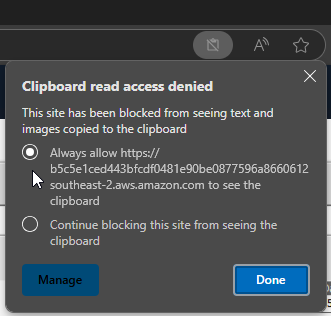
Yes please, if you could please check out the clipboard permission that would be great. There should be a clipboard icon in your address bar toward the right that looks like the below when you're logged in to your company file in Hosted.
Toggle the selection to Always Allow then click Done if its not already.
Let me know how you get on.
Cheers
Hi @Phoenix ,
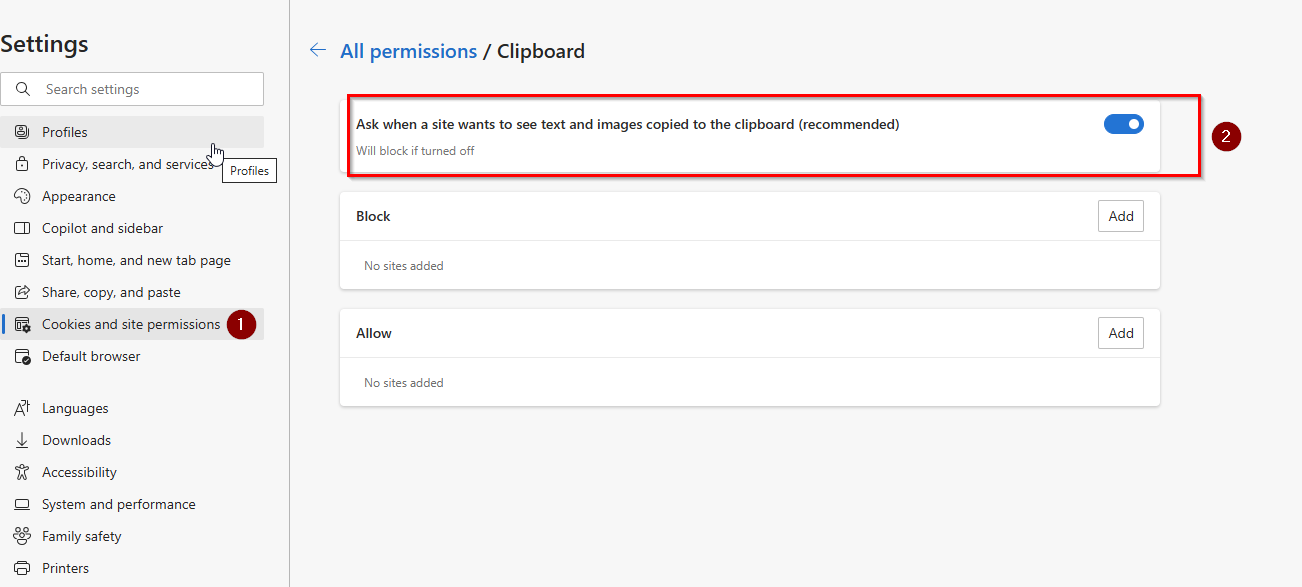
Please try the steps below to allow clipboard permission in Microsoft Edge.
I hope this resolves the issue.
Please let us know the outcome.
Regards,
Reeta
Great to hear that its working.
Happy to help😊
Hi @Blackwattle
How are you attempting to copy & paste? ie. are you using Ctrl+C and Ctrl+V or some other method? Can you take me through the steps you're going through.
What happens when you attempt to paste? Is there an error message appearing?
Also, are you copying from a source external to Reckon Accounts Hosted or from within Hosted?
Which browser are you using?
Thanks Rav,
We use Ctrl+C and Ctrl+V, even if i use the mouse to copy and paste same result.
There is no message, the email address just does not appear.
We used to a copy customer email address from outlook or our online store without issue.
I will check out clipboard permission, it had not been an issue before the updated version.
Using explorer.
Hi Team,
I am unable to copy and paste as well since the last update, have tried suggestions as listed above and still unable to do so, I have to copy/paste extensively for POs (from quotes) etc and its incredibly frustrating.
Note: I have given permission via settings to copy/paste, but there is no clipboard icon as indicted in the above screen shot. Using Microsoft Edge.
Thanks in advance.
Thanks Reeta! It is now working 🎉
Clipboard was turned on, but Reckon was blocked. Unblocked, restarted, working.
Appreciate your help.
Thank you, problem solved.
Hi Team
Same thing is happening as well trying to copy and paste from external programs into reckon, I am the only one out of my team that can not do this. Using google chrome, however after reading the above I do not have the clipboard in the top right hand corner. Is there any other solutions in fixing this issue. Thank you in advance
Don't miss announcements and important info for Reckon Accounts Hosted
Do you have an idea for a feature in Reckon Accounts Hosted? Let us know here!