MIGRATION: Confirming Book is shared with conversion teams

Datarec
Reckon Staff Posts: 1,445  Reckon Staff
Reckon Staff
To confirm that your book is correctly shared with the conversion teams, follow the steps below.
Follow the steps below to confirm the current book shares.
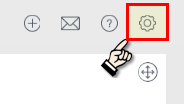
1. Click the cog-wheel icon on the top right corner of the Reckon One screen.
2. Click on Settings
3. In the General section click on Users
4. You can now see the email addresses and users your book is currently shared with.
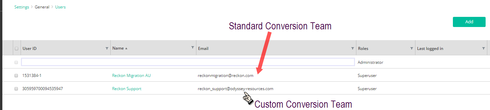
5. If you do not see the conversion team username or emails here then it is not shared with them. Follow one of the steps below
MIGRATION: Sharing your Reckon One book with the Standard Conversion Team
MIGRATION: Sharing your Reckon One book with the Custom Conversion Team

Searching the Reckon Help and Support Centre | Asking good questions on the Community
#TipTuesday: Picture Paints a Thousand Words | How do I add screenshots to my discussion?
0
This discussion has been closed.