Items List
I have been using the Items List for some time. It the past have been able to move items around, so they are under the correct group heading. Recently I have not been able to move anything. Has an update been made to make it impossible to change the order. Under Supplier we have 100's of items that need to be listed under the correct heading, eg Screws, board, plugs, packers etc. When doing a report it is easier to read when things are in the correct order..
thanks

Answers
-
Hi @agofarm
No, there's no change to the ability to reorganise Lists, however a subitem does need to be the same type as it's header (eg You can't move an Inventory Part-type sub-Item underneath a Service-type Item header)
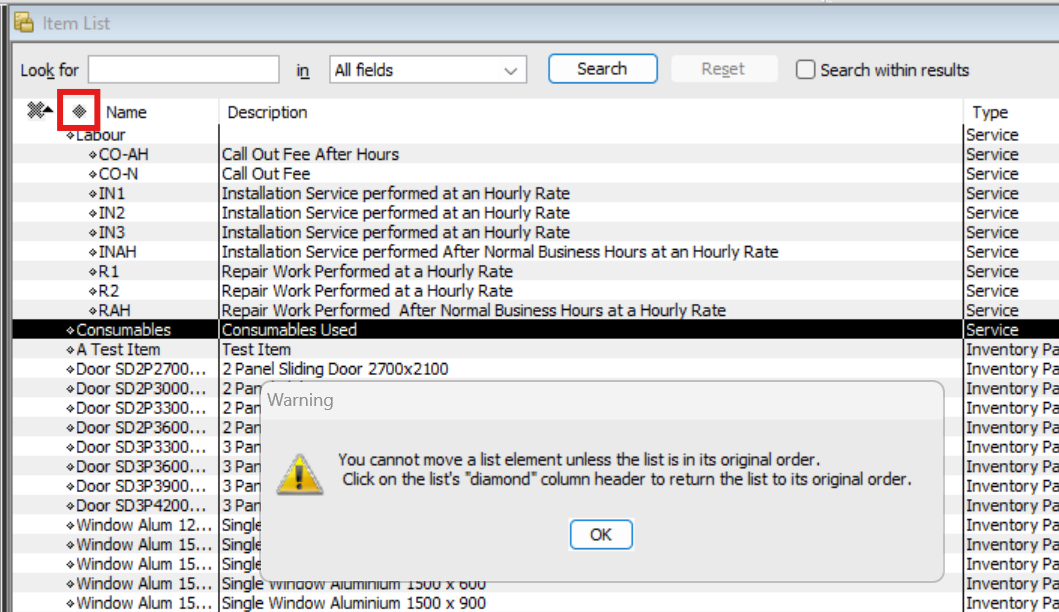
You may just need to click on the diamond column header to reset the list to its default order, first ๐ :
3 -
Morning. This was working fine up to a couple of months ago but now it is not, ( I have been using this for the past 10 years.)
I need to go to the Hierarchical View to change. When I do that and use the Daimond Header the message comes up
'You cannot move a list element unless the list is in it original order.
Click on the list' "diamond" column header to return the list to its original order'
Is this just a problem I have in my system? Maybe I need to contact Tech to see if they can sort it out.
Thanks
0 -
Click on the Edit button at the bottom of the Item List.
Select "Resort List" which will 'return the list to its original order'.
Then you can use the diamond icons to move that item record to be in different order
Searching the Reckon Help and Support Centre | Asking good questions on the Community
#TipTuesday: Picture Paints a Thousand Words | How do I add screenshots to my discussion?
0 -
If I do that will it return all the items to original order or just the group that I wish to change.
As I have 30 suppliers with thousands of items, so do not wish to have every item changed to the original listing
0 -
It will return all items back to the original sort order.
Searching the Reckon Help and Support Centre | Asking good questions on the Community
#TipTuesday: Picture Paints a Thousand Words | How do I add screenshots to my discussion?
0 -
if they are sub categories they should remain the same but will be sorted alphabetically by the main category.
I would do a backup first and if itโs not suitable restore the backup
2 -
Often, you wonโt even notice the default โresortโ.
NOTE: It doesnโt undo any header/sub arrangements, it just displays the full list alphabetically ๐
You may have noticed when you create a new list entry - eg a Customer or Account - if that list is already custom-sorted, it actually displays it in the list right at the top (or at the top of its type). โRe-Sort Listโ will just move it to where it should be, alphabetically ๐1 -
Ok thanks for that. The items are in Customer order and then in subcategories.
1 -
if you re-sort the list, the subcategories will be unaffected, the header Items (Customers) will just be in alphabetical order ๐
0 -
I will give it a try thankyou
1