emailing invoices and statements to different addresses


Hi,
I am increasingly asked by larger companies to email invoices to one email address and statements to another. I have told them I can only CC the other in and they will receive both, however, some of the companies don't like this and have stipulated we only send one invoice to the invoice processing department and one statement to the payable processing department. Which from what I can see means I have to do this manually each and every month and hope I don't forget. Any suggestions?
Comments
-
There are none. I have never had this request in twenty years. It sounds perverse. Why cannot the client do this himself? Does he need everything done for him? Sounds a tad lazy.
0 -
I agree Zappy, but these big companies can be a law unto themselves. In saying this, this is the second request I have had in the past week, and the 3rd in 2 months - however, the others was happy to be just CC'd in on the invoice and statement.
0 -
Sandy then they need to think outside the square. You can set up a rule to do this in Outlook.
0 -
Thanks Zappy, That was the only thing I could think of but was hoping there was another way in Reckon. Thanks for your help.
0 -
Well round here we say hoping doth butter no parsnips. I'm glad we found the solution.
0 -
Could you maybe set those companies up as a different customer type, then when you come to do statements, select them separately? eg, we have Trade, Wholesale & 'R'. I'd do one that was maybe R / S & just edit the email address when I sent them.
0 -
Thanks ColonialWalls. Appreciate your thoughts. There are a few ways around it obviously, I just need to work out which one will be the most simple.
1 -
Hi Reckon Community - I also have a couple of large clients who have requested that invoices and statements are sent to different addresses. To date, I have been managing this manually. I appreciate the suggestions above - but just thought I'd check to see if there has been any update on this in the last 4 1/2 years.
Thank you
0 -
Hi @Sandy Craig and @DanbarBne
There is no functionality in the Reckon Accounts Hosted application that can directly perform that task of sending invoices and statements to different email addresses.
The recommendation to use Outlook rules could be practical if you do not have a large number of customers who want invoices and statements sent to different email addresses.
If you are familiar with some coding using VBA (Visual Basic for Applications) that could be used with Outlook to process an incoming email to:
- look at the subject line
- detect the type of email it is such as the subject containing text like "Invoice" or "Statement"
- detect the Customer Name from the subject line (you would need to modify your invoice or statement template in Reckon Accounts Hosted to include the Customer name, using the built-in tags feature)
- look up that Customer name from an Excel sheet that contains Customer Name, Invoice Email Address, Statement Email address
- then re-send / forward the email accordingly to the appropriate designated email address
Or you could use automation tools like Zapier or Make.com to do a similar thing using its built-in connectors to Outlook, OneDrive and Excel, Gmail and Google Sheets.
These automation platforms would also have their own database such as Zapier Tables or Data Stores for Make.com as an alternative to using Google Sheets or Excel to store the customer names, email addresses.

Searching the Reckon Help and Support Centre | Asking good questions on the Community
#TipTuesday: Picture Paints a Thousand Words | How do I add screenshots to my discussion?
0 -
Outlook Rule Method
If one of your customers who want invoices and statements sent to different email addresses:
Modify their Customer record in Reckon Accounts.
- set the email address to your own designated email address
Modify the invoice template
Change it so that the format of the subject line includes the customers company name
A format like <Invoice from MyCompanyName to CustomerName>
- Go to Edit | Preferences | Send Forms
- Go to the Company Preferences tab
- In the Subject line add the tag <Name-Company>
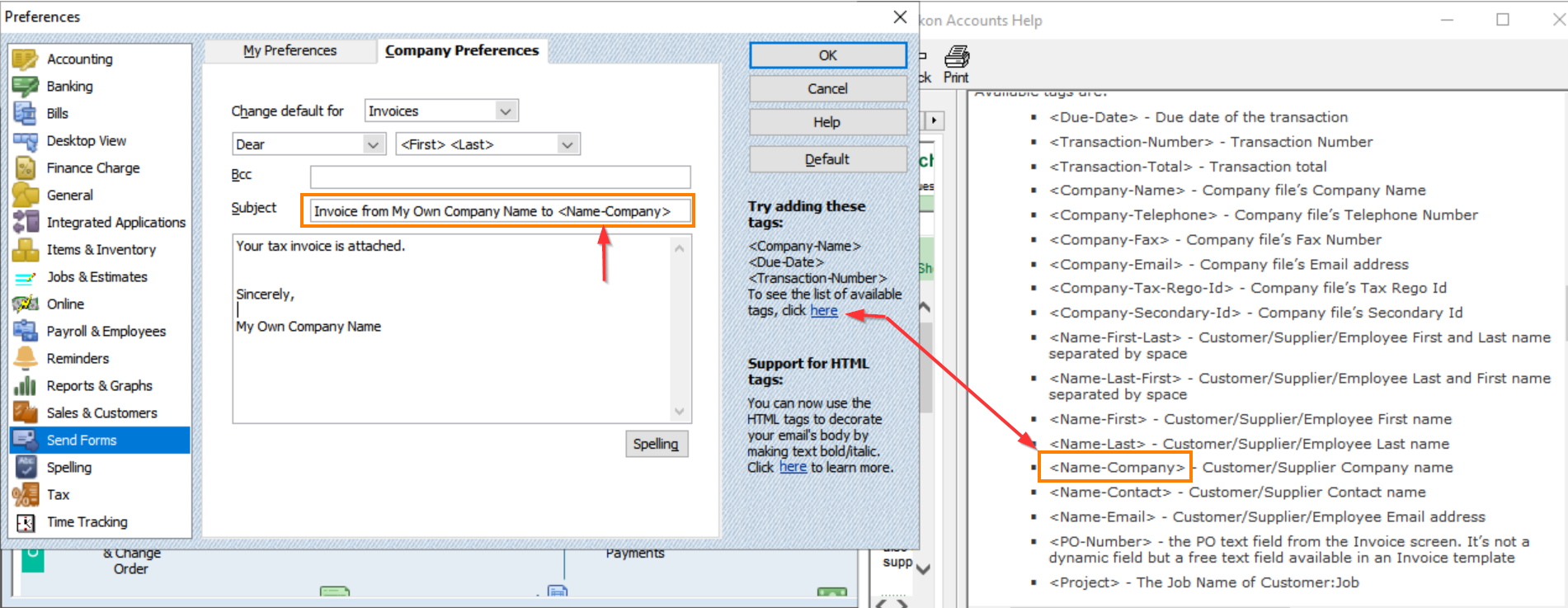
This will result in invoices being sent to your own designated email address with the subject that includes the Customers company name.
Example: Invoice from My Own Company Name to Customer1
Then in Outlook you can create rules.
Example Outlook Rule for incoming invoices:
Enable the "Subject contains" checkbox and add the matching parameter as "Invoice from My Own Company Name to Customer 1"
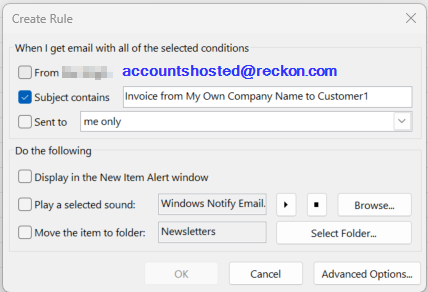
Then in the Advanced Options set the conditions.
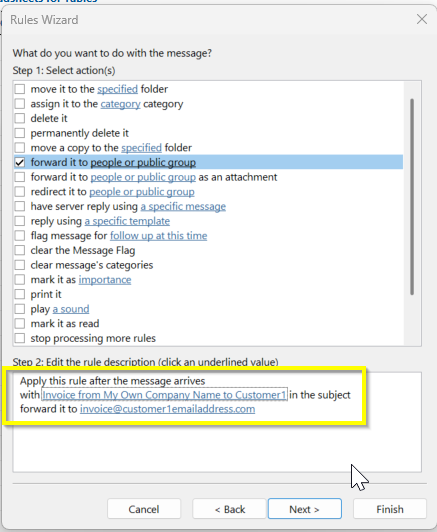
Step 1: enable the checkbox for
with "Invoice from My Own Company Name to Customer 1" in the subject
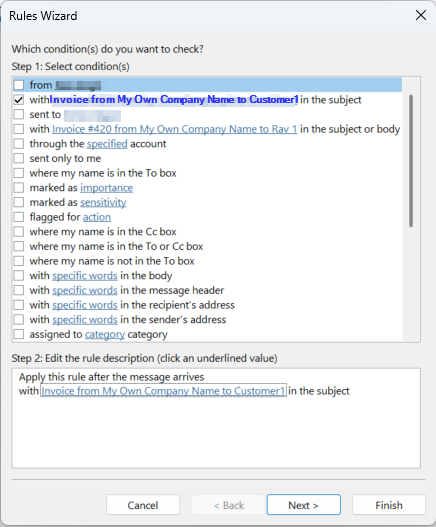
Click the Next button.
Enable the checkbox for "forward it to people or public group"
Then in Step 2, click on that "forward it to people or public group"
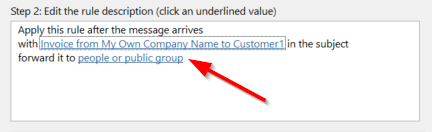
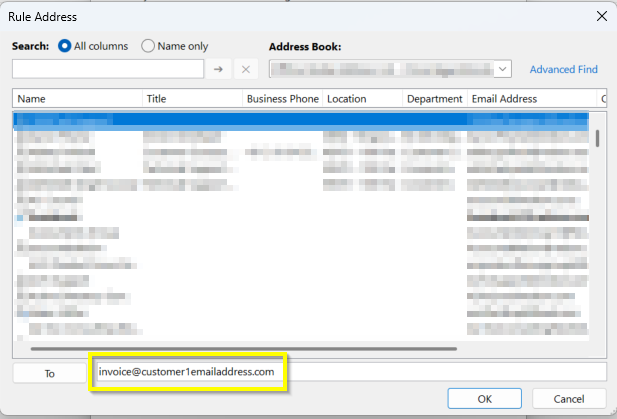
Set the email address To: value to the address you want invoices for that customer to go to.
Click the Next button
Set any specific exceptions you prefer (or just click Next button one more time)
Add any other actions you would like to do such as moving the processed email to a separate folder, setting a specific category, marking it as read, etc.
Modify the rule name if you prefer.
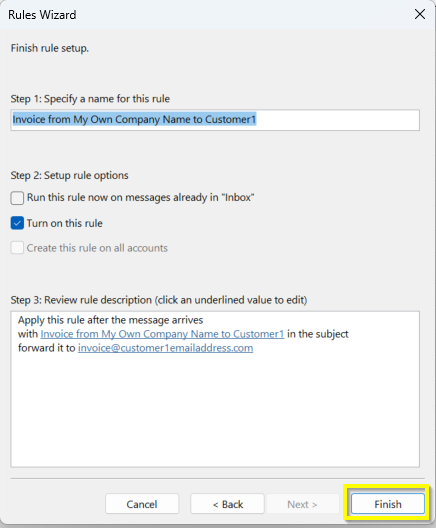
Then click the Finish button.
You can then create another separate rule to handle Statements in a similar manner.
You can repeat the same process for any other customer who requires this additional task for their invoices and statements.
Searching the Reckon Help and Support Centre | Asking good questions on the Community
#TipTuesday: Picture Paints a Thousand Words | How do I add screenshots to my discussion?
0



 Reckon Staff


