I want to get a list of which of my customers are on which price level and I cant find a way to do this.
Is there a way to get a customer list which shows what price level they are on?
Morning @Deebo
If you can please provide some more information related to your query -
Feel free to reach out for any concerns/issues. Thank you!
Regards
Tanvi
Hi @Deebo,
Thank you for your query.
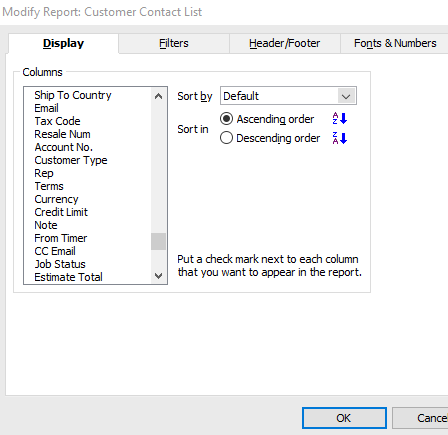
Simply go to Reports and select Customer Contact List. Next, click on Modify Report in the top left corner, then choose Filters. Scroll down to find Price Level, select it, and click OK. Finally, refresh the report, and you should see the information you're looking for.
Hope this helps.
Please let us know if you need any further assistance.
Kind regards,
Reeta
Hi Reeta
I am using Reckon Accounts Premier: Manufacturing & Wholesale Edition 2024 and the Price Level option does not appear on my drop down list when I follow your instructions as per the extract below. Are you able to assist?
Lauren
Hi @accounts.wrproducts ,
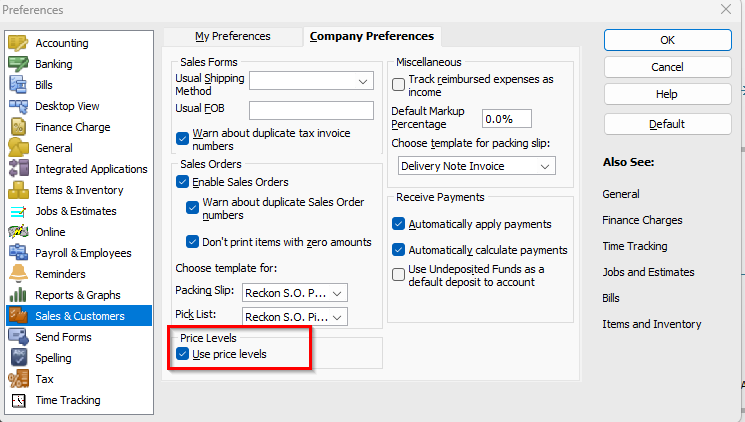
Could you please confirm whether the price level option is selected under Edit, Preferences, Sales and Customer, Company preferences and then Price Level ?
Regards,
Hi Reeta,
I can confirm that Price Levels are ticked as per your extract.
Thank you for informing me.
I’ll take a closer look into the matter and will keep you informed.
Don't miss announcements and important info for Reckon Accounts Hosted
Do you have an idea for a feature in Reckon Accounts Hosted? Let us know here!