DATA RECOVERY: Valid Item Types in an IIF import or export file for Reckon Accounts desktop and Host
Datarec
Reckon Staff Posts: 1,435
Reckon Staff
How to find what valid Item Types are in an IIF (import/export) file.
1) Create a blank new data file
2) Create one of each type of Item in that new file

3) Export the Item List
HOW TO: Simple steps for Exporting and Importing Lists (IIF) from Reckon Accounts Desktop and Hosted
4) You can then open that exported item list file in Excel or a text editor
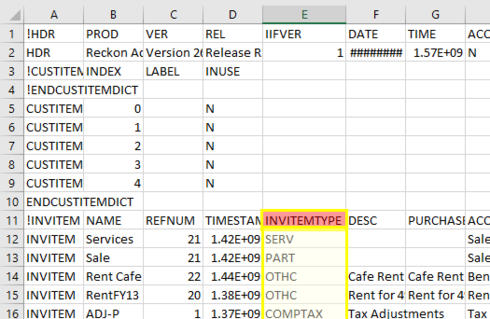
5) Now you can look at the INVITEMTYPE column to see what the valid types are
Here is a small example.
Regards,
Data Recovery Team

1) Create a blank new data file
2) Create one of each type of Item in that new file
3) Export the Item List
HOW TO: Simple steps for Exporting and Importing Lists (IIF) from Reckon Accounts Desktop and Hosted
4) You can then open that exported item list file in Excel or a text editor
5) Now you can look at the INVITEMTYPE column to see what the valid types are
Here is a small example.
Regards,
Data Recovery Team

Searching the Reckon Help and Support Centre | Asking good questions on the Community
#TipTuesday: Picture Paints a Thousand Words | How do I add screenshots to my discussion?
0
This discussion has been closed.
