Casual Employee receiving Parenting Leave Pay through Centrelink


Hi,
I am using Accounts Plus 2021 and am wondering how I would go about entering a Casual employee payment from centrelink for Parenting Leave Pay into our accounts. The payments from Centrelink will come to us and we are to reimburse the employee this payment (minimum wage). Does this go through the pay employee screen or do I need to create an account link. I am new to this so please bear with me. I would appreciate any advice on how to to go about this. The process I need to follow step by step would be helpful.
Thank You (in advance)
Iwalk
Comments
-
Hi Iwalk
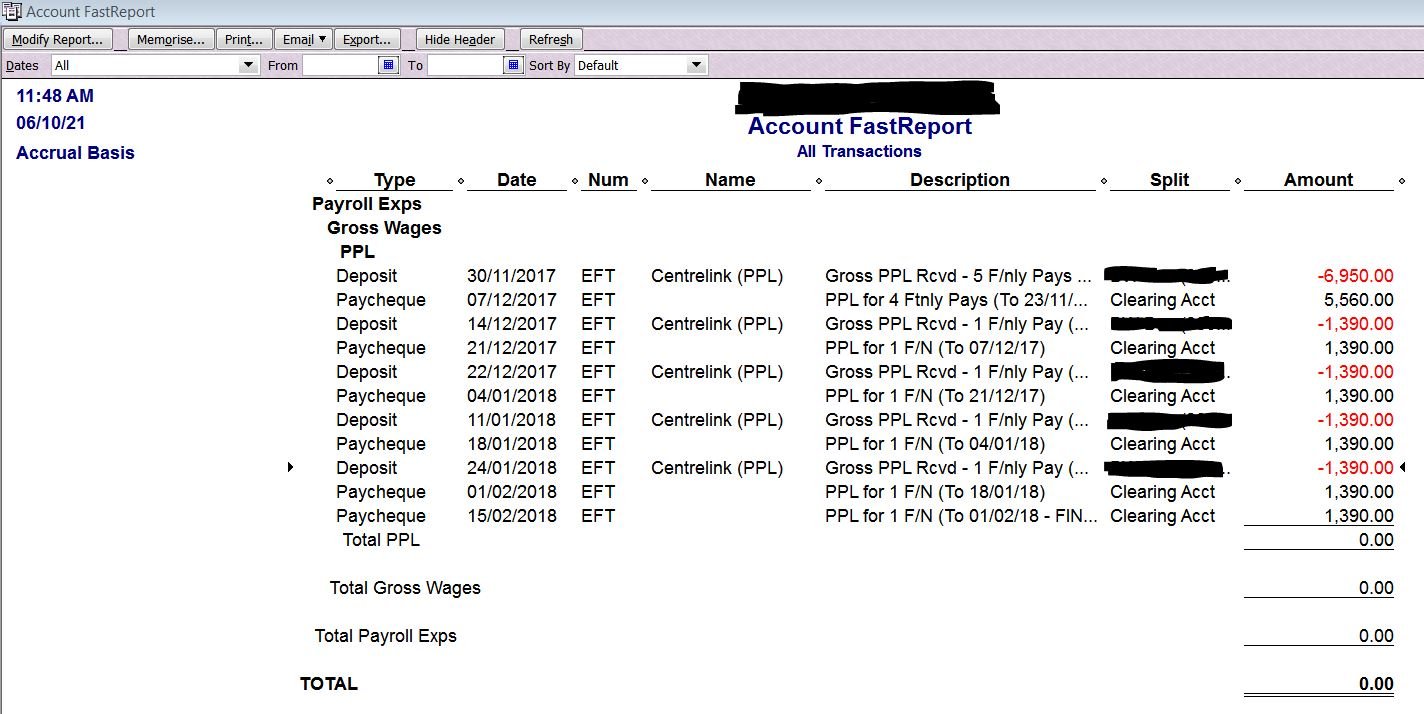
Create a "PPL" Payroll Expense subaccount
When you receive the PPL funds from Centrelink, enter this via Make Deposit:

Create a PPL Hourly Wage Payroll Item, linked to your new PPL Expense account & allocated to Gross Payments for Tax tracking type
On the Taxes window, it should be ticked for PAYG Tax but not State Payroll Tax
On the Inclusions window, Include in "Every hour worked" leave accruals should be UNticked & no Super Payroll Items selected in the list either.
You then run the Pay for the employee as normal using this PPL Payroll Item, the result being the PPL account will clear to $ 0 as all funds received will be onpaid to the employee:
 0
0