Reckon Personal Plus 2016

Karen_118831
Member Posts: 11 Reckoner 
My hard disk failed and I need to re-install my product. Who do I contact?
0
Comments
-
Hi Karen,
Sorry to hear about your PC!
You'll be able to download and install your program by accessing the Members Area and logging in with your Customer ID & PIN.
Click on the 'Download Software' option, select your product and click the download link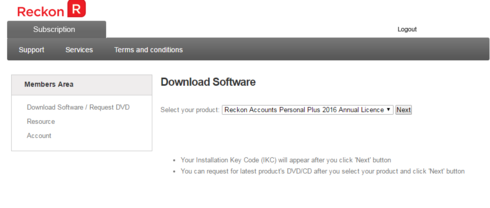
Cheers
Rav
1 -
Thanks. However.... My PC has a boot SSD and a much larger HD. The Reckon Personal Plus was installed on the HD, which is the one that failed. However, the computer still thinks PP is installed. I can't uninstall it because some unspecified DLL is missing. And PP won't let me re-install because it thinks there's an existing installation. How do I resolve this?0
-
ouch, always a bad idea to install software on drives other than C
in your case, you will need to search the registry for Reckon and delete all you can find, click find and type reckon, then delete what it finds, then hit F3 to find next and delete, repeat these steps until nothing is left
0 -
Thanks - working now.0



This discussion has been closed.