Company Logo in body of email

bromleysteel
bromleysteel Member Posts: 2 Novice Member Novice Member

I'm New to Accounts Hosted having used Quickbooks for years. I want to make the email more professional looking when sending from Accounts Hosted. i.e. I want to include my company logo, cell phone details etc into the body of the email (not the attachment). How do I do it. Looks very untidy presently.

Comments

  • Rav
    Rav Administrator, Reckon Staff Posts: 14,303 Reckon Community Manager Community Manager
    edited September 2021

    You can customise your templates to include additional elements such as logos, company details, phone numbers etc

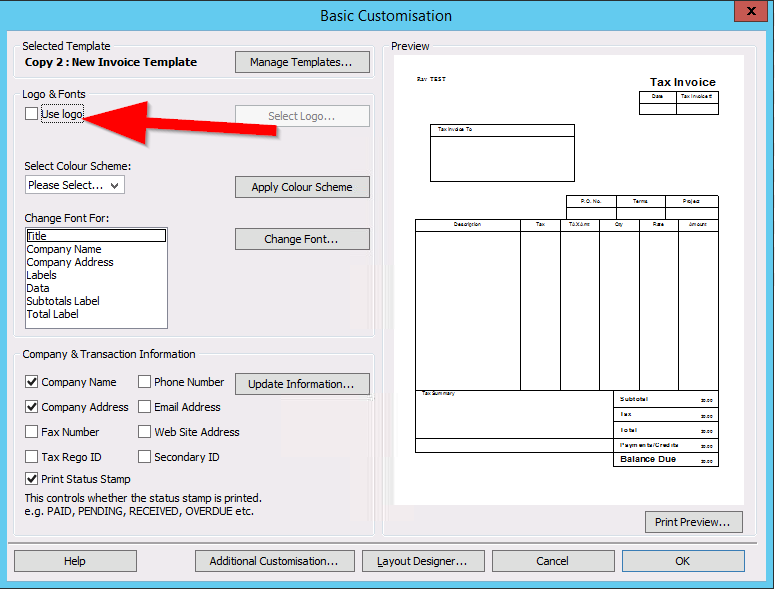
    To add a logo image you'll need to upload it your Hosted Q drive first using the Floating Toolbar and then select the 'Use Logo' option and select the image from its saved location on the Q drive. (Screenshot example below).

    image.png


  • PhuongDo
    PhuongDo Reckon Developer Partner Posts: 333 Reckon Hall of Famer Reckon Hall of Famer

    Hi @Rav , I believe @bromleysteel  wants to include custom info in the email itself, not the exported PDF.

    @bromleysteel, I don't think it is possible to do so at the moment.


    Phuong Do / Reckon Developer Partner

    phuong@cactussoftware.com.au

    https://www.youtube.com/watch?v=O61SfV2bte8

  • Rav
    Rav Administrator, Reckon Staff Posts: 14,303 Reckon Community Manager Community Manager

    Apologies, yes you're right @PhuongDo.

  • Charley
    Charley Member Posts: 498 Reckon Star Reckon Star

    What about preferences "send forms". I know you can amend the email for Invoices, I don't know about the logo but if 7ou can amend then surely you can do more and upload the logo as Ravi suggests and then post it into the email in preferences